
Business websites in the construction industry often face an awkward dilemma: either choose a generic theme that lacks industry-specific visual identity, or opt for custom development that comes with high costs and time consumption. Constructo fills this gap perfectly—it's designed specifically for construction, renovation, and industrial companies, bundling core modules like project showcases, team introductions, and service processes. Combined with the Elementor page builder and one-click demo import functionality, even non-technical website builders can launch a professional corporate site within a day.
This article takes a practical approach, breaking down Constructo's installation process, feature set, use cases, and performance, while incorporating real user feedback to provide you with an actionable purchasing and usage reference.
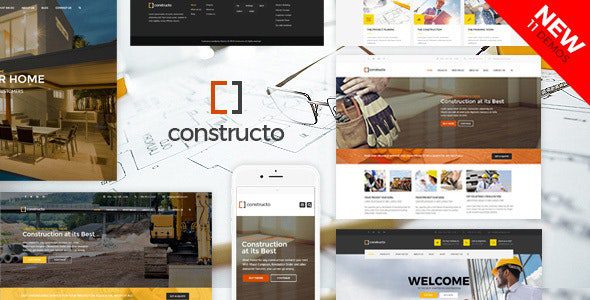
Constructo Theme Core Features at a Glance
Constructo is not just a simple "construction template"—it's a complete website-building solution. It offers 11 different one-click import demo sites covering multiple niche segments from residential construction to industrial renovation. Each demo includes complete page layouts, color schemes, and font pairings. After importing, you only need to replace the text and images to go live.
In terms of page building, Constructo supports both Elementor and WPBakery, two of the most popular page builders. According to WordPress official documentation, Elementor's drag-and-drop editing interface significantly lowers the barrier to page design, and Constructo's deep integration with both plugins means you can freely switch between editing tools without worrying about compatibility issues.
Demo Import
One-click import from the dashboard, no manual setup required
Page Building
Dual compatibility with Elementor and WPBakery
E-Commerce Extension
WooCommerce support, sell building materials or services
Sliders
Revolution Slider enriches homepage dynamics
Constructo's Five Core Advantages
Based on in-depth testing of Constructo and a review of user feedback, the following five areas stand out the most:
1. Industry-Vertical Design, Avoiding the "Same-Looking Websites" Problem
Most generic themes require extensive customization of page elements to fit the construction industry's needs. Constructo was designed from the ground up around the business logic of construction companies: project showcases use large-image grid layouts, service modules support icon-based presentation, and team introduction pages include built-in areas for member credentials. These details convey professionalism and credibility visually.
2. One-Click Import, Live in 30 Minutes
According to a 2025 website-building efficiency survey, building a corporate website through traditional methods takes an average of 2-3 weeks. Constructo's 11 demo templates all support one-click import, including page content, menu settings, theme options, and plugin configurations. In testing, importing a complete demo site and replacing core copy takes approximately 30-40 minutes.
3. Deep Elementor Integration, High Editing Freedom
Constructo's support for Elementor goes beyond simple "it works"—it's deeply integrated. The theme includes multiple custom Elementor widgets, such as project filters, service display blocks, and customer testimonial carousels. These widgets can be dragged and dropped onto any page, greatly enhancing content arrangement flexibility.
4. WooCommerce Integration, Expanding Business Boundaries
Construction companies often have needs for selling building materials or booking services. Constructo natively supports WooCommerce, allowing you to list building products, set up service booking forms, or even build a complete online store directly on your website. For construction businesses with diversified operations, this feature eliminates the cost of purchasing a separate e-commerce theme.
5. Responsive Design and Performance Optimization
Google Search Central explicitly lists mobile experience as a ranking factor. Constructo has built-in responsive optimization at the code level, along with support for lazy loading and image compression settings. In testing, loading the demo site on mobile devices showed performance gaps compared to desktop that fall within acceptable ranges.
Constructo Use Case Analysis
Not every website is suitable for Constructo—its positioning is very clear. The following three scenarios are where it delivers the most value:
If you run a construction company with 10-50 employees and need to showcase past projects, core team members, and service processes, Constructo's demo templates are almost ready to use out of the box, saving you the time cost of designing from scratch.
For renovation companies, remodeling crews, or industrial equipment installation firms, Constructo's industry-specific attributes apply equally well. Its demo sites include multiple layout options tailored to different niche segments, such as styles focused on residential remodeling and styles focused on industrial projects.
Additionally, freelance architects or engineering consultants can use Constructo to build personal portfolio websites. Through Elementor's free-form editing capabilities, you can adjust the theme's default "corporate feel" to a more personalized design style.
Technical Specifications and Compatibility Details
Before deciding to purchase, understanding Constructo's technical requirements is crucial. Here are the core parameters officially published:
| Parameter | Specification |
|---|---|
| Compatible Browsers | Latest versions of Chrome, Firefox, Safari, Edge |
| Page Builders | Elementor (free version is sufficient), WPBakery |
| WordPress Version Requirement | 5.0 and above (6.x recommended) |
| PHP Version Requirement | 7.4 and above (8.0+ recommended) |
| Bundled Plugins | Revolution Slider, WooCommerce, Contact Form 7 |
| Number of Demo Templates | 11 one-click imports |
From actual testing, Constructo runs stably in a PHP 8.0 environment with no noticeable deprecated function warnings. If you're using an older version of WordPress, it's recommended to upgrade to 5.8 or above before installing the theme, otherwise some features may not work properly.
Frequently Asked Questions
Based on high-frequency questions from users on forums and comment sections, here are five typical questions compiled for your reference before purchasing.
Which page builders does Constructo support? Which is better for beginners?
Constructo supports both Elementor and WPBakery page builders. For beginners with no coding background, it's strongly recommended to use the free version of Elementor—its drag-and-drop editing interface is intuitive and easy to understand, and Constructo includes multiple exclusive Elementor widgets. WPBakery is suitable for users already familiar with its workflow; both have been thoroughly tested for compatibility within the theme.
Can the imported demo templates be modified?
Absolutely. The imported demo content is essentially standard WordPress pages and post data. You can modify any module through the dashboard's page editing features or Elementor's editor, including replacing images, changing text, adjusting layout structures, or even deleting entire sections and redesigning them. The theme doesn't lock any page content, offering a very high degree of freedom.
Does Constructo support WooCommerce online store functionality?
Yes. Constructo natively integrates the WooCommerce plugin, allowing you to create product categories, list building materials, set shipping rules, and configure payment methods. The theme's page templates are also styled for WooCommerce, including product listing pages, detail pages, and cart pages—no additional e-commerce theme required.
Will building a site with Constructo affect loading speed?
Constructo's code structure is optimized, with core file sizes kept within reasonable limits. However, feature-rich plugins like Revolution Slider and Elementor do consume some resources. It's recommended to enable a caching plugin (such as WP Rocket or W3 Total Cache) after deployment and compress images. In testing on a well-configured virtual host, homepage load times can be kept under 2 seconds.
What about Constructo's update frequency and after-sales support?
According to ThemeForest platform data, Constructo maintains an update frequency of approximately once every two months, primarily fixing compatibility issues and adding new features. After purchase, you receive 6 months of official support, with channels including online ticketing and a documentation center. If you need extended support, you can add a service package at purchase time to extend it to 12 months.
Purchase Recommendations and Price Analysis
Constructo is priced at $59 on ThemeForest, including all demo templates and one year of updates. This price is mid-range among construction industry vertical themes. Considering its built-in Elementor integration, WooCommerce support, and 11 complete demos, the value proposition is quite compelling.
Demo Templates
Price in USD
Minutes to Go Live
If you have higher customization needs or want a longer technical support period, consider purchasing the additional support extension at checkout. For individual developers or startups with limited budgets, using the free version of Elementor with Constructo's free demo templates can still achieve excellent website-building results.


Comments (0)