
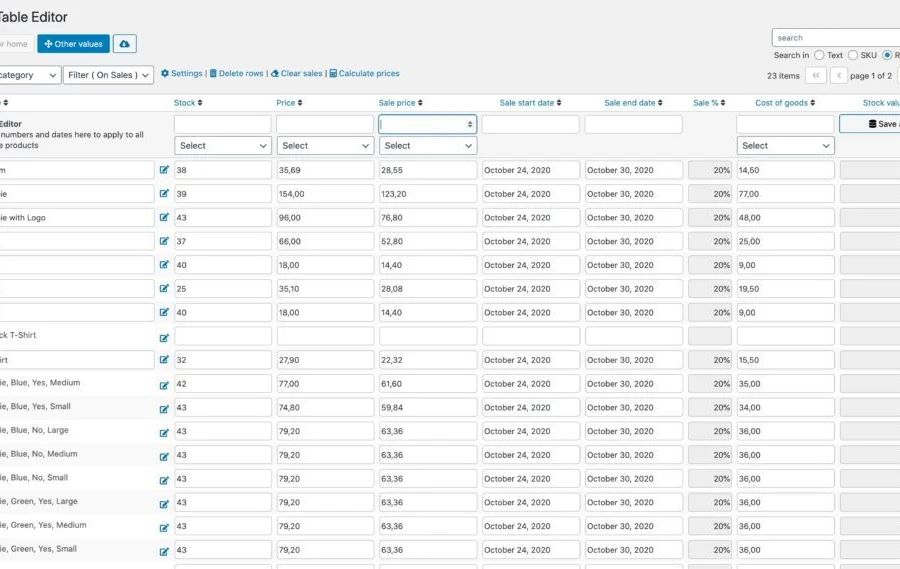
Bulk Table Editor for WooCommerce Plugin Overview
Bulk Table Editor for WooCommerce is a bulk editing plugin designed specifically for WooCommerce stores, enabling store owners to efficiently manage product data. Whether you need to set sale prices, edit stock levels, batch update SKUs, or handle product tags, this tool handles it all with ease. It also supports custom fields such as wholesale prices, price naming, and product costs, providing flexible solutions for complex business needs.
With Bulk Table Editor for WooCommerce, you can batch set prices, adjust stock, modify decimal values, and assign fixed values to products. The "Clear Sales" feature lets you quickly start or stop promotions, while bulk product deletion is seamlessly executed. Row filters make these operations even more convenient, helping you quickly browse through large numbers of products, product variations, and existing sales data.
This plugin also supports subscription products and variations, calculating inventory value for each product based on total stock value. The category selector lets you precisely target products, the magnifying glass on product images makes it easy to inspect details, and the progress bar displayed when saving new products makes operations more intuitive. Additionally, it supports bulk product deletion, active sales filters, single-product value table editing (including names), and multi-site network settings. User role permissions (store managers and administrators) ensure secure operations.
For SKU management, Bulk Table Editor for WooCommerce provides powerful generation features to create unique SKUs for products and variations. You can also use SKU options within the editing interface to easily manage product identifiers. Bulk sales functionality supports unique products and variations, with price adjustments available upward, downward, or by logical decimals (e.g., 19.70). Batch updating products, SKUs, tags, out-of-stock status, weight, length, width, and height makes data maintenance hassle-free.
The plugin also offers simple third-party integrations, supports batch setting of fixed prices and sale prices, as well as updating sale start and end dates. Columns display sales percentages, giving you clear insight into sales performance. For more information, visit the official product page.
Installing and Using Bulk Table Editor for WooCommerce
Installing Bulk Table Editor for WooCommerce is very simple. You can search for and upload the plugin zip file on the plugin installation page in your WordPress admin panel, or upload it via FTP to the wp-content/plugins directory. Once activated, the plugin is ready to use with no additional configuration required. This plugin version v2.6.9 has been tested to ensure stable performance.
With this plugin, you can quickly master bulk editing techniques. First, select the product range you want to edit, then apply row filters to narrow down the scope. Next, set new prices, stock levels, or sales data, and apply changes with one click. The plugin features a user-friendly interface with intuitive operations, making it easy for beginners to get started. For more advanced features, such as custom field editing, refer to the official documentation.
If you need more WordPress resources, you can visit our website for more practical plugin and theme recommendations.
Frequently Asked Questions
How do I install Bulk Table Editor for WooCommerce?
The installation method is similar to other WordPress plugins: search for "Bulk Table Editor for WooCommerce" under "Plugins" -> "Add New" in your admin panel, or manually upload the zip file and activate it. Once activated, it's ready to use with no additional setup required.
What use cases does this plugin support?
It's suitable for any WooCommerce store that needs to manage products in bulk, such as batch modifying prices, stock, SKUs, tags, and more. It's especially ideal for e-commerce sites with a wide variety of products that require frequent updates.
Which WordPress versions and themes are compatible with the plugin?
The plugin is generally compatible with the latest versions of WordPress and WooCommerce, but for specific compatibility, please refer to the official documentation or plugin description. We recommend backing up your site before updating.
How often is the plugin updated?
Update frequency depends on the developer and WooCommerce version changes. We recommend keeping an eye on the official changelog, or enabling automatic updates to get the latest features and fixes.
Does it support multi-site networks?
Yes, the plugin supports multi-site network settings, making it convenient to manage multiple sub-sites.


Comments (0)