
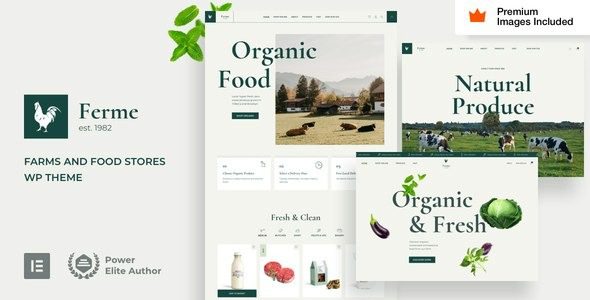
Ferme WordPress Theme: The Ultimate E-commerce Solution for Farms and Food Stores
Ferme WordPress Theme is a modern e-commerce theme designed specifically for farms, food stores, organic product shops, grocery markets, and the agricultural sector. Whether you're selling fresh produce, dairy products, meat, or organic processed foods, Ferme provides complete online store functionality. The theme is fully compatible with WooCommerce and comes with multiple beautifully designed shop pages and product layouts, allowing you to quickly build a professional agricultural e-commerce website without writing any code.
Unlike many general-purpose themes on the market, Ferme was designed from the ground up to focus on the visual needs of the food and agriculture industry. Its color palette leans toward a natural, organic, and healthy style, combined with high-quality typography and whitespace, effectively conveying the natural qualities of products and enhancing consumer trust. For small farms or organic food startup teams looking to build brand differentiation, this is a choice well worth considering.
Ferme Theme's Core Features and WooCommerce Integration
As a WordPress theme deeply integrated with WooCommerce, Ferme offers a complete e-commerce experience from product display to checkout. The theme includes multiple product listing styles, quick view functionality, a mini shopping cart, and advanced filtering options to help customers find what they need more efficiently. Additionally, Ferme provides full support for Elementor and Elementor Pro, allowing you to freely adjust the layout of your homepage, about page, contact page, and product landing pages through a drag-and-drop page builder.
For content-driven sites that need to showcase farm stories or production processes, Ferme also offers blog layouts and custom post types. You can seamlessly combine farm diaries, recipe sharing, seasonal promotions, and other content with your store to create a brand site with warmth. If you're looking for more similar WordPress resources, you can visit BoboHello Resource Site for more theme and plugin recommendations.
Key Points for Installing and Configuring the Ferme Theme
Installing the Ferme theme is similar to other WordPress themes: upload the theme package in the admin panel under Appearance > Themes and activate it, then install the recommended plugins (such as WooCommerce, Elementor, etc.) as prompted. The theme typically offers a one-click demo content import feature, making it easy to quickly replicate the official demo site's layout. During configuration, it's recommended to first set up WooCommerce's currency, shipping zones, and payment methods, then adjust the colors, fonts, and header/footer styles in the theme options. For detailed steps, please refer to the official documentation.
Ferme Theme's Use Cases and Target Users
Ferme is particularly well-suited for the following types of websites: organic farm direct stores, Community Supported Agriculture (CSA) projects, local food grocery delivery, specialty ingredient e-commerce, agricultural brand websites, and agritourism projects. Its responsive design ensures a smooth browsing experience on mobile phones, tablets, and desktops, which is especially important for food consumers who frequently place orders on mobile devices.
Furthermore, Ferme has a relatively SEO-friendly foundational structure, with optimized heading hierarchy, semantic tags, and page loading speed. Combined with plugins like Yoast SEO or Rank Math, you can further improve visibility in search engines. For farm brands that focus on content marketing, this is an advantage that cannot be overlooked.
Frequently Asked Questions
What plugins are needed for the Ferme theme?
The Ferme theme recommends installing WooCommerce for e-commerce functionality and Elementor for page building. Some advanced features may require Elementor Pro. For specific dependencies, please refer to the official documentation.
Is the Ferme theme compatible with the latest WordPress version?
The theme developer regularly updates to maintain compatibility with the latest WordPress versions. It's recommended to back up your website before updating and check the theme changelog. For specific compatibility information, please refer to the official documentation.
Does the Ferme theme support multiple languages?
The Ferme theme is typically translation-ready and can be used with multilingual plugins such as WPML or Polylang. For specific language support details, please refer to the official documentation.
How often is the Ferme theme updated?
The theme update frequency depends on the developer's release schedule, typically following major WordPress or WooCommerce updates. For specific update records, please refer to the official documentation.


Comments (0)