
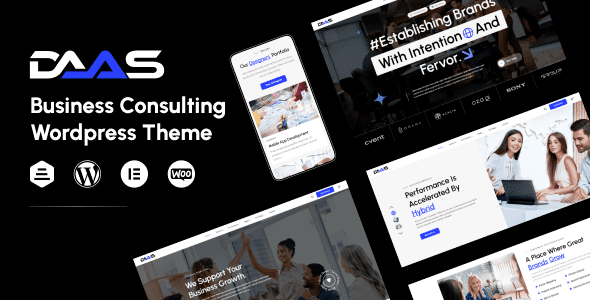
DaaS WordPress Theme In-Depth Review
DaaS is a dark-themed portfolio WordPress theme built specifically for creative agencies. With high-contrast visuals and full-screen gallery design, it gives your website an instant portfolio feel. This article examines core features, use cases, and theme comparisons to help you decide whether DaaS is right for your team. If you're looking for a WordPress theme that delivers strong visual impact, DaaS deserves your attention.
DaaS WordPress Theme Core Features at a Glance
DaaS emphasizes bold dark aesthetics and visual hierarchy in its design. Here are its main selling points:
- Dark visual system: Black backgrounds with high-contrast color schemes deliver a premium feel, ideal for showcasing photography, design, and video work.
- Full-screen portfolio gallery: Supports full-screen gallery displays with project metadata, helping clients quickly understand case background.
- Service column layout: Displays strategy, design, development, and marketing services in separate sections with clear structure.
- Team page: Photos paired with style tags help visitors quickly get to know team members.
- Contact form: Built-in project type and budget fields make it easy to collect high-quality inquiries.
- Restrained animations: Entrance animations are memorable without being distracting, maintaining a professional feel.
Which Teams Is the DaaS WordPress Theme Suited For
The DaaS WordPress theme is particularly well-suited for visually driven creative agencies such as design studios, advertising firms, photography teams, and film production companies. If your website needs to let the work speak for itself and you want a dark background to amplify visual impact, DaaS is a better fit than generic corporate themes. Conversely, if your team leans toward minimalist restraint or methodology-driven approaches, continue reading the theme comparison below.
DaaS WordPress Theme Installation and Usage Tips
After installing the DaaS WordPress theme, we recommend importing the demo content first, then adjusting the global color scheme to match your brand colors. Since the theme emphasizes dark visuals, uploaded portfolio images should be high-contrast and sharp. For detailed installation steps, refer to the official documentation or check out our WordPress site-building tutorial.
Comparison of Three Creative Agency Themes: DaaS, Dots, and Evne
DaaS, Dots, and Evne all target creative agencies, but their styles diverge significantly:
- DaaS: Bold dark approach, suited for high-impact visual portfolios.
- Dots: Minimalist dot-matrix style, suited for teams with restrained aesthetics.
- Evne: Case-study oriented, suited for methodology-driven companies.
If you want your website to grab visitors' attention at first glance, the DaaS WordPress theme is the top choice. If you prioritize content depth and case narratives, Evne may be more suitable. We recommend comparing all three demo sites before making a decision based on your team's positioning.
DaaS WordPress Theme Compatibility and Extensibility
DaaS is built on mainstream WordPress development standards, compatible with the Gutenberg editor and popular page builders. It supports responsive layouts and maintains the integrity of its dark visuals on mobile devices. For theme update frequency and compatibility details, refer to the official documentation. To explore more portfolio themes, visit our WordPress theme resource library.
Frequently Asked Questions
How do I install the DaaS WordPress theme?
Go to your WordPress admin, navigate to Appearance > Themes > Add New, upload the theme zip file, and activate it. For detailed steps, refer to the official documentation.
What use cases is the DaaS theme suited for?
It's ideal for creative agencies, design studios, photography teams, and other scenarios that need to showcase visual work—especially dark-style websites.
Is the DaaS theme compatible with the latest version of WordPress?
The theme undergoes compatibility maintenance with WordPress version updates. For specific compatible versions, refer to the official documentation.
How often is the DaaS theme updated?
Update frequency is determined by the theme author. We recommend following the official changelog for the latest information.


Comments (0)