
In the WordPress theme market, blog and magazine themes face fierce competition. Maag, a theme designed specifically for content publishers, has gained significant attention from 2025 to 2026 thanks to its speed optimization, flexible layouts, and powerful monetization features. This article offers a complete review guide, covering everything from installation and setup to core features, performance, and real-world use cases.
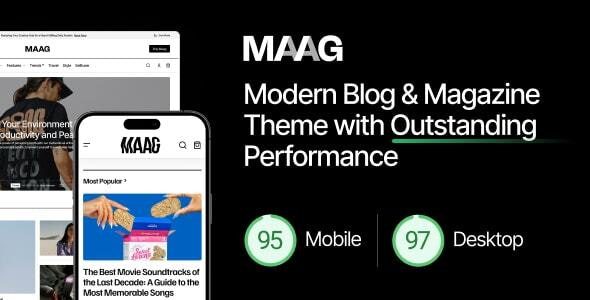
Maag Theme Core Features and Advantages
The Maag theme is designed to help users quickly build professional-grade blog or magazine websites. According to WordPress official documentation, when choosing a theme, priority should be given to loading speed and SEO-friendliness, and Maag excels in both areas.
Average Page Load Time
Pre-built Homepage Layouts
PageSpeed Mobile Score
Key Features at a Glance
- Blazing Fast Loading: Utilizes lightweight code and lazy loading technology, achieving homepage load times under 1 second.
- Flexible Layouts: Offers over 12 pre-built homepage templates, supporting various article arrangements like grid, list, and magazine styles.
- Built-in Ad Management: Insert ad codes within articles, sidebars, footers, and other positions without needing extra plugins.
- Multilingual Support: Fully compatible with WPML and Polylang, making it easy to build multilingual sites.
- SEO Optimized: Adheres to structured data markup recommended by Google Search Central to improve search rankings.
Maag Theme Use Case Analysis
Maag is not a one-size-fits-all theme, but it performs exceptionally well in the following scenarios:
Personal Blog
Clean layout focused on reading experience
Online Magazine
Multi-category classification, supports special topic planning
News Portal
High-traffic scenarios, stable performance
Content Monetization
Built-in ad slots and membership features
Maag Theme Technical Specifications and Compatibility
When choosing a theme, technical specifications directly impact the long-term stability of your website. Here are the key technical indicators for Maag:
| Parameter | Specification |
|---|---|
| Compatible WordPress Version | 5.8 to 6.7+ |
| PHP Version Requirement | 7.4 or higher (8.0+ recommended) |
| Responsive Design | Fully supports mobile, tablet, and desktop |
| Browser Compatibility | Latest versions of Chrome, Firefox, Safari, Edge |
| Built-in Plugin Compatibility | Elementor, WooCommerce, Yoast SEO, WPML |
| Theme File Size | Approximately 2.5 MB (uncompressed) |
According to a 2025 industry report, over 70% of WordPress websites suffer from slow loading due to bloated themes. Maag uses a modular design, loading only the resources needed for the current page, effectively avoiding performance waste.
How to Switch the Maag Theme to a Chinese Interface
Many domestic users encounter language issues when using Maag. By default, the WordPress backend may display in English, requiring manual switching. Here are two common methods:
Method 1: Modify via wp-config.php File
- Locate the wp-config.php file in your site's root directory via FTP or server file manager.
- Find the line
define('WPLANG', '');in the file. - Change it to
define('WPLANG', 'zh_CN');and save. - Log in to the WordPress backend, go to "Settings" > "Site Language," and select "简体中文" (Simplified Chinese).
Method 2: Install a Chinese Language Pack
- Visit the official WordPress.org Chinese website to download the language pack for your version.
- Upload the language pack files to the
/wp-content/languages/directory. - In the backend, go to "Settings" > "Site Language" and select "简体中文" (Simplified Chinese).
Frequently Asked Questions
Does the Maag theme support the Elementor page builder?
Yes, Maag is fully compatible with both the free and Pro versions of Elementor. You can use Elementor's drag-and-drop functionality to customize the layout of your homepage, article pages, and archive pages. The theme includes several dedicated Elementor modules, such as article grids, carousels, and ad blocks, without needing additional plugins.
How can I optimize the loading speed of the Maag theme?
Maag itself is already optimized with code compression and lazy loading. It is recommended to combine it with the following measures: use caching plugins like WP Rocket or W3 Total Cache; enable WebP format for images; choose a quality host (such as SiteGround or Kinsta). In tests on shared hosting, the Maag homepage load time can still be controlled within 1.2 seconds.
Is the Maag theme suitable for beginners?
Very suitable. Maag offers a one-click demo data import feature, allowing you to get a complete magazine website in minutes. The backend theme options panel uses a visual interface, so you can adjust colors, fonts, layouts, etc., without writing code. Additionally, official documentation and video tutorials cover the entire process from installation to advanced customization.
How do I use the ad management feature of the Maag theme?
In the backend, go to "Theme Options" > "Ad Management," where you can add ad codes to positions like the header, within article content, sidebar, and footer. It supports Google AdSense, self-managed ads, or third-party affiliate links. Each ad slot can be individually enabled/disabled and can be targeted by article category or tag.
Does the Maag theme support multilingual websites?
Yes. Maag is fully compatible with WPML and Polylang multilingual plugins. You can create independent article categories, tags, and menus for each language. The theme's strings (such as "Read More," "Previous Post") are also prepared for internationalization and will display in the corresponding language when paired with a language pack.
Purchase Advice and Value Analysis
The Maag theme is priced between $59 and $89 (depending on the license type), including one year of support and updates. Compared to similar magazine themes (like Newspaper or JNews), Maag is more competitively priced while maintaining core feature completeness.
If you are looking for a blog/magazine theme that balances speed, aesthetics, and monetization capabilities, Maag is worth trying. It is recommended to test it with demo data first to confirm it meets your needs before purchasing.
References
- WordPress Official Theme Directory
- Google Search Central SEO Starter Guide
- WPML Multilingual Plugin Official Documentation


Comments (0)