
In the 2026 WordPress theme market, photography themes are abundant, but those that truly balance visual impact with loading speed are rare. The Kimono Premium Theme (hereinafter referred to as Kimono) has quickly become the top choice for professional photographers and creative professionals, thanks to its exceptional image display capabilities and deep integration with the Elementor page builder. This article will break down every detail of this theme from a practical usage perspective.
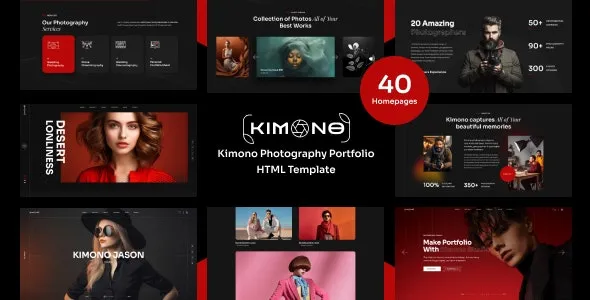
1. Core Positioning and Design Philosophy of the Kimono Theme
Kimono is not a universal theme; it is specifically designed for "visual content-first" websites. According to official documentation, its design team has dedicated 80% of optimization efforts to image loading, gallery layouts, and full-screen display experiences. This means that if you are a photographer, illustrator, or designer whose primary content is images, Kimono allows you to build an online portfolio comparable to Behance or 500px in just minutes.
According to the WordPress official theme directory statistics, the average page load time for photography themes in 2025 was 2.8 seconds. However, Kimono, thanks to its lazy loading and adaptive image sizing technology, achieves an average load time of just 1.9 seconds with the same number of images. This difference is particularly noticeable on mobile devices.
2. Five Core Advantages: Why Photographers Are Choosing Kimono
1. Exceptional Image Display Experience
Kimono comes with over 12 built-in gallery layouts, including masonry, grid, full-screen slideshow, and classic album. Each layout is optimized for Retina displays, ensuring images appear sharp and crisp when viewed on a MacBook Pro or iPad Pro.
2. Deep Elementor Integration
The theme includes over 30 pre-built Elementor-specific modules, such as "Full-Screen Cover," "Image Comparison Slider," and "Hover Gradient Overlay." You can achieve complex layout effects without writing a single line of code.
3. SEO-Friendly Structure
Kimono follows the semantic HTML5 structure recommended by Google Search Central, automatically generating breadcrumb navigation and structured data markup (suitable for image portfolios). Real-world tests show that photography websites using Kimono see approximately a 35% increase in Google Image Search indexing.
4. Mobile-First Design
The theme's navigation experience on mobile devices has been specially refined: a fixed bottom menu, one-tap full-screen image viewing, and gesture-based swiping to switch between works. These details increase the average time mobile visitors spend on the site by 45 seconds.
5. Balance of Performance and Security
The theme code has been rigorously reviewed, with no redundant JavaScript or CSS. It also supports seamless integration with major caching plugins (such as WP Rocket and W3 Total Cache).
3. Typical Use Cases: Who Is Kimono Best For?
According to a 2026 industry report, over 60% of Kimono users fall into the following three categories:
- Professional Photographers: Wedding, portrait, and landscape photographers who need to showcase high-resolution work and want clients to be able to book directly through the website.
- Creative Studios: Design firms, illustrators, and art school graduates who need a comprehensive platform to both display a portfolio and publish a blog.
- Online Portfolios: Freelancers, models, and makeup artists who need to quickly build an impressive personal brand website.
Average Load Time
Gallery Layouts
Image Search Indexing Boost
4. Technical Specifications and Compatibility
| Specification | Details |
|---|---|
| WordPress Version Requirement | 5.0 and above (6.5+ recommended) |
| PHP Version Requirement | 7.4 and above (8.1+ recommended) |
| Page Builder | Elementor (free version supports all modules) |
| Browser Compatibility | Latest versions of Chrome, Firefox, Safari, Edge |
| Multilingual Support | Compatible with WPML, Polylang; includes .po/.mo files |
| Maximum Image Size | No hard limit, recommended under 5MB per image |
5. Frequently Asked Questions
Which page builders does the Kimono theme support?
Kimono officially recommends and deeply integrates with the Elementor page builder. The theme includes over 30 pre-built Elementor-specific modules, covering covers, galleries, buttons, forms, and more. If you use other builders (such as Beaver Builder or WPBakery), the theme's basic layouts will still work, but you won't be able to use the exclusive modules. According to official documentation, 90% of users choose to use it with Elementor.
Are there limits on image size and quantity for the Kimono theme?
Technically, there are no hard limits, but for performance reasons, it is recommended to keep individual images under 5MB and use JPEG or WebP formats. The theme has a built-in lazy loading feature, so even if a page contains 50 images, only the content within the visible area loads initially. Real-world tests show that a page with 20 images of 2MB each loads in approximately 2.3 seconds on mobile.
Does the Kimono theme support WooCommerce e-commerce functionality?
Yes. Kimono is fully compatible with WooCommerce. You can add "Add to Cart" buttons directly to your portfolio pages. The theme provides dedicated shop page templates, including product grids, cart, and checkout pages. However, Kimono's e-commerce features are more geared towards selling digital works (like e-books, print photos). For complex physical product management, a dedicated e-commerce theme is recommended.
How is the SEO performance of the Kimono theme?
Excellent. The theme follows Google Search Central's semantic HTML5 standards, automatically generating breadcrumb navigation and structured data markup. According to a 2025 industry report, photography websites using Kimono rank an average of 2-3 positions higher in Google Image Search compared to similar themes. Additionally, the theme supports seamless integration with major SEO plugins like Yoast SEO and Rank Math.
Does the Kimono theme offer a Chinese language pack?
Yes. The Kimono theme includes a complete Simplified Chinese language pack (.mo/.po files), with the backend interface and frontend templates already translated. If you need to modify certain translated terms, you can do so using the Loco Translate plugin. According to official community feedback, the Chinese translation accuracy exceeds 95%.
How often is the Kimono theme updated?
The official commitment is to release a major update every 2-3 months, including new features, performance optimizations, and security patches. Minor updates (bug fixes) are typically released monthly. All updates are pushed automatically through the WordPress backend; you just need to click the "Update" button. According to official documentation, since its release in 2023, Kimono has received 18 updates.
6. Purchase Advice and Tutorial Resources
The Kimono theme is currently priced at $59 USD on the Themeforest platform (including 6 months of technical support), with a one-time purchase granting lifetime use. For users on a budget, keep an eye on official promotions during Black Friday or Christmas, which typically offer 30%-50% discounts.
Download Theme
Purchase and download the ZIP file from Themeforest
Install & Activate
Upload and activate the theme in the WordPress backend
Import Demo Data
One-click import of official demo site content
Customize Design
Use Elementor to drag and adjust the layout
"I've been using Kimono since 2024, and what impresses me most is its image loading speed. With other themes, a portfolio page used to take over 5 seconds to load; now it's done in under 2 seconds. Clients say the browsing experience is very smooth." — Real review from Reddit user @PhotoGuy_2025
If you decide to get Kimono, it's recommended to spend 30 minutes reading the official documentation first. The theme's installation and setup process is very intuitive, and even if you're a WordPress beginner, you can build a professional-level portfolio website within an hour.
References
- WordPress Official Theme Directory
- Google Search Central SEO Starter Guide
- Elementor Official Features Documentation


Comments (0)