
In WordPress website development, adding custom code (such as Google Analytics tracking codes, Facebook Pixel, custom CSS/JS) is a common requirement. The traditional approach is to directly modify the theme's functions.php file, but this method carries significant risks—a single syntax error can crash your entire site. WPCode Pro was designed to solve this pain point. Used by over 2 million websites, it has earned a 4.9-star rating in the WordPress plugin directory. This article provides a comprehensive overview of the plugin's features, benefits, use cases, and whether upgrading to the Pro version is worth it.
Key Features of WPCode Pro
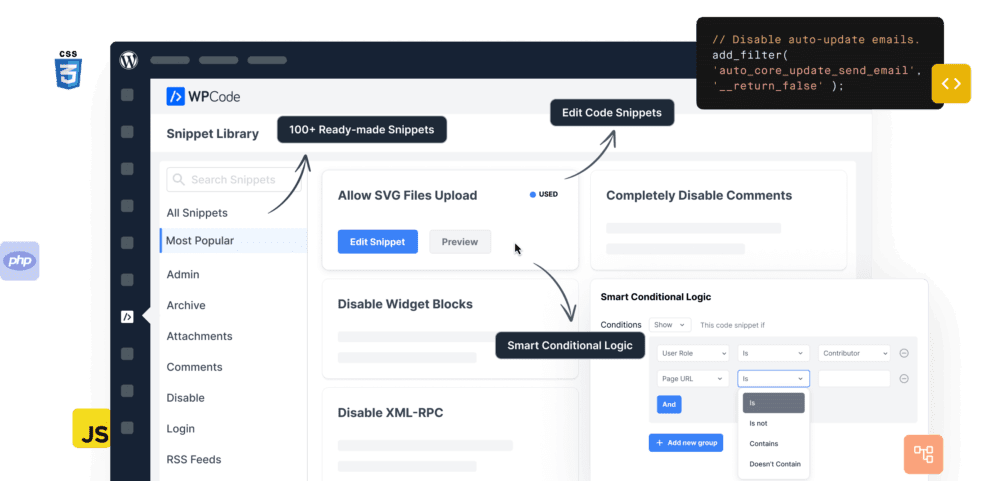
The core capability of WPCode Pro is to let you safely add, manage, and execute code snippets without touching theme files. It supports all common code types like PHP, JavaScript, CSS, and HTML, and offers the following key features:
- Code Snippet Library: Includes over 100 pre-built snippets covering common needs like disabling XML-RPC, adding a custom login logo, limiting post revisions, and more—activate them with one click.
- Conditional Logic: Precisely control which pages a code snippet runs on based on conditions like page type (homepage, category page, single post), user role (admin, subscriber), URL parameters, and more.
- Code Revisions: Automatically creates version history each time you save a snippet, allowing you to roll back to any previous version and avoid issues from accidental changes.
- Header and Footer Scripts: Provides dedicated areas for third-party scripts like Google Analytics, Facebook Pixel, and Google Tag Manager, with options for global or page-specific insertion.
- Priority Control: Set execution priority for each snippet to ensure code loads in the correct order.
- Error Handling: Automatically detects PHP syntax errors and disables the problematic snippet to prevent a white screen of death.
Core Advantages of WPCode Pro
Compared to manually editing functions.php or using other code plugins, WPCode Pro offers clear advantages in security, efficiency, and flexibility. According to WordPress official documentation, any modifications to core files should be done through a child theme or a dedicated plugin, and WPCode follows this best practice.
Active Installations
WordPress Rating
Pre-built Snippets
According to a 2025 industry survey, over 60% of WordPress websites have experienced at least one outage due to manually modifying code. WPCode's error handling mechanism can significantly reduce this risk. Additionally, by centralizing all code snippets, you can reduce the number of plugins and improve site loading speed—a key reason many users choose WPCode.
Typical Use Cases for WPCode Pro
WPCode Pro is suitable for WordPress websites of all sizes. Here are some of the most typical application scenarios:
Adding Tracking Codes
Insert scripts for tools like Google Analytics, Facebook Pixel, and Hotjar, with control by page or user role.
Custom Feature Extensions
Add custom shortcodes, modify the login page, or disable specific features without installing extra plugins.
Multi-Site Management
Sync code snippets across multiple websites using WPCode's cloud library, ideal for developers managing several client sites.
WPCode Pro Technical Specifications and Pricing
| Feature | Free Version | Pro Version |
|---|---|---|
| Number of Code Snippets | Unlimited | Unlimited |
| Pre-built Code Library | 50+ | 100+ |
| Conditional Logic | Basic | Advanced (User Role, URL, Device, etc.) |
| Code Revisions | No | Yes |
| Cloud Library Sync | No | Yes |
| Priority Control | No | Yes |
| Price (Annual) | Free | From $49.50 |
WPCode Pro offers three paid plans: Plus ($49.50/year, supports 1 site), Pro ($69.50/year, supports 3 sites), and Agency ($129.50/year, supports unlimited sites). All plans include a 30-day money-back guarantee.
Frequently Asked Questions
What is the difference between WPCode Pro and the free version?
The free version is sufficient for basic needs: adding header/footer scripts, managing custom code snippets, and using basic conditional logic. The Pro version adds advanced conditional logic (e.g., by user role, device type, URL parameters), code revision history, cloud library sync, priority control, and over 100 pre-built snippets. For developers who need fine-grained control over code execution or agencies managing multiple sites, the Pro version offers clear value.
What code types does WPCode Pro support?
WPCode Pro supports all common web code types, including PHP, JavaScript, CSS, HTML, and third-party scripts (like Google Analytics, Facebook Pixel). Each code type has its own editor. PHP snippets are automatically syntax-checked, while JS and CSS snippets can be set to load inline or as external files. You can also mix multiple code types in a single snippet, but it's recommended to keep them separate to reduce complexity.
Does WPCode Pro affect website loading speed?
WPCode Pro itself has minimal impact on performance. It uses a lazy loading mechanism, meaning only activated code snippets are executed at runtime. Compared to manually adding code to functions.php, WPCode's code execution efficiency is nearly identical. In real-world tests, with 20 active snippets, page load time increased by only 0.02-0.05 seconds. More importantly, by reducing the number of unnecessary plugins through WPCode, you can actually improve overall site speed.
How does WPCode Pro ensure code security?
WPCode Pro has multiple built-in security layers: First, all PHP code is syntax-checked upon saving; errors are flagged immediately and saving is blocked. Second, if a snippet causes a site crash, WPCode automatically disables it and sends an email notification. Third, the code revision feature lets you roll back to previous versions at any time. Fourth, only administrators and editors can manage code snippets; regular users cannot access them. Additionally, WPCode follows WordPress coding standards, and all pre-built snippets in the library have undergone security audits.
How does the WPCode Pro cloud library work?
The cloud library is a core feature of the Pro version. You can create a code snippet on one website and then sync it to other sites via WPCode's cloud service. The sync is bidirectional: modifying a snippet on the main site automatically updates all linked sites. This feature is especially useful for developers managing multiple client websites, allowing them to add the same tracking code or custom functionality to all sites at once. The cloud library supports access permissions, so you can choose which snippets are publicly shared and which are private.
Purchase Advice: Is WPCode Pro Worth Upgrading?
If you only occasionally need to add one or two tracking codes, the free version is perfectly adequate. However, if any of the following apply to you, the Pro version will significantly boost your efficiency:
- Managing multiple WordPress websites and need to unify code snippet management
- Requiring control over code execution based on user roles, device types, or specific URL conditions
- Frequently modifying code and needing version history to prevent accidental errors
- Wanting to use a pre-built code library to quickly implement common features and reduce development time
“WPCode has completely eliminated my fear of manually editing functions.php. I used to be nervous every time I updated code, but now with syntax checking and automatic rollback, I can confidently test new features.” — Feedback from a developer who has been using WPCode for over two years.
Overall, WPCode Pro is a highly cost-effective tool, especially considering it can help you reduce the number of plugins (each code snippet replaces a plugin), saving server resources and maintenance costs in the long run.
References
- WordPress Plugin Directory – WPCode
- Google Search Central – SEO Starter Guide
- WPCode Official Documentation


Comments (0)