
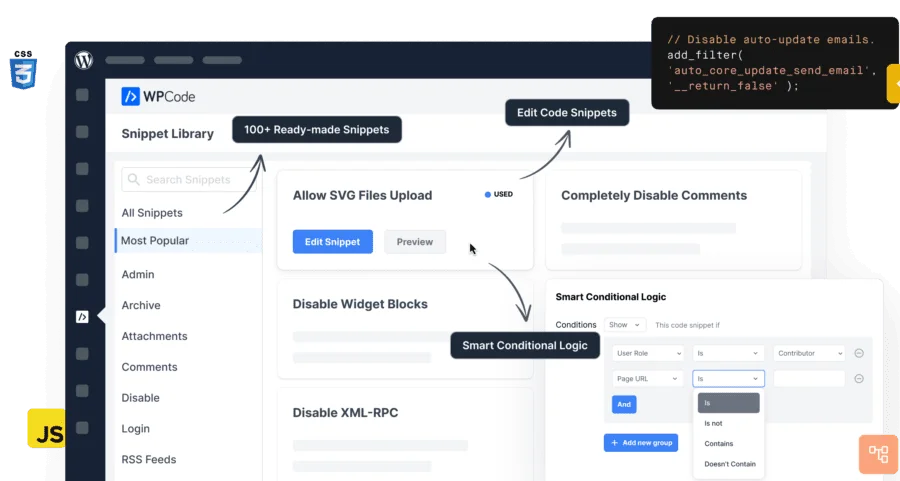
WPCode Pro WordPress Code Manager Plugin Complete Introduction
WPCode Pro (formerly Insert Headers and Footers by WPBeginner) is currently the most popular WordPress code snippet management plugin, used by over 1 million websites worldwide. This WordPress plugin allows you to easily add various code snippets to your WordPress site without editing your theme's functions.php file. Whether you need to insert header and footer scripts or manage custom PHP, JavaScript, CSS, and HTML code, WPCode Pro handles it all in one place.
WPCode Pro v2.4.0 paired with Conversion Pixels v1.2.4 provides website administrators with a professional-grade code management solution. Through an intuitive interface, you can quickly insert Google Analytics, Facebook Pixel, custom CSS, and other code into your WordPress site's header, footer, and other areas, completely eliminating the tedious task of manually editing theme files.
WPCode Pro Core Features and Advantages
Future-Proof Code Snippet Management
Traditional WordPress tutorials typically require adding code snippets to your theme's functions.php file, which not only makes code management messy but also prevents you from updating your theme. Once you update or switch themes, all custom code is lost. WPCode Pro perfectly solves this pain point by providing a way to insert header and footer scripts and other code snippets directly from the WordPress dashboard. These code snippets actually run just like they would in your theme's functions.php file, but in a safer and more controllable way.
Smart code snippet validation helps you prevent common code errors, ensuring you don't break your site when adding code snippets or header and footer scripts. You can manage all header and footer scripts and other custom code snippets from a single screen, organize snippets using tags, and add reminder notes for each snippet.
Complete Code Snippet Library and Code Generator
WPCode Pro comes with a built-in library of expert-tested WordPress code snippets that let you customize WordPress features with just one click. You can find verified PHP code snippets for common needs, such as disabling the REST API, disabling XML-RPC, disabling comments, allowing SVG file uploads, disabling the Gutenberg editor, enabling the classic editor, and more — no need to install a separate plugin for each feature.
Auto-insert functionality allows you to run code snippets anywhere, or choose from custom options: run only on the front end, run only in the WordPress admin area, add header and footer scripts site-wide, insert PHP code snippets before or after post content, insert code snippets before or after specific paragraphs, insert code snippets on specific archive pages, insert code snippets after specific WooCommerce functions (Pro feature).
Import/Export and Cloud Management
When managing multiple websites or developing in a staging environment, WPCode Pro provides an easy way to import and export custom code snippets, functions, and header and footer scripts. You can also save code snippets to WPCode Cloud (Pro feature) for easy reuse of the same code snippets across multiple websites. If you're switching from another code snippet plugin, the auto-import feature can import your custom code snippets from Woody Code Snippets and Code Snippets Pro plugins.
If you're looking for more quality WordPress resources and plugin recommendations, you can visit our resource site for more information.
Typical Use Cases for WPCode Pro
WPCode Pro is WordPress's most powerful code snippet and header/footer management plugin. Here are the main reasons website owners and developers love it:
- Insert Google Analytics tracking code in the header and footer
- Insert PHP or JavaScript code snippets without modifying your theme's functions.php file
- Use conditional logic to insert Facebook Pixels, Google Conversion Pixels, and other ad conversion pixel scripts in WordPress headers and footers
- Insert Google AdSense ad code, Amazon Native Contextual Ads code, and other media ad code
- Insert custom JavaScript, CSS, and HTML code
- Insert domain verification meta tags for social media, Google Search Console, and more in your site's header and footer
- Insert reusable custom content blocks and PHP code snippets
- Insert ad code in content after specific paragraphs
- Show or hide custom code snippets based on conditional logic
- Disable XML-RPC, disable REST API, disable comments, allow SVG uploads, disable Gutenberg and enable the classic editor — no additional plugins needed
In short, WPCode Pro is a WordPress code manager plugin that can help you eliminate dozens of other plugins without losing functionality. For more official information about this plugin, refer to the official WordPress plugin page.
Frequently Asked Questions
How do I install WPCode Pro?
In the WordPress admin, go to "Plugins" -> "Add New", upload the WPCode Pro ZIP installation package, and activate it to start using it. For detailed installation steps, please refer to the official documentation.
What scenarios can WPCode Pro be used for?
It's suitable for inserting Google Analytics, Facebook Pixel, and other header and footer code, managing custom PHP, CSS, JS, and HTML code snippets, and controlling code execution on specific pages or devices through conditional logic.
Is WPCode Pro compatible with other themes and plugins?
WPCode Pro is compatible with the vast majority of WordPress themes and plugins, including e-commerce plugins like WooCommerce. It supports importing code snippets from Code Snippets Pro and Woody Code Snippets.
How often is WPCode Pro updated?
WPCode Pro is continuously maintained by the WPBeginner team and typically releases new versions regularly alongside WordPress version updates, fixing bugs and adding new features. For specific changelogs, please refer to the official documentation.
Does WPCode Pro support multisite networks?
WPCode Pro supports WordPress multisite network environments, allowing you to manage code snippets centrally from the network admin dashboard. For specific configuration, please refer to the official documentation.

