
Registration & Login with Mobile Phone Number Plugin: In-Depth Analysis
In the e-commerce sector, user experience is one of the key factors that determine conversion rates. The Registration & Login with Mobile Phone Number plugin offers a revolutionary login method for WooCommerce stores, replacing traditional usernames and passwords with mobile numbers and OTP verification codes, greatly simplifying the customer registration and login process. This article will delve into the plugin's features, installation methods, use cases, and frequently asked questions to help you fully leverage its advantages and boost your store's operational efficiency.
Developed by FmeAddons and designed specifically for WooCommerce, this plugin aims to eliminate the burden of remembering passwords, allowing customers to complete identity verification using just their mobile phones. For stores with a high proportion of mobile users, this can undoubtedly significantly enhance the shopping experience and reduce cart abandonment rates.
Core Features and Benefits
The main features of the Registration & Login with Mobile Phone Number plugin include:
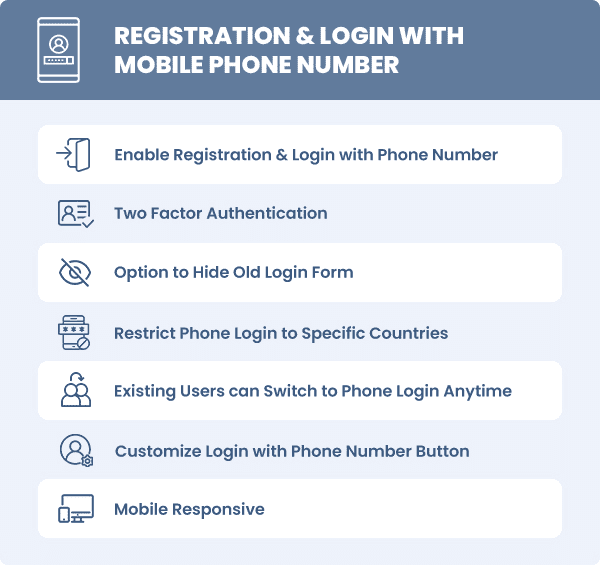
- Mobile Number Registration & Login: Customers only need to enter their mobile number and receive an OTP verification code to complete registration or login, with no password required.
- OTP Verification Mechanism: A one-time verification code is sent via SMS to ensure account security and prevent unauthorized access.
- Seamless WooCommerce Integration: Perfectly integrates with WooCommerce's registration, login, and checkout processes without disrupting existing functionality.
- Multi-language Support: Includes a Chinese interface for convenient localized use.
Registration & Login with Mobile Phone Number Installation & Configuration Guide
Installing this plugin is very simple and can be completed in just a few minutes. Here are the detailed steps:
- In the WordPress admin panel, go to "Plugins" -> "Add New" and search for "Registration & Login with Mobile Phone Number".
- Click "Install Now", then click "Activate" once the installation is complete.
- After activation, navigate to "WooCommerce" -> "Settings" -> "Accounts" tab, find the mobile login-related options, and configure them.
- Configure the SMS service provider: You will need to select an SMS provider (such as Twilio, Alibaba Cloud SMS, etc.) and fill in the API key.
- Save the settings, and you can test the mobile number login feature on the front end.
According to the official documentation, this plugin requires WooCommerce 3.0 or above and recommends a PHP 7.2+ environment. If you encounter issues during configuration, you can refer to the WordPress Plugin Usage Guide for additional assistance.
Use Cases and Best Practices
The Registration & Login with Mobile Phone Number plugin is suitable for a variety of scenarios, particularly the following:
- Mobile E-commerce: Simplify the login process for mobile users to enhance the user experience.
- Membership Websites: Quickly register large numbers of members and reduce customer service pressure related to password recovery.
- Multi-factor Authentication: Combine with other security plugins to strengthen account security.
Best practice recommendations: Back up your website data before enabling the plugin; choose a stable and reliable SMS provider when configuring it; and regularly check OTP sending logs to ensure the service is functioning properly.
Frequently Asked Questions
How do I install the Registration & Login with Mobile Phone Number plugin?
Installation method: Search for the plugin name in the WordPress admin panel, install and activate it with one click, then configure it in the WooCommerce settings. Please refer to the installation guide in this article for specific steps.
Which SMS service providers does this plugin support?
The plugin supports multiple SMS service providers, such as Twilio, Nexmo, etc. Please refer to the official documentation or the plugin settings page for specific details.
Is it compatible with other WooCommerce extensions?
This plugin is compatible with most WooCommerce extensions, but it is recommended to test it before installation to ensure there are no conflicts.
How often is it updated?
The plugin is regularly updated to fix vulnerabilities and add new features. It is recommended to enable automatic updates or check for updates periodically.
Does it provide Chinese language support?
Yes, the plugin includes a built-in Chinese language pack that can be switched in the WordPress language settings.

