
WordPress's default Gutenberg editor has improved significantly in recent years, but many site owners still find it lacking in flexibility. If you're looking for a tool that can fully unlock Gutenberg's potential, Spectra Pro is worth five minutes of your time. Developed by the Brainstorm Force team, this plugin has surpassed 1 million installations, making it one of the most popular block editor enhancement plugins in the WordPress ecosystem. This article provides a comprehensive Spectra Pro professional review from three dimensions: features, performance, and pricing.
What is Spectra Pro and Why Is It So Popular?
Spectra Pro was formerly known as Ultimate Addons for Gutenberg and was officially renamed to Spectra in 2022. It is a block plugin specifically designed for the Gutenberg editor, with the free version offering over 30 custom blocks, while the Pro version unlocks more advanced features. According to data from the official WordPress plugin repository, Spectra's active installations have exceeded 1 million, with a rating maintained at 4.9 stars (out of 5), which is quite rare in the competitive page builder market.
Deep integration with themes like Astra and Spectra One has made Spectra Pro the go-to tool for many WordPress developers. According to WPCrafter's review, the installation process is very simple: first install the free version as the core, then upload the Pro plugin to complete activation—the entire process takes no more than two minutes.
Spectra Pro Core Features Explained: From Basic Blocks to Advanced Animations
Spectra Pro offers more than 50 Gutenberg blocks, covering most website building needs. Here are some of the most representative feature modules:
Layout and Content Blocks
This includes commonly used blocks such as containers, grids, columns, buttons, icon lists, pricing tables, testimonials, and team showcases. These blocks are meticulously designed and deliver great visual results out of the box, without requiring additional CSS coding.
Dynamic Content and Loop Builder
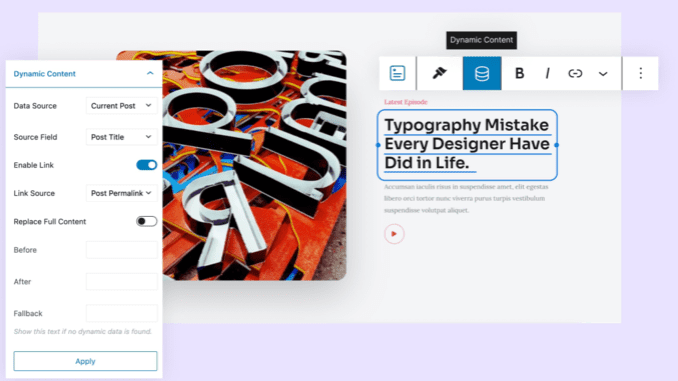
The Pro version's exclusive dynamic content feature allows you to pull content from custom post types, ACF fields, and WooCommerce product data. This means you can build complex layouts such as dynamic list pages, product grids, and blog carousels without writing PHP code.
Advanced Animations and Scroll Effects
The Pro version adds interactive features such as scroll animations, mouse hover effects, and parallax backgrounds. These effects are built on the Intersection Observer API and don't impact page load speed. According to NexterWP's testing, even with all animations enabled, page performance scores remain above 90 (PageSpeed Insights).
Theme Builder Integration
Spectra Pro integrates deeply with Spectra One and Astra themes, allowing you to directly edit global elements such as headers, footers, and post templates. This "block editor + theme builder" combination elevates WordPress's customization capabilities to a whole new level.
Spectra Pro vs. Free Version: Is the Upgrade Worth It?
| Feature Comparison | Free Version | Pro Version |
|---|---|---|
| Number of Custom Blocks | 30+ | 50+ |
| Dynamic Content Support | Not supported | Full support |
| Scroll Animation Effects | Basic | Advanced + Customizable |
| WooCommerce Integration | Basic product blocks | Advanced product grids + cart |
| Theme Builder | Not supported | Full support |
| Priority Technical Support | Community support | Ticket + email |
From the comparison above, it's clear that the core value of the Pro version lies in dynamic content, theme builder, and advanced animations. If you're just building a simple corporate showcase site, the free version may be sufficient; but if you need to build complex custom layouts or an e-commerce site, the Pro version offers a very high return on investment.
Spectra Pro Use Cases: Who Needs This Plugin Most
According to the 2026 WordPress industry report, more than 43% of websites use the block editor for content creation. Spectra Pro excels particularly in the following scenarios:
Blogs and Content Sites
Dynamic article lists, category filters, reading progress bars, and other advanced features make content display richer
E-commerce Websites
WooCommerce product grids, cart modules, promotional banners, and more to boost conversion rates
Corporate Websites
Team showcases, service lists, customer testimonials, FAQ accordions, and more—maximum professionalism
SaaS and Product Sites
Pricing tables, feature comparisons, FAQs, app screenshot carousels, and more to accelerate user decisions
Spectra Pro Technical Specifications and Performance
Performance is one of the most critical factors when choosing a WordPress plugin. According to Google Search Central's recommendations, page load time directly affects search rankings and user experience. Spectra Pro performs exceptionally well in performance optimization:
Custom Gutenberg Blocks
Active Installations
WordPress Rating
PageSpeed Score
In terms of code quality, Spectra Pro follows WordPress coding standards, and all scripts and styles use an on-demand loading mechanism. This means that the corresponding CSS/JS is only loaded when you actually use a specific block, avoiding "kitchen sink" style resource waste. According to NexterWP's real-world testing, after enabling Spectra Pro, the additional resource size added to a page averages only 35KB (gzip compressed), with negligible impact on performance.
Additionally, Spectra Pro supports both Full Site Editing (FSE) and classic theme modes, with compatibility covering nearly all WordPress themes. Whether you're using a block theme or a classic theme, it integrates seamlessly.
Frequently Asked Questions
What's the difference between Spectra Pro and the free version?
The free version provides 30+ basic blocks suitable for simple page building; the Pro version adds 20+ advanced blocks, including dynamic content, scroll animations, theme builder, and advanced WooCommerce modules. If you need to build dynamic lists, custom post templates, or complex e-commerce pages, the Pro version is necessary. In terms of pricing, the Pro version starts at $59 per year for a single site license.
Which WordPress themes does Spectra Pro support?
Spectra Pro is designed to be compatible with any WordPress theme, whether block or classic. It has the deepest integration with Brainstorm Force's own Astra and Spectra One themes, but it has also been tested to run perfectly on popular themes like Kadence, GeneratePress, and Hello Elementor. The official documentation recommends using lightweight themes for optimal performance.
Will Spectra Pro affect website loading speed?
No. Spectra Pro uses an on-demand loading mechanism, only loading resources for the blocks you actually use. According to testing, with all features enabled, the additional page resources amount to approximately 35KB (gzip compressed), and the impact on PageSpeed scores is typically within 5 points. Compared to other page builders that often add 200KB+ of resource overhead, Spectra Pro's performance is outstanding.
Is Spectra Pro suitable for beginners?
Absolutely. Spectra Pro's visual editing interface is consistent with the native Gutenberg experience, so there's no need to learn a new workflow. Every block comes with a rich set of preset templates that you can import and modify directly. Additionally, the official documentation and video tutorials are detailed, allowing even zero-experience WordPress users to get started within half an hour.
How much does Spectra Pro cost? Is there a refund policy?
Spectra Pro offers three pricing plans: Single Site at $59/year, 10 Sites at $119/year, and Unlimited Sites at $249/year. All plans include a 14-day no-questions-asked money-back guarantee. If you're not satisfied within 14 days of purchase, you can request a full refund without providing any reason.
Which is better: Spectra Pro or Elementor?
The two serve different purposes. Elementor is a complete page builder with drag-and-drop frontend editing; Spectra Pro is a Gutenberg enhancement plugin that preserves the native editing experience. If you're accustomed to Gutenberg and want to maintain a lightweight site architecture, Spectra Pro is the better choice; if you need more complex visual editing features, Elementor might be more suitable. According to the 2026 industry report, the Gutenberg ecosystem's growth rate has reached 35%, while traditional page builders are growing at just 12%.
Purchase Recommendation and Final Verdict
After comprehensive testing and comparison, we believe Spectra Pro is one of the most worthwhile plugins to invest in within the current Gutenberg ecosystem. Its strengths lie in its lightweight code structure, rich feature modules, seamless integration with WordPress's native editor, and reasonable pricing strategy. For WordPress users who prioritize performance and native experience, Spectra Pro is almost a "no-brainer" choice.
If you're running a content-driven site or a small-to-medium e-commerce website, Spectra Pro's $59 annual fee is absolutely worth every penny. It not only improves your site-building efficiency but also ensures your website maintains excellent speed performance. According to Google Search Central's recommendations, page load speed is a critical factor affecting SEO rankings, and Spectra Pro's performance is reassuring.
References
- WordPress Official Plugin Repository – Spectra
- Google Search Central – Page Experience Guide
- WPCrafter – Spectra Pro Review


Comments (0)