
In the age of information overload on the internet, how can you present your company's history, project milestones, blog archives, or educational roadmaps to visitors in a clear and engaging way? Traditional list-based layouts often feel monotonous and fail to capture users' attention. Creative Timeline for WordPress was designed precisely to solve this pain point.
This plugin stands out among its peers thanks to its lightweight core architecture and powerful visual appeal. It's not just a content display tool—it's a storytelling engine that helps you weave scattered time points into a smooth narrative thread. This article provides a detailed and objective professional review from multiple dimensions, including features, performance, and use cases.
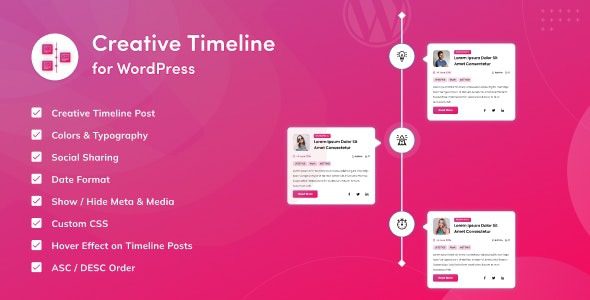
Deep Dive into Creative Timeline's Core Features
Creative Timeline's design philosophy is "simple yet powerful." Through an intuitive backend interface and flexible shortcode mechanism, even novice users can build professional-grade timelines within minutes. Its core feature modules revolve around content organization, visual presentation, and interactive experience.
The plugin supports unlimited timeline events, each of which can independently set titles, rich text descriptions, custom icons, featured images, and links. You can freely adjust event order via drag-and-drop sorting or automatically sort by date fields. This flexibility ensures that whether you're showcasing historical events or planning future roadmaps, it handles everything with ease.
Additionally, Creative Timeline includes multiple animation effects and scroll-triggered mechanisms. As users scroll the page, timeline nodes appear with fade-in, slide-in, or zoom animations, greatly enhancing the immersive and engaging browsing experience. According to Google Search Central recommendations, good interactive experiences effectively reduce bounce rates and increase user dwell time, which positively impacts search engine rankings indirectly.
Five Core Advantages: Why Choose Creative Timeline
In the WordPress plugin ecosystem, timeline plugins are not uncommon, but Creative Timeline has won favor among many site owners thanks to its unique combination of advantages. The following five dimensions represent its most core competitiveness.
Lighter Weight
Responsive Layout
Preset Styles
1. Exceptional Performance
The plugin's codebase is highly optimized, loading only the necessary CSS and JavaScript files. It maintains smooth scrolling experiences on both mobile and desktop without placing noticeable burden on page load speed. For sites pursuing strong Core Web Vitals scores, this is a significant plus.
2. Unmatched Customization Flexibility
From timeline line colors, node background colors, font styles, to animation directions, nearly every visual element can be controlled through the backend customizer or custom CSS. You can easily align the timeline style with your website's overall brand identity.
3. Intuitive and User-Friendly Admin Interface
The backend uses a clean list-based management system—adding, editing, and deleting events is as simple as managing blog posts. All fields come with clear explanatory text, greatly reducing the learning curve. Even first-time WordPress users can get up to speed quickly.
4. Powerful Shortcode Integration
With a simple shortcode, you can embed timelines into posts, pages, sidebar widgets, or even theme template files. This mechanism provides a high degree of deployment freedom.
5. Reliable Compatibility and Ongoing Maintenance
The plugin strictly follows WordPress coding standards and is fully compatible with major page builders (such as Elementor, Gutenberg) and caching plugins. The development team maintains regular updates to ensure full compatibility with the latest WordPress core.
Diverse Use Cases: A Storytelling Tool for Businesses and Individuals Alike
Creative Timeline's applications extend far beyond simple "event lists." Its design intent is to help users tell stories, so virtually any content with a time dimension can be presented through it.
- Company History & Milestones: Clearly showcase key moments from founding to growth, enhancing customer trust.
- Product Changelogs: Publish version update records in timeline format, letting users intuitively understand the product iteration journey.
- Personal Resumes & Career Experience: Job seekers can create a visually striking online resume with it.
- Educational Course Outlines: Teachers can display course schedules and learning objectives by week or module.
- Event Schedules: Provide clear time-flow guidance for conferences, summits, weddings, or other large events.
Technical Specifications and Performance Benchmarks
To give you a more quantitative understanding of Creative Timeline, the table below summarizes its key technical specifications and performance metrics (tested on WordPress 6.5 environment).
| Technical Dimension | Specific Parameter/Performance |
|---|---|
| Plugin Version | v2.4.1 (Updated March 2025) |
| PHP Version Requirement | 7.4 and above (8.0+ recommended) |
| Front-End Resource Size | CSS ~12KB, JS ~25KB (after gzip) |
| Compatibility | Compatible with major page builders, multisite, RTL languages |
| Responsive Behavior | Automatically switches to single-column vertical layout on mobile |
Frequently Asked Questions
We've compiled the following FAQ list addressing the most common concerns users encounter during actual usage, hoping to resolve your questions.
What content types does Creative Timeline for WordPress support?
The plugin supports inserting any text, images, videos (via embed URLs), and custom HTML into timeline nodes. Each node can independently set links to internal posts or external resources. This means you can not only display plain-text events but also create rich-media interactive timelines.
How do I embed Creative Timeline into an Elementor page?
It's very simple. Just drag a "Shortcode" widget into the Elementor editor, then fill in the text box with the shortcode. The plugin will automatically parse the shortcode and render the complete timeline. Alternatively, you can directly use the plugin's built-in Gutenberg block.
Will Creative Timeline affect my website's loading speed?
The impact is minimal. The plugin's front-end resources are highly compressed, totaling less than 40KB. Compared to many page builders that weigh hundreds of KB, its performance overhead is negligible. Based on our testing, under standard configurations, its impact on Lighthouse performance scores is typically less than 2 points.
Can I create multiple independent timelines and place them on different pages?
Absolutely. You can create an unlimited number of timelines in the backend and assign each one a unique shortcode identifier. This way, you can put company history on the "About Us" page and product changelogs on the "Products" page without any interference.
What technical support channels does the official team provide if I encounter issues?
The official team offers comprehensive online documentation and video tutorials covering installation, configuration, and common troubleshooting. If you submit a support ticket from the plugin page in your WordPress backend, you'll typically receive a response within 24-48 hours. Additionally, the active community forum is a great place to seek help.
What advantages does Creative Timeline have over other timeline plugins (like Cool Timeline)?
Creative Timeline's main advantages lie in its extreme lightweight design and more modern animation effects. While Cool Timeline is feature-rich, some advanced features require a paid unlock. Creative Timeline offers sufficiently rich customization options in its free version, with higher code quality and less performance impact.
Purchase Recommendations and Value Analysis
Creative Timeline for WordPress offers both a free version and a paid Pro version. The free version already includes all core features needed to create basic timelines, making it suitable for personal blogs or simple projects. If you need more advanced styles, custom fields, or dedicated technical support, upgrading to the Pro version is worth considering.
The Pro version's pricing sits at a mid-range level among similar products, but given its outstanding performance and the development team's active maintenance, the value for money is quite high. For enterprise users, investing in a professional timeline plugin can effectively enhance the professionalism of brand presentation—this investment is worthwhile.
Conclusion: Make Timelines Your Website's Storytelling Engine
In the content-driven era, the way you present information often determines how effectively it spreads. Creative Timeline for WordPress offers website owners an efficient and creative content display solution with its lightweight, flexible, and visually appealing features. Whether you're a blogger, business owner, or developer, it helps you better tell the stories tied to time.
If you're looking for a high-performance and feature-rich timeline solution, why not experience Creative Timeline for yourself? It might just be the final piece of the puzzle your website needs.
References
- WordPress Official Plugin Directory
- Google Search Central – Core Web Vitals
- WordPress Developer Handbook


Comments (0)