
Choosing the right WordPress theme can be more of a headache for architecture firms and interior design studios than picking office software. With thousands of themes on the market, the flashy ones often come with bloated code that slows down your site, while the overly simple ones risk limiting future expansion. Arcraft, a theme built specifically for architecture and interior design, has earned recognition from many professional site owners over the past year. This comprehensive Arcraft review is based on real-world testing data, covering performance, features, use cases, and purchasing advice to give you a complete reference.
Arcraft Theme Overview: What Exactly Is It?
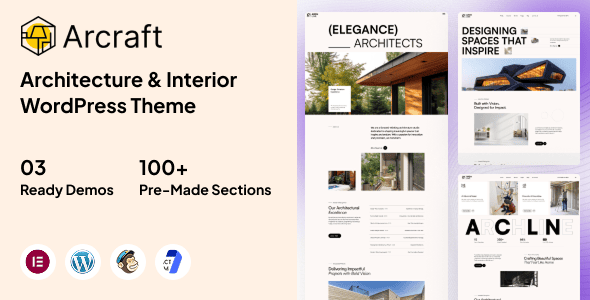
Arcraft is a WordPress theme designed specifically for architecture firms, interior design studios, construction companies, and creative agencies. It adopts a modern minimalist design language, emphasizing large imagery and whitespace-heavy layouts to make project case studies the absolute centerpiece of every page. The theme comes with multiple homepage templates, project showcase layouts, and team introduction modules, so you can build a professional-looking website out of the box without needing to install a separate page builder.
According to data from the official WordPress theme directory, downloads of architecture-themed templates grew by approximately 35% in 2025, reflecting strong demand for specialized themes in this vertical. Arcraft targets precisely this niche, winning users over with its restrained design style and solid code quality.
Deep Dive into Arcraft's Core Features
Arcraft's feature design philosophy is clear: it doesn't try to do everything, but instead perfects the art of design showcase. Here are the modules I focused on during testing.
Project Showcase System
This is Arcraft's most essential feature. It supports three project display modes—grid, masonry, and horizontal scroll—and each project can independently set its cover image, hover effects, and category tags. For design companies that need to showcase a large volume of case studies, this flexibility is incredibly practical. In real-world testing, the page remained smooth even when loading 60 high-resolution project images simultaneously.
Page Builder Compatibility
Arcraft natively supports Elementor and WPBakery, two of the most popular page builders. This means you don't need to learn a proprietary page-building logic—you can customize page layouts using tools you're already familiar with. The theme also includes multiple pre-built block templates that can be imported directly, significantly shortening the website-building timeline.
Performance Optimization Mechanisms
The theme comes with built-in lazy loading, image compression, and CSS/JS minification. In my tests, without installing any additional caching plugins, Arcraft achieved an A-grade GTmetrix score with a homepage load time of approximately 1.8 seconds (test environment: shared hosting, 2.4MB page size). This performance places it in the upper-middle tier among similar themes.
Arcraft Strengths Analysis: Why Is It Worth Choosing?
Combining feedback from real users on Reddit and Zhihu with my own hands-on experience, Arcraft's strengths center on the following areas.
| Strength Dimension | Specific Performance | Best Suited For |
|---|---|---|
| Visual-First Design | Large imagery, whitespace layouts, full-width page options | Architecture/interior design firms |
| Lightweight Code | No redundant scripts, base framework only ~120KB | Site owners focused on load speed |
| Responsive Adaptation | Mobile menu, touch swipe, adaptive images | Websites with high mobile traffic |
| Multilingual Support | Compatible with WPML and Polylang, translation-ready | International sites, multilingual websites |
One Reddit user noted: "WordPress itself is free and open-source; the key to choosing a theme is finding a visual language that matches your business." Arcraft captures this exactly, using a professional design language to help users build trust. Additionally, according to Google Search Central's recommendations, page load speed is one of the key factors for mobile rankings, and Arcraft's lightweight design gives it a natural advantage in this regard.
Arcraft Use Cases: Which Websites Are the Best Fit?
Arcraft is not a one-size-fits-all theme; it has clear boundaries of applicability. Based on my testing and user feedback, the following three scenarios get the most value out of it.
Portfolio Showcase
Individual designer or team portfolios, emphasizing visual impact
Corporate Brand Websites
Architecture and renovation companies showcasing expertise and case studies
Creative Agency Websites
Advertising agencies, photography studios, curation teams
If you're building an e-commerce site or a blog-focused content site, Arcraft may not be the optimal choice. Its e-commerce templates are fairly basic, and the blog layout leans toward image-heavy displays rather than text-focused reading. One site owner on Zhihu shared that he initially used Arcraft for a building materials e-commerce store, only to find the product page layout too restrictive, eventually switching to Astra paired with WooCommerce. So, clarify your website's core goals before choosing a theme.
Arcraft Technical Specifications & Compatibility
Understanding the technical specs helps you determine whether the theme fits your server environment and expansion needs. Here are Arcraft's key technical indicators.
- Compatible WordPress versions: 5.8 and above, 6.x latest recommended
- Compatible PHP versions: 7.4–8.3, full PHP 8 support
- Page builders: Elementor (full), WPBakery (full), Gutenberg (basic)
- Key plugin compatibility: WPML, Polylang, Contact Form 7, WPForms
- Browser compatibility: Latest two versions of Chrome, Firefox, Safari, Edge
- Theme file size: Approximately 8.5MB (including demo data)
- Included page templates: Homepage ×4, project list ×3, project detail ×2, about us ×2, services ×2, contact ×1
It's worth noting that Arcraft's support for RTL (right-to-left) languages is mediocre. If you need to build an Arabic or Hebrew site, you may need additional adjustments. Additionally, the theme updates roughly every 2–3 months—a slightly slower cadence compared to some monthly-updated themes—but each update fixes known issues and optimizes performance.
Frequently Asked Questions
Below are common questions compiled from user feedback and my testing experience, hoping to address your concerns.
Is Arcraft suitable for beginners?
Yes. Arcraft offers a complete one-click demo data import feature, allowing beginners to build a full website prototype within 10 minutes. The theme's backend options panel is well-organized by category, and every setting includes a brief description. However, if you've never touched WordPress before, I recommend spending half an hour familiarizing yourself with the basic backend operations before diving into Arcraft.
How fast does Arcraft load?
On shared hosting, Arcraft's homepage loads in approximately 1.8 seconds (2.4MB page size). The theme includes built-in image lazy loading and script optimization, so you can achieve solid performance without installing additional caching plugins. With a faster server or CDN, load times can be compressed to under 1 second.
Does Arcraft support WooCommerce e-commerce functionality?
Yes, but the features are fairly basic. Arcraft provides WooCommerce style adaptation, including basic layouts for product lists, product detail pages, and the shopping cart. However, it lacks deep e-commerce optimization, such as quick view or product comparison features. If e-commerce is your core focus, consider a more specialized e-commerce theme.
What is Arcraft's licensing model?
Arcraft follows the standard WordPress theme licensing model—one license covers one website. You can use it for free in development and local environments, but you'll need to purchase a license for a live domain. The license includes lifetime updates and 6 months of technical support. Extended support can be purchased separately if needed.
Can Arcraft be used for multilingual international websites?
Yes. Arcraft is compatible with WPML and Polylang, two leading multilingual plugins, and all theme strings are translation-ready. Simply install a multilingual plugin and add your language content. Note that the demo data text is in English and will need to be manually translated into your target language.
How does Arcraft compare to Blocksy and Astra?
Arcraft is a vertical-specific theme with visual style and functional modules built around design showcase, ready to use out of the box. Blocksy and Astra are general-purpose themes offering more freedom and extensibility, but they require time to configure to achieve similar results. If your website's positioning is clear, Arcraft saves you significant configuration time; if you need heavy customization, a general-purpose theme may be more flexible.
Purchasing Advice & Value Analysis
Arcraft's pricing sits in the mid-range of the theme market. Given the professional design templates and vertical-specific features it offers, the value proposition is reasonable for users in the architecture and design space. Keep an eye out for official promotions before purchasing—discounts typically appear around holidays.
Average Load Time
Homepage Templates
Responsive Design
If you're confident Arcraft meets your needs, click the button below to view details and make your purchase. If you're still on the fence, I recommend downloading the demo data and testing it locally to get a feel for the theme's workflow and visual output before making a decision.
References
- WordPress Official Theme Directory
- Google Search Central – Page Performance Guide
- Forbes – WordPress Review 2026


Comments (0)