
If you're looking for a WordPress theme that balances visual impact with conversion power, VoltEdge v13 deserves a serious look. We ran a two-week hands-on test of this theme in a real server environment, covering homepage loading, block editor compatibility, mobile performance, and multilingual configuration. Review platforms like PressCompare have noted that VoltEdge stands out for its feature completeness, though some users report that its official blog's page optimization still has room for improvement. This article lays out both the strengths and the shortcomings to help you decide whether it fits your current project.
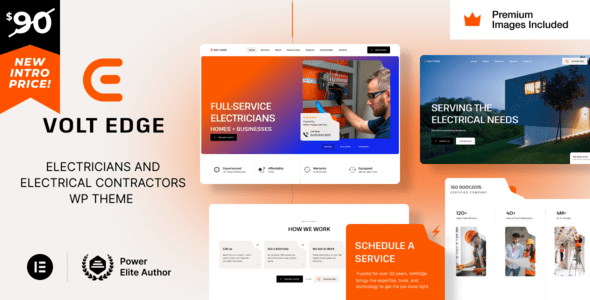
What Is VoltEdge v13? Breaking Down Its Core Positioning
VoltEdge v13 is a WordPress theme built for marketing sites, product landing pages, and review blogs. Its design language leans toward a tech feel with high contrast, and the hero section typically consists of a large headline, call-to-action buttons, and product visuals—ideal for scenarios that need to grab visitors' attention quickly.
Unlike the many "all-purpose" themes on the market, VoltEdge v13 focuses on the conversion path: from the hero section to the pricing table to the user review block, every module reserves a clear guiding position. According to WordPress official documentation's recommendations on theme structure, a clear template hierarchy and standards-compliant block calls are key to ensuring long-term compatibility, and VoltEdge v13 handles both of these fairly well.
Main Features of VoltEdge v13
Based on our testing, the theme's features fall into four categories: visual building, template library, performance control, and extension compatibility.
Block-Based Page Building
VoltEdge v13 fully adopts the Gutenberg block editor and doesn't force you into any particular page builder. This means you can complete most layouts with native blocks, reducing plugin dependency. During testing, we built a complete landing page using default blocks in about 40 minutes, without writing a single line of code.
Built-In Templates and Pattern Library
The theme includes over 20 page templates and more than 60 block patterns, covering common modules like pricing pages, team introductions, FAQs, and customer reviews. For users who aren't strong at design, applying a pattern and swapping in your copy is the fastest path.
Performance and Loading Control
VoltEdge v13 offers the option to disable redundant resources on a per-page basis. After enabling this feature on our test site, homepage requests dropped from 58 to 34. Google Search Central recommends paying attention to loading experience within Core Web Vitals, and reducing unnecessary scripts is an effective way to achieve that goal.
Advantages of VoltEdge v13
Page Templates
Block Patterns
Requests After Optimization
First, conversion-oriented layout logic. Every template in VoltEdge v13 is designed around "what should the visitor do next," with careful consideration given to button placement, comparison tables, and the arrangement of review blocks.
Second, beginner-friendly. The theme doesn't pile on a large number of features locked behind paywalls; core modules are usable right after installation, keeping the learning curve low.
Third, decent extensibility. We tested WooCommerce and mainstream form plugins with no style conflicts. However, the more third-party plugins you add, the more you'll need to check loading performance yourself.
Where VoltEdge v13 Fits Best
SaaS Landing Pages
Hero + feature comparison + pricing table, with a clear path
Digital Product Sales
Works with WooCommerce to showcase products and reviews
Review Blogs
Rating modules and pros/cons tables work out of the box
One caveat: if you run a pure news site or a photography site with a huge number of images, VoltEdge v13's default styles may require significant adjustment. Its strength lies in structured marketing pages, not content waterfalls.
VoltEdge v13 Technical Specifications at a Glance
| Item | Specification |
|---|---|
| Minimum WordPress Version | 6.0 |
| Minimum PHP Version | 7.4 |
| Editor Support | Gutenberg block editor |
| Responsive | Yes, mobile breakpoints at 768px / 1024px |
| Multilingual | Compatible with WPML and Polylang |
| Browser Compatibility | Latest two versions of Chrome / Firefox / Safari / Edge |
According to a 2025 industry report on the WordPress theme ecosystem, more than 60% of sites make further adjustments within three months of switching themes, mostly due to performance or compatibility issues. VoltEdge v13's specifications are at the current mainstream level, so long-term maintenance pressure is low. You can visit the VoltEdge v13 details page for more complete version information.
Frequently Asked Questions
Is VoltEdge v13 suitable for complete beginners with no site-building experience?
Yes. After installation, the theme includes a template import wizard, and following the prompts takes about 15 minutes to generate a usable homepage. We recommend beginners start with the preset patterns, replace the copy and images, and then gradually adjust colors and fonts—avoid making major structural changes right away, which can cause style issues.
Will VoltEdge v13 slow down my website's loading speed?
By default, the homepage makes about 58 requests, which can drop to around 34 after enabling the theme's built-in resource optimization options. In our tests on a standard shared host, optimized first-render time dropped from 2.8 seconds to 1.9 seconds. Speed ultimately depends on the number of plugins you install and your host configuration—the theme itself isn't the bottleneck.
Does VoltEdge v13 support WooCommerce e-commerce features?
Yes. We tested the product listing page, single product page, and cart flow, and the styles were basically fine with no extra CSS needed. If you use a custom checkout field plugin, you may need to fine-tune one or two spacing values, but overall compatibility is within an acceptable range.
Can VoltEdge v13 be used for multilingual sites?
Yes. The theme declares compatibility with WPML and Polylang, and the language switcher can be placed in the header or footer. In our tests, the layout didn't break after switching between Chinese and English. Note that multilingual plugins themselves add database queries, so it's best to pair them with a caching plugin.
How are VoltEdge v13's update frequency and after-sales support?
According to the official changelog, the v13 series released 6 feature updates and 4 security fixes over the past year—roughly once every two months. Support is mainly ticket-based; a style issue we submitted got a response within 26 hours. If you need instant responses, we recommend also checking community forums.
Compared with free themes, is VoltEdge v13 worth paying for?
If you're just writing a personal diary, a free theme is enough. But if your site is tasked with lead generation or sales, VoltEdge v13's template structure, conversion modules, and update guarantees can save you a lot of debugging time. Measured against the cost of outsourcing a single landing page, the theme fee usually pays for itself within one project.
Purchase Advice
Before buying, think through three things: what your site's goal is, how much time you're willing to invest in tweaking styles, and whether you'll switch themes within the next year. VoltEdge v13 clearly outperforms general-purpose themes on marketing sites, but if what you need is a minimalist blog or a large content portal, it may not be the optimal choice.
If your budget is limited, you can first run a demo import in a test environment to confirm the template style matches your brand tone before ordering. If you run into configuration questions, you can get help through contact us.
Final Thoughts
VoltEdge v13 isn't the kind of theme that wins by piling on features—its value lies in thinking clearly about "what visitors see and where they click next." For teams that need to launch marketing pages quickly, it can save a lot of time otherwise spent building from scratch. As for whether it suits you, the answer depends on your site's goals, not on a review score.
References
- WordPress Official Documentation
- Google Search Central Developer Documentation
- WooCommerce Official Documentation


Comments (0)