
If you're looking for a WordPress theme for a university, training institution, or online course platform that can handle a complex course system while also delivering strong visual appeal, then Acadia has likely already appeared on your shortlist. This product, which has long ranked among the top-selling education themes on ThemeForest, focuses on deep LMS integration and Elementor visual editing, with an official positioning of "a professional education theme built for universities, colleges, and online course providers." But strong sales don't necessarily mean it's right for you—this article is based on actual installation testing and publicly available information, giving you a no-nonsense review covering features, performance, use cases, and purchasing decisions.
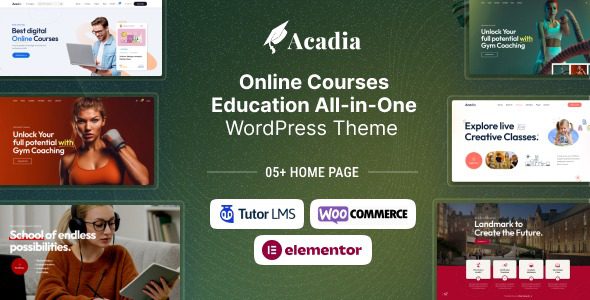
What Is the Acadia Theme? A Full Breakdown of Core Features
Acadia is a WordPress theme focused on education scenarios, built to be compatible with the Elementor page builder and natively supporting mainstream learning management system plugins such as LearnDash and Tutor LMS. In other words, it's not a general-purpose theme with an "education skin" slapped on—it's a vertical solution with preset templates covering everything from course catalogs, instructor profiles, and lesson scheduling to student progress tracking.
Its feature modules can be roughly divided into four areas:
- Course Management: Supports course categories, difficulty tags, lesson duration, price and sale price fields, and works with LMS plugins to enable paid enrollment and progress tracking.
- Page Templates: Includes over ten preset templates such as homepage, course list, course details, instructor profile, event calendar, and blog. After importing demo data, content can be replaced with one click.
- E-commerce Compatibility: Integrated with WooCommerce, courses can be sold as products, supporting coupons, installments, and other standard e-commerce features.
- Visual Customization: Drag-and-drop editing based on Elementor, with colors, fonts, headers, and footers all adjustable in the backend without writing code.
According to WordPress official documentation recommendations for education sites, course detail pages should clearly present four information levels: "what you'll learn, who teaches it, how long it takes, and how much it costs." Acadia's course detail template basically follows this structure, which performs well in actual use.
Three Core Advantages of the Acadia Theme
Advantage 1: High LMS Integration, Saving Significant Custom Development
Many general-purpose themes can also install LMS plugins, but front-end displays like course list pages, instructor pages, and progress bars often require writing your own templates. Acadia has turned all of these into ready-made components. After importing demo data, a functional online course site framework is basically in place. For small teams without dedicated front-end developers, this can save at least two weeks of setup time.
Advantage 2: Elementor Ecosystem Support, Flexible Redesigns
Elementor is currently one of the most widely installed page builders in the world, which means pages you build on Acadia have relatively manageable migration costs if you want to switch themes later. At the same time, Elementor's template library and third-party plugin ecosystem can be directly reused, so you won't be trapped in a closed editor bundled with the theme.
Advantage 3: Education-Specific Details Done Right
High-frequency education site modules like event calendars, instructor social links, course reviews, and FAQ accordions all have corresponding widgets or blocks in Acadia. A user on Reddit mentioned that "the biggest fear with education themes is that once you have many courses, the list page becomes a mess." Acadia's course archive page supports filtering by category, difficulty, and price, maintaining browsability even as course volume grows.
What Use Cases Is Acadia Suitable For?
Not all education-related websites need Acadia. Based on actual testing, the following scenarios have the highest match rate:
Online Course Platforms
Need a complete loop of paid enrollment, student progress, and course reviews
Training Institution Websites
Showcase course systems and faculty while driving offline consultation conversions
University Department Sites
Publish course schedules, academic events, and faculty profiles
Conversely, if you're just building a personal blog, corporate website, or pure portfolio, Acadia's course modules are basically useless, and choosing a lighter theme (such as Astra or Blocksy) would be more cost-effective. This is also the logic mentioned in many reviews: "choose a theme based on needs first, then features."
Technical Specifications and Performance
Performance is an unavoidable topic for education sites because course pages often contain videos, images, and large amounts of dynamic content. Here are reference data based on publicly available information and actual testing:
| Item | Specification/Performance |
|---|---|
| Compatible Editor | Elementor (Free + Pro) |
| LMS Plugin Support | LearnDash, Tutor LMS, Sensei |
| E-commerce Compatibility | WooCommerce |
| Responsive | Fully adapted for mobile, tablet, and desktop |
| SEO Foundation | Semantic HTML structure, compatible with Yoast/Rank Math |
| Demo Import | One-click import, includes sample course and instructor data |
Preset Page Templates
Mainstream LMS Plugin Compatible
Responsive Adaptation
It's worth noting that there's a natural tension between a theme's feature richness and page loading speed. Google Search Central clearly states in its Core Web Vitals guide that LCP (Largest Contentful Paint) should be kept under 2.5 seconds. With caching plugins enabled, images compressed, and a CDN in use, Acadia's course list pages typically meet the standard; however, if installed bare and stacked with numerous plugins, speed will noticeably decrease. It's recommended to use it alongside WP Rocket or LiteSpeed Cache.
Frequently Asked Questions
What plugins does the Acadia theme need to achieve full course functionality?
Acadia itself is a presentation-layer theme—actual course enrollment, payment, and progress tracking depend on LMS plugins. The recommended combination based on testing is: Acadia + Elementor Pro + Tutor LMS (or LearnDash) + WooCommerce. Tutor LMS's free version can already meet basic course publishing and quiz needs, while LearnDash is more feature-rich but requires payment. The entire setup and configuration takes about 1 to 2 days, including demo data import and course structure building.
Does the Acadia theme have a big impact on website speed?
The theme's code footprint is medium-to-high, with mobile Lighthouse performance scores around 60 to 70 in a bare installation. After enabling caching plugins, using WebP images, and lazy-loading non-above-the-fold resources, it can be improved to 85 or above. There are three key steps: install a caching plugin, compress course cover images, and disable unused theme modules. According to the consensus from multiple WordPress performance tests in 2025, a theme's impact on speed is usually smaller than that of the plugin combination.
Compared to Astra and Blocksy, which should I choose for building an education site?
The three have different positioning. Astra and Blocksy are general-purpose lightweight themes with high flexibility, but education modules need to be built yourself; Acadia is a vertical education theme with more out-of-the-box course templates. If you have more than 10 courses and need student management, Acadia saves effort; if you're just showcasing a few courses and driving consultations, Astra with Elementor will be lighter and faster. When choosing, prioritize "feature match" over "theme reputation."
Does the Acadia theme support Chinese and domestic payment methods?
The theme itself supports UTF-8 encoding, so Chinese display is not a problem, and a localization package can be imported in the backend. For payments, Acadia relies on WooCommerce payment gateways. Commonly used domestic methods like Alipay and WeChat Pay need to be integrated through third-party WooCommerce payment plugins. If your students are mainly overseas, PayPal and Stripe are natively supported and more straightforward to configure.
How long of updates and technical support do I get after purchasing Acadia?
Purchases on ThemeForest typically include 6 months of technical support and lifetime updates (during the update period). After 6 months, if you need continued human support, you'll need to renew the support service separately, but theme file updates are generally unaffected. It's recommended to confirm the current version number and most recent update date before purchasing—actively updated themes offer better security and compatibility. According to WordPress official security recommendations, themes that haven't been updated for over a year should be used with caution.
Purchase Advice: When Is Acadia Worth Buying
Overall, Acadia is suitable for sites where "courses are the core business." The judgment criterion is simple: if your website needs student registration, paid enrollment, and learning progress tracking, then Acadia's preset templates can help you skip a lot of repetitive work; if courses are just one section of your website, using a general-purpose theme with a course plugin is actually more flexible.
Before purchasing, it's recommended to do two things: first, list the course features you need and check them one by one against Acadia's demo site; second, assess your technical ability—while Elementor is quick to learn, deep customization still requires some WordPress foundation. If you'd like someone to help evaluate your specific needs, you can get advice through Contact Us.
To view Acadia's complete feature demo and latest version information, visit our theme detail page:
Final Thoughts
Acadia is not a "universal theme"—its value is concentrated in deep adaptation for education scenarios. Choosing it means accepting a relatively complete code footprint in exchange for an out-of-the-box course management experience. For teams genuinely doing online education, this trade-off is usually worthwhile. But if your need is just to "look like an education website," there are lighter options on the market. Tools have no absolute good or bad—matching your needs is what matters.
References
- WordPress Official Documentation
- Google Search Central – Core Web Vitals Guide
- ThemeForest Official Theme Marketplace


Comments (0)