
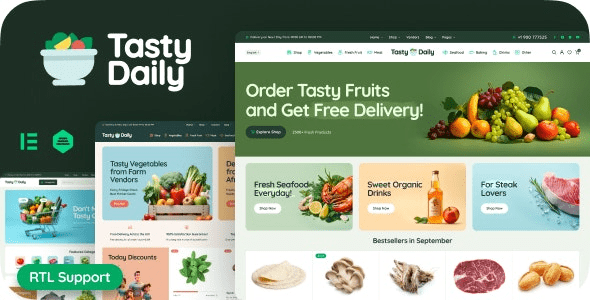
Tasty Daily WordPress Theme: A Complete Solution for Grocery Stores and Food E-commerce
Tasty Daily is a WordPress theme designed specifically for grocery stores, food shops, and fresh food e-commerce, with the current version being v1.21.1. It combines visual appeal with WooCommerce's powerful e-commerce capabilities, helping you quickly build an attractive and functional food sales platform online. Whether you sell fresh produce, baked goods, snacks and beverages, or regional specialties, Tasty Daily provides page layouts and shopping experiences tailored to industry needs.
With deep WooCommerce integration, you can manage inventory, process orders, and configure payment methods directly from the WordPress dashboard without additional development. The theme's responsive design ensures customers can browse and place orders smoothly on mobile phones, tablets, and computers—especially important for food e-commerce, as many users prefer to complete purchases quickly on mobile devices.
Key Features of the Tasty Daily Theme
Page Templates Designed for Food and Grocery Scenarios
Tasty Daily includes multiple page templates related to food sales, including product category displays, promotional sections, recipe content pages, and brand story pages. These templates are not simply recolored versions of generic e-commerce themes—they are optimized for the visual habits of the food industry, such as showcasing ingredient details with large images and highlighting freshness and origin information.
Full Compatibility with WooCommerce E-commerce Features
The theme works seamlessly with the WooCommerce plugin, supporting variable products, grouped products, inventory management, coupons, shipping calculations, and multiple payment gateways. You can complete the entire process from listing products to shipping orders in a single dashboard. For foods that need to be sold by weight or quantity, WooCommerce's extensibility can also meet your needs.
Responsive Design and Performance Optimization
Tasty Daily uses a responsive layout that automatically adjusts navigation, product grids, and checkout flows on mobile devices. The theme code is lightweight, and combined with caching plugins, it can maintain fast loading speeds. If you're looking for more similar WordPress theme resources, you can visit BoboHello Resource Site to browse related categories.
How to Install and Configure the Tasty Daily Theme
The installation process for Tasty Daily is the same as for regular WordPress themes: upload the theme zip file in the dashboard under "Appearance → Themes → Upload Theme," activate it, and follow the prompts to install recommended plugins (typically including WooCommerce and the theme's bundled page builder plugin). Then import the demo content to quickly get a page structure similar to the official preview, and replace it with your own brand images and copy.
During configuration, it's recommended to first set up WooCommerce's basic options, such as currency, shipping zones, and tax rules, and then adjust the theme's color scheme, fonts, and homepage modules. The theme options panel typically provides settings for logo upload, header and footer styles, product card styles, and more. Please refer to the version you have installed for specific options.
If you need to reference the latest official documentation and changelog, you can check the Tasty Daily official page, where version changes and technical support information are provided.
Use Cases and Recommendations for Tasty Daily
Tasty Daily is suitable for small and medium-sized food e-commerce businesses, local fresh food delivery services, baking studios, specialty stores, and online shops for restaurant brands. It can also be used for content-based food blogs, selling recipe e-books or ingredient kits through WooCommerce. For multilingual sites, the theme itself supports translation files, and you can use multilingual plugins to create a Chinese version or localized versions in other languages.
During use, it's recommended to regularly update the theme and WooCommerce plugin to get security patches and new features. If you encounter compatibility issues with third-party plugins, you can troubleshoot in a testing environment first or contact the theme author for support. Please refer to the official documentation for details.
Frequently Asked Questions
How do I install the Tasty Daily theme?
Go to "Appearance → Themes → Upload Theme" in the WordPress dashboard, select the theme zip file to upload, and activate it. After activation, install the required plugins as prompted, then import the demo content to quickly set up your pages.
Does Tasty Daily require WooCommerce?
The theme's core features are built around WooCommerce. To use product displays, shopping cart, and checkout features, you need to install and activate the WooCommerce plugin. If you're only using it for content display, you can skip WooCommerce, but you'll lose the e-commerce-related modules.
Does Tasty Daily support mobile devices?
Yes. The theme uses a responsive design that automatically adapts to phone and tablet screens, ensuring customers can browse products and complete orders normally on mobile devices.
How often is the theme updated?
Update frequency depends on the theme author's release schedule, typically following up with compatibility fixes after major WordPress or WooCommerce updates. Please refer to the official documentation or theme page for specific update records.
Can it be used for a multilingual food store?
The theme includes translation files and can be used with multilingual plugins such as WPML or Polylang. Chinese or localized versions can be implemented through translation files or plugins. Please refer to the official documentation for specific configuration.


Comments (0)