
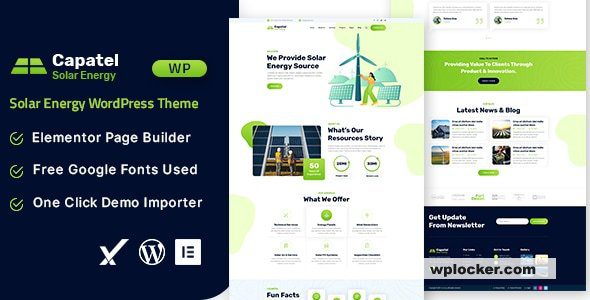
Solar Sites: Answer the Payback Period First
People who install solar come to a website for one purpose: to figure out how long it takes to save their money back. A page full of "green future" and "carbon neutrality" won't convert a single cent. The Capatel solar WordPress theme only delivers value when its content is organized around this calculation. This article lays out a complete site-building approach, from visitor segmentation and calculation tools to case showcases and performance optimization.
Three Types of Visitors, Three Kinds of Questions
Homeowners ask, "How big a system can my roof hold, and how many years until payback?" Factories and businesses ask, "Can it cover our daytime electricity use, and do we need battery storage?" Distributors ask, "Do you do wholesale, and what are the payment terms?" These three groups land on the same site but need different paths, so the page must have segmentation entry points. We recommend placing three card entries below the hero section, pointing to residential solutions, commercial and industrial solutions, and channel partnership pages respectively, so visitors can find their answer in one step.
Put the Calculator Front and Center
The payback calculator is the core conversion tool for a solar site, and the Capatel theme's page structure suits placing it prominently in the hero or second screen. Keep the following in mind when designing it:
- Don't overdo the input fields. Roof area or monthly electricity bill, region, and roof type—three or four fields are enough for a rough estimate.
- Give output as ranges. Power generation, annual savings, and payback period should be ranges rather than precise figures to avoid making promises.
- State your assumptions. Spell out sunlight hours, annual electricity price increases, and system degradation rates so customers know how the estimate was derived.
- Make results portable. Let users leave contact details or download a one-page proposal after calculating; otherwise, once they close the page, they're gone for good.
If you're still choosing a theme, you can refer to the business site theme comparisons on the WordPress theme resource site; Capatel performs well in interactive components and layout flexibility.
Case Studies and Credentials
Solar is a classic "look at your neighbor" business. Cases categorized by installed capacity, roof type, and region, paired with grid-connection dates and first-year generation data, are more persuasive than a pile of retouched renderings. Credentials and warranty terms deserve their own page: construction qualifications, warranty periods for modules and inverters, and O&M response times—these three are what customers check before signing.
Be cautious with policy subsidies. Grid-connection and subsidy rules change frequently across regions, so state on the page that "the latest local policies prevail" and provide a lookup entry point; don't hang a particular year's subsidy rate as a long-term promise.
Layout and Performance
New energy themes tend to favor full-panorama images and dark backgrounds, which look professional but easily get out of hand in file size. Use one compressed banner in the hero and lazy-load the rest; defer interactive components like the calculator so they don't block first-screen rendering. The Capatel theme itself supports image lazy loading—enable the relevant option in the theme settings and pair it with a caching plugin.
For Capatel's specific number of demo sets, built-in components, and whether it includes a calculation module, refer to the official demo site and documentation; this site won't list them one by one. After installation, first confirm the demo import is complete, then replace the sample solar plants with your own real projects. To view the official documentation, visit the Capatel official page (please refer to the official documentation for details).
Installation and Notes
The theme follows the standard WordPress installation process, and the package generally includes a child theme—make your changes in the child theme. Before going live, test the contact form's receiving email; inquiry volume on these sites depends directly on whether the form delivers.
There's one more easily overlooked page: O&M. Installation isn't the end—cleaning, inspections, and fault response are the long-term experience. Clearly stating what O&M includes, how often it happens, and how quickly someone comes out when there's a problem can noticeably reduce hesitation before signing. We recommend creating an "O&M Services" page template in the theme and displaying the service contents with an icon list.
FAQ
How do I install the Capatel theme?
In the WordPress admin, go to "Appearance - Themes - Add New Theme," upload the theme zip file, activate it, then follow the prompts to install recommended plugins and import the demo content. Please refer to the official documentation for detailed steps.
What types of websites is Capatel suitable for?
It suits official websites for solar, photovoltaic engineering, and new energy companies, and can also be used for showcasing residential and commercial/industrial solar solutions, case introductions, and online estimates.
Is the Capatel theme compatible with the latest version of WordPress?
The theme generally updates alongside WordPress versions. Before use, check the official compatibility notes and verify in a testing environment.
How often is the Capatel theme updated?
Update frequency is subject to official releases; please refer to the official documentation or changelog for details.


Comments (0)