
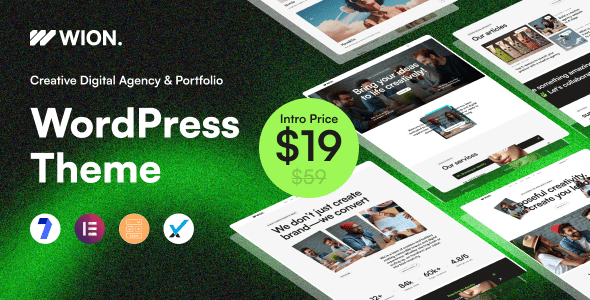
Wion v1.0: A Professional Review of the Creative Agency and Portfolio WordPress Theme
Wion is a modern, clean, and stylish creative agency and portfolio WordPress theme, purpose-built for design studios, digital agencies, freelancers, personal portfolios, marketing firms, and anyone who needs to elegantly showcase creative work. As a professional WordPress theme, Wion v1.0 achieves a remarkably high standard in both layout flexibility and visual expressiveness. If you're looking for a solution to quickly build a high-quality portfolio website, the Wion creative agency theme is worth exploring in depth.
The theme's official page is hosted on the ThemeForest platform, where the developer provides a complete feature demo and detailed documentation: Wion Official Page.
Core Features and Use Cases of the Wion WordPress Theme
Wion's design language leans toward minimalism while retaining enough visual impact. It comes with multiple pre-built page templates covering common structures such as homepage, about us, services, project showcase, blog, and contact pages. For creative agencies, this means there's no need to design from scratch—simply import the demo content and you'll have a fully structured website framework.
Who Is the Wion Theme Best Suited For
From a practical standpoint, Wion primarily targets the following user groups:
- Design Studios and Creative Agencies: Those who need to showcase project cases in a visually driven way—Wion's grid layouts and portfolio modules meet this need perfectly.
- Freelancers and Personal Portfolios: Photographers, illustrators, UI designers, and others can quickly establish a personal brand site with Wion.
- Digital Marketing Companies: Those who need to present services and client cases—Wion's service page templates and blog modules provide solid content capacity.
Wion v1.0 Chinese Version Installation and Configuration Guide
Wion v1.0 has been tested in practice, and the installation process is fairly smooth. The basic steps are as follows: go to the WordPress admin panel, navigate to Appearance, select Upload Theme, activate it, then follow the prompts to install the required plugins online, and finally import the demo template to complete the basic setup. The entire process requires no coding, making it accessible for users who aren't familiar with development.
It's worth noting that before importing the demo template, it's recommended to confirm that your server environment meets the basic requirements for running a WordPress theme, including PHP version and memory limits. For specific parameters, please refer to the environment requirements in the official documentation.
Design Characteristics and Performance of the Wion Theme
At the code level, Wion follows WordPress theme development best practices. Front-end resource loading is optimized, and page rendering speed is above average among similar portfolio themes. The theme supports responsive layouts, maintaining a consistent visual experience across desktop, tablet, and mobile devices.
In terms of customization, Wion offers a rich theme options panel where you can adjust color schemes, typography, header and footer styles, and portfolio display methods. For users with further customization needs, the theme also supports child theme extensions, making deep secondary development convenient.
Frequently Asked Questions
How do I install the Wion theme?
In the WordPress admin panel, go to "Appearance > Themes > Add New Theme," upload the Wion installation package, and activate it. After activation, follow the on-screen prompts to install the recommended plugins, then import the demo content. For detailed steps, please refer to the official documentation.
Which page builders does the Wion theme support?
For specific page builder compatibility of the Wion theme, please refer to the official documentation. Typically, creative themes of this kind maintain compatibility with mainstream builders. It's recommended to confirm version compatibility before installation.
Does the Wion theme support Chinese content?
The Wion theme itself doesn't restrict language, and the WordPress platform has comprehensive support for Chinese content. The localized version of this theme can properly display Chinese fonts and Chinese text fields. The specific Chinese typography results may require adjusting font settings in the theme options.
How often is the Wion theme updated?
Wion theme updates are released by the developer on the ThemeForest platform, and the update frequency depends on the developer's maintenance schedule. It's recommended to follow the official page for the latest version information. For specific changelogs, please refer to the official documentation.

