
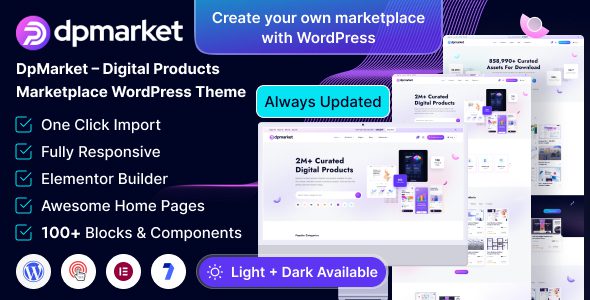
Welcome to DpMarket, the ultimate WordPress theme designed specifically for digital product marketplaces. Built on the powerful Elementor page builder, DpMarket offers a seamless and intuitive experience for creating professional online marketplaces for digital products like eBooks, software, graphics, and music. As a professional digital marketplace multi-vendor WooCommerce theme, DpMarket v1.0.1 integrates multi-vendor functionality, allowing you to easily build a multi-seller platform similar to Envato. Whether you are a startup or an established business, this theme helps you quickly launch your digital product sales operations.
Official link: DpMarket Theme Official Page
Core Features and Advantages of the DpMarket Theme
The DpMarket theme is tailored for digital marketplaces, offering a rich set of features to meet multi-vendor needs. It is fully compatible with WooCommerce, supporting digital product downloads, seller management, commission systems, and more. Additionally, the theme integrates Elementor, allowing you to customize page layouts through drag-and-drop without writing code.
Multi-Vendor Marketplace Features
DpMarket comes with built-in multi-vendor support, enabling sellers to independently upload products, manage orders, and view sales reports. Administrators can set commission rates, review products, and control the entire marketplace. This architecture is ideal for creating digital product aggregation platforms.
Digital Product-Specific Design
The theme provides various page templates tailored for digital products, including product listing pages, detail pages, download pages, and seller store pages. The design is modern and responsive, ensuring excellent performance on mobile devices.
How to Install and Configure the DpMarket Theme
Installing the DpMarket theme is straightforward. First, upload the theme file and activate it. Then, install and activate the required plugins, such as Elementor and WooCommerce. Next, import demo content to get started quickly. Finally, adjust settings as needed to begin operating your digital marketplace.
Detailed Installation Steps
1. In the WordPress admin panel, go to "Appearance" > "Themes," click "Add New Theme," upload the DpMarket theme zip file, and activate it.
2. The system will prompt you to install necessary plugins. Follow the prompts to install and activate all recommended plugins.
3. In the theme settings, choose to import demo data. Select a demo template suitable for your marketplace and import it with one click to get a complete page layout.
4. Configure WooCommerce settings, including payment gateways, shipping methods (digital products typically require no shipping), and tax options.
If you encounter issues during installation, refer to the official documentation or the theme's built-in help files. Additionally, you can find more WordPress theme tutorials at related resource sites.
Use Cases for DpMarket
The DpMarket theme is suitable for various digital marketplace scenarios:
- eBook marketplace: Authors and publishers can sell eBooks in PDF and EPUB formats.
- Software marketplace: Developers can distribute applications, plugins, and scripts.
- Graphic design marketplace: Designers can sell templates, icons, fonts, and more.
- Music and audio marketplace: Musicians can sell songs, sound effects, and sample packs.
No matter which field you focus on, DpMarket provides a professional multi-vendor solution.
Frequently Asked Questions
Does the DpMarket theme support multiple languages?
Yes, the DpMarket theme is compatible with multilingual plugins like WPML and Polylang, allowing you to easily create a multilingual marketplace. For specific configuration methods, please refer to the official documentation.
How often is the DpMarket theme updated?
The theme author releases regular updates to fix bugs, add new features, and ensure compatibility with the latest WordPress version. It is recommended to keep the theme and plugins up to date.
Is the DpMarket theme compatible with other plugins?
DpMarket is built on WooCommerce and Elementor and is compatible with most mainstream WordPress plugins. However, for optimal performance, it is recommended to use the plugins suggested by the theme.
How do I set commissions for sellers?
In the theme settings, you can find multi-vendor options to set different commission rates for individual sellers or product categories. Please refer to the theme documentation for details.
What payment methods does the DpMarket theme support?
Through WooCommerce, you can integrate various payment gateways such as PayPal, Stripe, Alipay, and more. Digital products typically use instant payment methods.


Comments (0)