
What is Fluent Board Pro? An In-Depth Look at the Project Management WordPress Plugin
Fluent Board Pro is a professional project management plugin built specifically for the WordPress platform. The current version 2.0.15 delivers more stable performance and a more polished feature experience. Whether you're a freelancer, a small team, or a medium-to-large enterprise, this plugin lets you handle the entire workflow—from task assignment to progress tracking—right from the familiar WordPress dashboard, eliminating the hassle of switching back and forth between multiple tools.
Unlike other project management tools on the market, Fluent Board Pro is deeply integrated into the WordPress ecosystem, supporting unlimited projects, unlimited boards, and unlimited assignees without charging extra as your team grows. For users already using Fluent Forms or FluentCRM, it offers seamless connectivity—turning form submissions directly into task cards and linking CRM contacts to specific projects, creating a truly closed-loop workflow.
Key Features of Fluent Board Pro
Kanban View and Drag-and-Drop Task Management
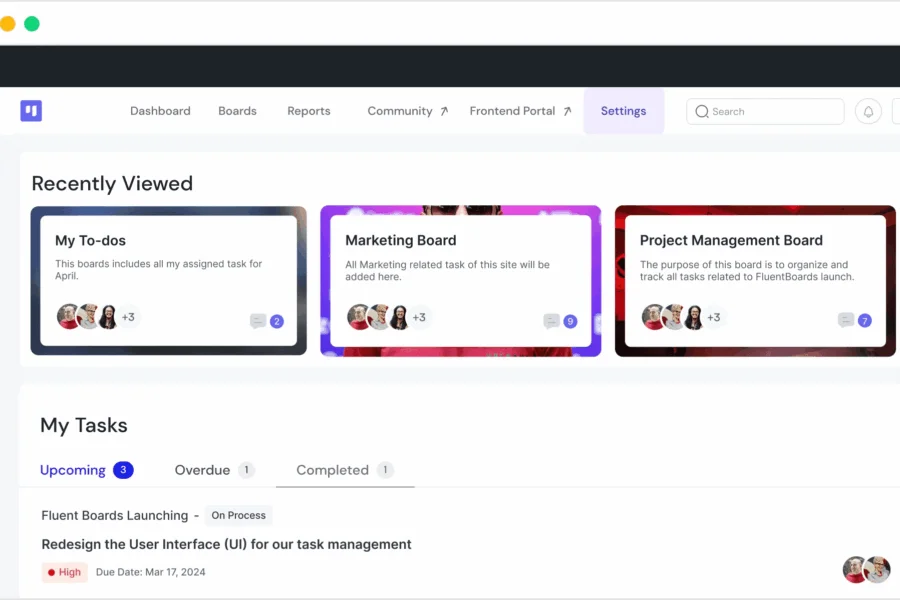
Fluent Board Pro uses a classic Kanban layout, allowing you to create multiple boards to separate different projects or clients. Each board supports multi-stage workflows, and task cards can be freely dragged and dropped between stages to reflect project progress in real time. Color-coded labels, custom covers, and backgrounds make the entire interface clear and intuitive, so team members can identify priorities and task types at a glance.
Unlimited Assignees and Templated Project Launch
Many project management tools impose limits on the number of assignees, but Fluent Board Pro allows an unlimited number of assignees to participate in projects without affecting pricing. You can also save commonly used project workflows as templates and reuse them with one click when starting a new project, significantly reducing the time cost of repetitive setup.
CRM Integration and Automated Workflows
Fluent Board Pro integrates deeply with FluentCRM. You can add CRM contacts directly to any task and run automated workflows through FluentCRM triggers. For example, automatically send an email notification to a client when a task status changes to "Completed," or automatically create a follow-up task when a new contact is added. Additionally, the plugin supports converting Trello boards into FluentBoard boards, making migration from other tools easy.
Frontend Portal and Fluent Forms Integration
With the frontend portal feature, you can display boards on your website's front end, allowing clients and team members to view and manage tasks without logging into the WordPress dashboard. Combined with Fluent Forms, you can create project requirement collection forms that automatically convert submissions into tasks in FluentBoards, reducing manual data entry.
Use Cases for Fluent Board Pro 2.0.15
This plugin suits a variety of business scenarios: design teams can use it to manage client draft progress; development teams can use it to track feature development and bug fixes; marketing teams can use it to plan content calendars and campaign execution; consulting firms can use it to manage client projects and deliverables. Since data is stored on your own WordPress site, you retain full control over security and privacy—more reassuring than using third-party SaaS tools.
If you're looking for a WordPress-native project management solution to replace Trello, Asana, or Monday, Fluent Board Pro is worth serious consideration. It simplifies task management, reduces administrative complexity, and enhances the security of your project data.
Frequently Asked Questions
How do I install Fluent Board Pro?
In the WordPress dashboard, go to "Plugins" -> "Add New" -> "Upload Plugin," select the Fluent Board Pro installation package, upload it, and activate it. After activation, follow the guided setup to complete the basic configuration. For details, please refer to the official documentation.
What use cases does Fluent Board Pro support?
It is suitable for task management, project progress tracking, client collaboration, content planning, and more. It supports Kanban views, multi-stage workflows, frontend portal display, and can be integrated with FluentCRM and Fluent Forms for automation.
Is Fluent Board Pro compatible with other WordPress plugins?
Fluent Board Pro has native integration with the Fluent product line (Fluent Forms, FluentCRM) and is compatible with most mainstream WordPress themes and plugins. If conflicts arise, it's recommended to troubleshoot in a staging environment. For details, please refer to the official documentation.
How often is Fluent Board Pro updated?
Fluent Board Pro is continuously maintained by the Fluent team and typically releases new versions in line with WordPress updates and security requirements. The current version is 2.0.15. It's recommended to keep the latest version for the best experience and security.
Does Fluent Board Pro support unlimited projects and tasks?
Yes, Fluent Board Pro allows you to manage an unlimited number of projects and tasks from the WordPress dashboard, along with unlimited boards and unlimited assignees, without additional costs as you scale.

