
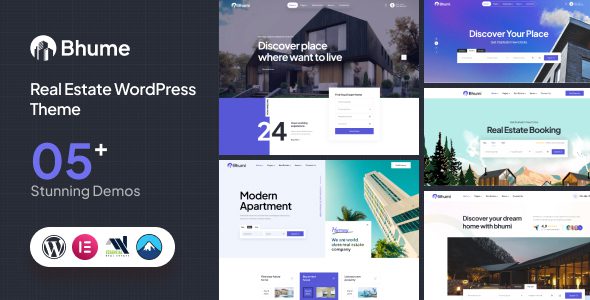
Bhume WordPress Theme: A Professional Solution for Real Estate Websites
If you're looking for a WordPress theme that perfectly showcases property listings, agent information, and client inquiries, the Bhume WordPress theme deserves your attention. This theme is purpose-built for real estate businesses, agencies, and property listings, blending modern design language with highly customizable features. Whether you're a small real estate agency or a large property platform, Bhume makes managing property listings, agent profiles, and client inquiries effortless and efficient through its user-friendly admin interface.
Key Features of the Bhume Theme
Advanced Search and Property Comparison
Bhume comes with built-in advanced search filters, allowing visitors to quickly narrow down their ideal properties by price, area, number of rooms, location, and more. The property comparison feature lets users view multiple properties side by side and intuitively compare various parameters, greatly improving decision-making efficiency. For real estate websites, this kind of interactive experience can significantly reduce bounce rates and boost conversion rates.
Rich Property Detail Page Displays
Each property detail page supports image galleries, floor plans, and map embeds, giving visitors a comprehensive view of property information. The theme offers three property listing styles—grid, list, and slider—so you can freely switch between display formats based on your brand identity. This flexibility means that whether it's a luxury estate or a budget apartment, you'll find the right presentation format.
Why Choose the Bhume WordPress Theme?
Compared to other real estate themes on the market, Bhume pays more attention to detail. The theme's code follows WordPress best practices, is optimized for loading speed, and is SEO-friendly. It's also compatible with mainstream page builders, making it easy to customize layouts without touching code. If you want to further extend your website's functionality, you can refer to the WordPress resources and tutorials on bobohello.com for more website-building inspiration.
The official page provides complete demos and documentation support. You can visit the Bhume official page to view the detailed feature list and changelog.
Frequently Asked Questions
How do I install the Bhume theme?
In your WordPress admin, go to "Appearance - Themes - Add New Theme" and upload the Bhume theme ZIP file to complete the installation. After installation, follow the prompts to install the recommended plugins to enable all features.
What use cases is Bhume suitable for?
Bhume is suitable for real estate agency websites, property rental platforms, developer project showcase pages, and individual real estate agent homepages. Its flexible listing styles and search filters can adapt to various business models.
Which plugins is the Bhume theme compatible with?
Bhume is compatible with mainstream page builders such as Elementor and WPBakery, and also supports form plugins like Contact Form 7. Please refer to the official documentation for the specific compatibility list.
How often is the Bhume theme updated?
The theme author releases updates regularly to fix known issues and add new features. It's recommended to enable automatic update notifications in your WordPress admin, or follow the official page for the latest version information.


Comments (0)