
What is the Registration & Login with Mobile Phone Number Plugin?
Registration & Login with Mobile Phone Number is a WordPress plugin designed specifically for WooCommerce stores, developed by FmeAddons. It allows customers to register and log in using their mobile phone number and OTP verification code, without needing to remember usernames and passwords. For mobile shoppers, this approach significantly lowers the registration barrier, helping to improve conversion rates and repeat purchase rates.
The latest version of this plugin is v1.3.9, compatible with mainstream WordPress themes and WooCommerce versions. Verifying identity through SMS verification codes simplifies the process while enhancing account security. If you are running an e-commerce site targeting mobile users, this plugin is worth considering.
The official page provides detailed feature descriptions and a demo: Registration & Login with Mobile Phone Number.
Core Features and Benefits
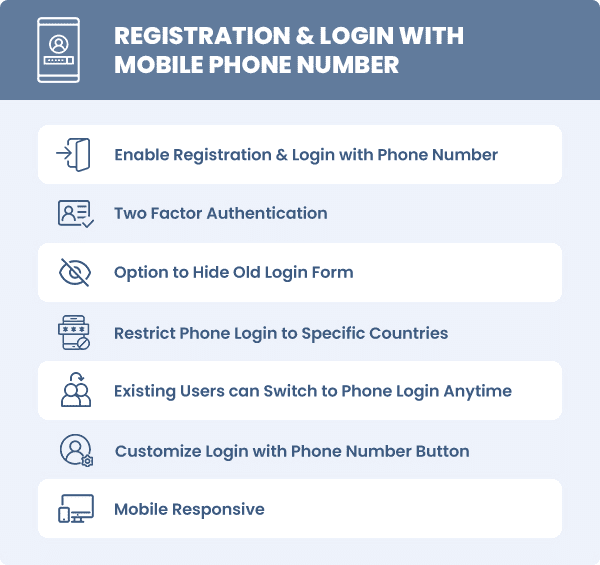
This plugin builds a complete identity verification system around mobile phone numbers. Its main features include:
- Mobile Phone Registration: Users only need to enter their mobile phone number and verify via OTP SMS to create an account.
- Mobile Phone Login: Registered users can log in directly with their phone number + verification code, without entering a password.
- OTP Verification: Integrates with SMS gateways to send one-time verification codes, effectively preventing malicious registrations.
- Seamless Integration with WooCommerce: Automatically adds mobile phone fields to checkout, My Account, and other pages.
- User Role Management: User roles can be assigned based on mobile phone verification status.
Compared to traditional email registration, mobile phone registration better aligns with the usage habits of mobile internet users, especially suitable for e-commerce sites targeting domestic or Southeast Asian markets. If you want to further optimize the user experience of your WordPress site, you can refer to related tutorials and resources on bobohello.com.
Installation and Configuration Tutorial
Installation Steps
- In the WordPress admin panel, go to "Plugins" -> "Add New", upload the plugin ZIP package and activate it.
- After activation, a "Mobile Phone Registration Login" option will appear in WooCommerce settings.
- Configure the SMS gateway API (such as Twilio, Alibaba Cloud SMS, etc.) as prompted, and set the verification code validity period and length.
- Enable the mobile phone field on the "Registration" and "Login" pages, and save the settings.
Note: Version v1.3.2 has been personally tested and works. Simply install and activate it. It is recommended to verify the SMS sending functionality on a test site before deploying to a production environment.
Use Cases
This plugin is suitable for various e-commerce scenarios: quick registration for new users, password-free login for existing users, reducing registration drop-off during promotional campaigns, and high-value transactions requiring mobile phone verification. By simplifying the login process, it can effectively reduce shopping cart abandonment rates.
Compatibility and Update Frequency
The plugin is compatible with WordPress 5.0+ and WooCommerce 4.0+, and supports multisite networks. The development team FmeAddons regularly releases updates to fix vulnerabilities and add new features. It is recommended to enable automatic updates or regularly check the changelog to ensure security and stability.
Frequently Asked Questions
How do I install the Registration & Login with Mobile Phone Number plugin?
In the WordPress admin panel, click "Plugins" -> "Add New" -> "Upload Plugin", select the downloaded ZIP file, install and activate it. Then configure the SMS gateway in WooCommerce settings.
Which SMS service providers does the plugin support?
The plugin supports mainstream providers such as Twilio, Nexmo, Alibaba Cloud SMS, and Tencent Cloud SMS. Please refer to the official documentation for specific configuration methods.
Is it compatible with the latest WordPress and WooCommerce versions?
The plugin is continuously updated and is currently compatible with WordPress 6.x and WooCommerce 8.x. It is recommended to use the latest version for the best compatibility.
How frequent are the updates?
FmeAddons typically releases a feature update or security patch quarterly. The specific changelog can be viewed on the official page.

