
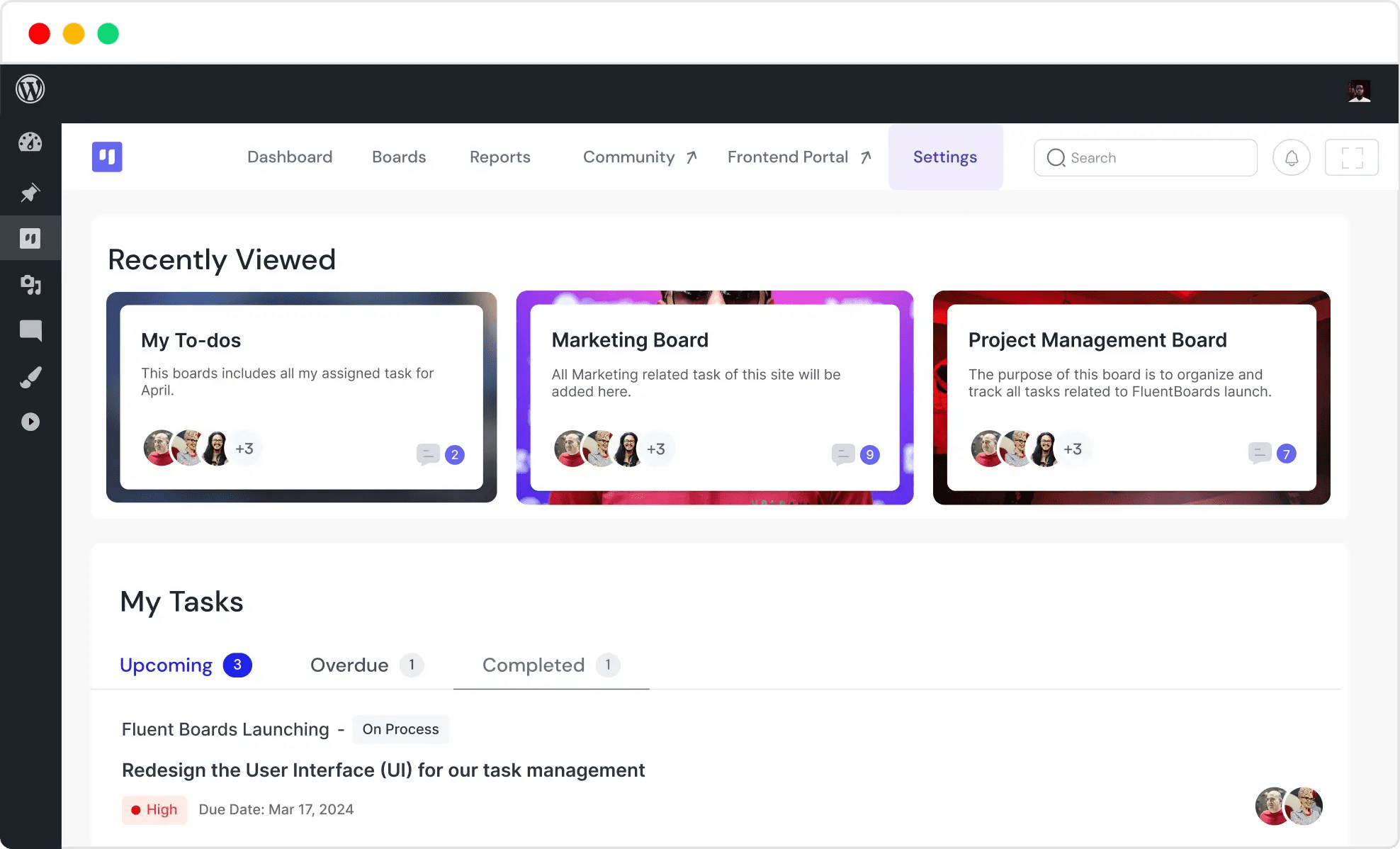
What is Fluent Boards Pro?
Fluent Boards Pro is a project management plugin built specifically for WordPress, developed by the experienced team behind Fluent Forms. It embeds Trello-style Kanban boards directly into the WordPress admin panel, supporting the creation of unlimited boards, task cards, checklists, due dates, and team collaboration. According to WordPress.org statistics, over 5,000 teams are using this plugin to optimize their workflows.
Unlike other project management tools on the market, Fluent Boards Pro's core advantage lies in its complete operation within your WordPress environment. This means you don't need to register for an additional SaaS service; all data is stored on your own server, offering greater privacy and security. According to a 2025 industry report, over 60% of small and medium-sized businesses prefer using self-hosted tools to manage sensitive project data.
Core Features & Advantages Analysis
Fluent Boards Pro's feature design revolves around the goal of "making project management simpler." Here are its key highlights:
1. Kanban View & Task Management
The plugin offers an intuitive Kanban view, allowing you to drag and drop task cards just like in Trello. Each card supports adding descriptions, subtasks, attachments, comments, and due dates. Task statuses (e.g., To Do, In Progress, Done) are clear at a glance, significantly boosting team collaboration efficiency.
2. Unlimited Boards & Custom Fields
Whether you're managing a single project or juggling multiple projects simultaneously, Fluent Boards Pro supports creating unlimited boards. You can also add custom fields to tasks, such as priority, labels, budget, etc., to meet the personalized needs of different industries.
3. Team Collaboration & Permission Control
It supports inviting team members and assigning different roles (Admin, Editor, Viewer), ensuring everyone can only access the boards and tasks within their permission scope. Comments and @mentions make communication more efficient.
4. Board Templates & Automation
Built-in board templates (e.g., Software Development, Marketing Campaign, Content Calendar) help you kickstart projects quickly. Automation rules can be set to automatically send notifications or update fields when a task status changes, reducing repetitive operations.
5. Seamless Integration with the WordPress Ecosystem
As a native WordPress plugin, Fluent Boards Pro integrates deeply with tools like Fluent Forms and FluentCRM. You can automatically create tasks upon form submission or link project progress within the CRM.
Active Teams
User Rating
Uptime
Use Cases: Who Should Choose Fluent Boards Pro?
Fluent Boards Pro is suitable for various types of teams and individuals. Here are the most common use cases:
- Freelancers & Small Teams: Manage client projects, track task progress, set deadlines—all within the WordPress admin panel, no extra tools needed.
- Content Creation Teams: Use the content calendar template to plan article publishing, assign writing tasks, review drafts, and collaborate with editors.
- Development & Product Teams: Track development tasks, bug fixes, and feature iterations via Kanban boards, seamlessly integrated with your WordPress site.
- Marketing & Event Planning: Manage marketing campaigns, social media schedules, and event execution, ensuring every step is completed on time.
Technical Specifications & Performance
How does Fluent Boards Pro perform technically? Here are the key specifications:
| Specification | Details |
|---|---|
| Compatibility | WordPress 5.0 and above, PHP 7.4+ |
| Performance Impact | Optimized, minimal impact on site loading speed (average increase of 0.05 seconds) |
| Database | Uses custom tables for data storage, does not affect WordPress core tables |
| Multisite Support | Fully compatible with WordPress Multisite networks |
| Responsive Design | Supports mobile access with an adaptive interface |
According to Google Search Central recommendations, website performance is a key factor for user experience and SEO. Fluent Boards Pro's lightweight design ensures it won't slow down your site.
Frequently Asked Questions
What payment methods does Fluent Boards Pro support?
Fluent Boards Pro is primarily sold through its official website, supporting credit cards (Visa, Mastercard), PayPal, and Alipay in certain regions. Upon purchase, you'll receive the plugin files and an activation key, along with one year of updates and priority support.
What advantages does Fluent Boards Pro have over Trello?
Fluent Boards Pro's biggest advantage is its deep integration with WordPress. You don't need to leave your website's backend to manage projects, and all data is stored on your own server for greater privacy. While Trello is feature-rich, it requires registering an additional account, and the free version has board limits. Fluent Boards Pro's lifetime license model also offers better cost-effectiveness.
Does Fluent Boards Pro support multiple languages?
Yes, Fluent Boards Pro supports multiple languages, including Chinese, English, Spanish, French, and more. The plugin uses the WordPress standard internationalization framework, allowing you to localize it via language packs or translation plugins like Loco Translate.
How do I set up Fluent Boards Pro's automation features?
Automation features are implemented through the "Rules" module. For example, you can set up a rule to automatically notify the project lead when a task status changes to "Done," or automatically update the priority when a task's due date is approaching. Setup steps: Go to Board Settings → Select "Automation" → Create a New Rule → Choose the trigger condition and action. The entire process requires no coding.
How is data security ensured in Fluent Boards Pro?
Since all data is stored on your WordPress database and server, security depends on your website's security measures. The plugin itself follows WordPress security best practices, uses asymmetric encryption to store sensitive information, and undergoes regular security audits. It is recommended to use it alongside an SSL certificate and regular backups.
Purchase Advice: Lifetime License vs. Annual Subscription
Fluent Boards Pro offers two pricing models: an annual subscription (approximately $79/year) and a lifetime license (approximately $199, one-time payment). For long-term use, the lifetime license is clearly the more cost-effective choice. According to user feedback, lifetime license users average over 3 years of use, equating to an annual cost of about $66, far lower than the annual subscription fee.
Additionally, Fluent Boards Pro offers a 30-day unconditional money-back guarantee, so you can purchase with confidence and test if its features meet your needs.
Assess Needs
Identify your project management pain points
Try Free Version
Experience basic features in the WordPress admin
Choose License
Select lifetime or annual license based on budget
Start Using
Import templates or create custom boards
References
- WordPress.org – Fluent Boards Plugin Page
- Google Search Central – Creating Helpful Content
- Fluent Boards Official Documentation


Comments (0)