
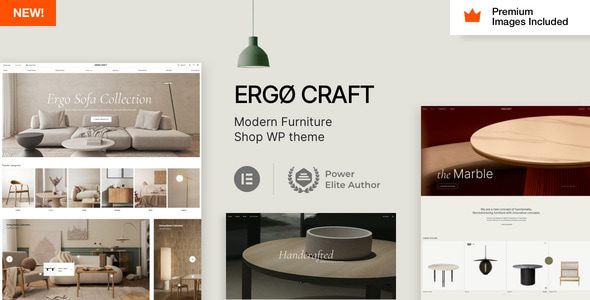
ErgoCraft Furniture Store WordPress Theme: Build a Modern Furniture E-Commerce Website
Welcome to ErgoCraft, a modern WordPress theme designed specifically for furniture stores and furniture manufacturers. Whether you run a physical furniture store or want to expand your business online, ErgoCraft provides a powerful website-building solution. With deep integration of WooCommerce and the Elementor Pro page builder, you can easily create a professional and attractive online store without any coding knowledge.
This article provides a detailed introduction to ErgoCraft, installation tutorials, and frequently asked questions to help you get started quickly and build an impressive furniture e-commerce website.
Core Features and Advantages of the ErgoCraft Theme
ErgoCraft is more than just a theme—it's a complete furniture e-commerce solution. Its core advantages include:
- Fully WooCommerce Compatible: Seamlessly integrates with the WooCommerce plugin, supporting complete e-commerce features such as product display, shopping cart, and checkout.
- Elementor Pro Integration: With the drag-and-drop page builder, you can freely design page layouts and achieve personalized visual effects.
- Modern Furniture Design Style: The theme includes multiple stylish homepage templates and inner page styles, suitable for modern, minimalist, Nordic, and other furniture brand aesthetics.
- Responsive Layout: Automatically adapts to desktop, tablet, and mobile devices, ensuring a smooth browsing experience for users on any device.
- SEO Optimized: Clean code structure and fast loading speeds help improve search engine rankings.
Additionally, ErgoCraft offers a comprehensive theme options panel, allowing you to adjust colors, fonts, layouts, and other details to create a unique brand identity.
How to Install and Configure the ErgoCraft Theme
Installing the ErgoCraft theme is very simple, even for WordPress beginners. Here are the detailed steps:
- Upload the Theme: In the WordPress admin panel, go to "Appearance" → "Themes" → "Add New Theme," click the "Upload Theme" button, select the ErgoCraft ZIP file, and upload it.
- Activate the Theme: After the upload is complete, click the "Activate" button to enable ErgoCraft.
- Install Required Plugins: After activation, the system will prompt you to install necessary plugins such as WooCommerce and Elementor Pro. Follow the prompts to complete installation and activation.
- Import Demo Data: In the theme options, find the "Import Demo" feature, choose your preferred demo template, and import it with one click. This will give your website the same pages and settings as the demo site.
- Customize Settings: Use Elementor or the theme options panel to adjust your website's fonts, colors, layouts, and more to match your brand image.
If you encounter any issues during installation, you can refer to the WordPress Theme Installation Tutorial for more assistance.
What Scenarios Is the ErgoCraft Theme Suitable For
ErgoCraft is specifically designed for the furniture industry and is suitable for multiple scenarios:
- Furniture E-Commerce Websites: Display and sell various furniture products such as sofas, beds, dining tables, and chairs.
- Furniture Manufacturer Websites: Showcase company strengths, product lines, and production capabilities to attract B2B clients.
- Interior Design Companies: Display design portfolios, service projects, and team introductions to enhance professional credibility.
- Home Goods Retailers: In addition to furniture, sell lighting, decor, and other home accessories.
ErgoCraft Theme Compatibility and Updates
ErgoCraft is highly compatible with mainstream WordPress plugins and browsers, including Chrome, Firefox, Safari, and Edge. It supports the latest WordPress version and is regularly updated to fix bugs and add new features. We recommend keeping the theme and plugins up to date to ensure optimal performance and security.
Regarding update frequency, ErgoCraft typically releases updates once a month, but please refer to the official documentation for specifics. If you obtained the theme through third-party channels, you may not receive automatic update notifications, so please regularly visit the official page to check for new versions.
Frequently Asked Questions
How do I install the ErgoCraft theme?
Installing the ErgoCraft theme is similar to installing other WordPress themes: upload the theme ZIP file in the admin panel, activate it, install the required plugins as prompted, and import the demo data. For detailed steps, please refer to the "How to Install and Configure the ErgoCraft Theme" section of this article.
What types of websites is ErgoCraft suitable for?
ErgoCraft is specifically designed for furniture stores, furniture manufacturers, interior design companies, and home goods retailers—ideal for any website that needs to display and sell furniture products.
Is ErgoCraft compatible with Elementor?
Yes, ErgoCraft is fully compatible with Elementor Pro. You can use Elementor's drag-and-drop editor to easily customize page layouts.
How often is ErgoCraft updated?
ErgoCraft typically updates once a month, but the frequency may vary depending on the version. We recommend checking the official changelog or regularly checking for update notifications in the theme settings.
Does ErgoCraft support WooCommerce?
Yes, ErgoCraft is deeply integrated with WooCommerce, supporting complete e-commerce features including product management, shopping cart, payment, and shipping.

