
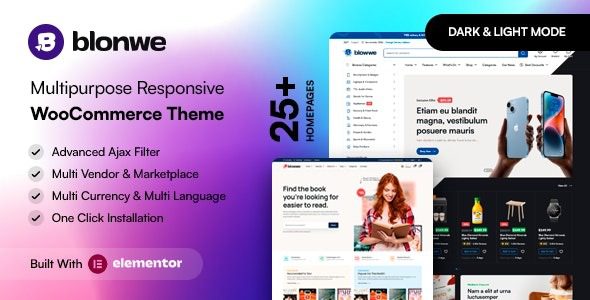
Blonwe WordPress Theme: A Comprehensive Analysis of a Multi-Purpose WooCommerce E-Commerce Solution
Blonwe WordPress Theme is a multi-purpose WooCommerce theme built specifically for e-commerce scenarios, suitable for a variety of business types ranging from grocery stores and fashion boutiques to multi-vendor marketplaces. It integrates page building, product display, and checkout processes into a single system, allowing you to build a store visually even without any website-building experience. This article will help you determine whether it's worth your time by examining its features, use cases, installation process, and common questions.
Core Features and Use Cases of the Blonwe Theme
Blonwe's design philosophy is "one theme covering multiple e-commerce business types." It comes with built-in homepage templates and block combinations tailored to different industries, allowing you to replace text and images as needed to quickly achieve a page structure that matches your industry's character. Common use cases include:
- Everyday consumer goods: grocery stores, organic shops, pet stores, toy stores
- Fashion and accessories: fashion boutiques, jewelry stores, eyewear shops, watch stores
- Vertical specialty stores: auto parts stores, medical supply stores, sportswear stores, bookstores
- Platform-type businesses: multi-vendor marketplaces, Dokan multi-vendor stores
On a technical level, Blonwe works closely with Elementor, allowing page modules to be adjusted via drag and drop. Product grids, promotional banners, category navigation, and other elements can all be configured directly in the editor. For operations teams that need to frequently update campaign pages, this flexibility is more practical than traditional fixed templates.
Blonwe Theme Installation and Basic Configuration Process
Installing the Theme and Bundled Plugins
In the WordPress admin panel, go to "Appearance → Themes → Add New Theme," upload the Blonwe theme package, and activate it. After activation, the theme will prompt you to install the required companion plugins. Install and activate them one by one as prompted. These plugins typically handle product display, page building, and demo content import.
Running the Installation Wizard
Once the plugins are ready, the theme will generally guide you into the installation wizard. The wizard helps you select your site type, import demo content, and set up the homepage and menus. Following the wizard steps can help you avoid omissions caused by manual configuration. If you need more references for using WordPress themes and plugins, you can visit Bobo Hello Resource Site to view related tutorials.
Product and Payment Configuration
After completing the basic installation, go to WooCommerce settings to add products and configure shipping and payment methods. Blonwe's templates inherit WooCommerce's standard functionality, so payment gateways, tax rates, and order management all follow the WooCommerce system without requiring additional adaptation.
Blonwe Theme Performance and Compatibility
Blonwe is built on Elementor, and page rendering depends on the front-end builder. In practice, it's recommended to use caching plugins and image optimization tools to control homepage resource size. The theme is adapted for mainstream browsers and mobile layouts, with product listings and detail pages switching to a more touch-friendly arrangement on mobile devices.
In terms of compatibility, Blonwe supports standard WooCommerce extensions and can also work with multi-vendor plugins like Dokan. If you plan to build a platform-type marketplace, it's recommended to first validate the multi-vendor workflow in a small-scale testing environment before launching your live site. For specific compatible versions and dependent plugins, please refer to the official documentation.
Frequently Asked Questions
How do I install the Blonwe theme?
In the WordPress admin panel, go to "Appearance → Themes → Add New Theme," upload the theme package, and activate it. Then install the bundled plugins as prompted, and finally run the theme installation wizard to complete initialization. Specific steps may vary slightly by version, so please refer to the official documentation.
What types of e-commerce websites is Blonwe suitable for?
It's suitable for a wide range of scenarios including groceries, fashion, furniture, auto parts, cosmetics, jewelry, bookstores, pet stores, watches, wine, organic shops, gardening, toys, coupons, and multi-vendor marketplaces. The core reason is that it provides templates and block combinations tailored to different industries.
Is Blonwe compatible with WooCommerce?
Blonwe itself is a multi-purpose theme built around WooCommerce, with products, shopping cart, checkout, and order management all running on the WooCommerce system. For extension plugin compatibility, it's recommended to refer to the official documentation or test in a live environment.
How often is the Blonwe theme updated?
Theme updates typically follow version changes in WordPress, WooCommerce, and Elementor for adaptation. For specific update records and frequency, please check the official changelog.
Do I need programming knowledge to use Blonwe?
No. Blonwe works with Elementor to provide visual editing, and page modules can be adjusted via drag and drop. The basic site-building process can be completed through the installation wizard and WooCommerce settings. Only complex customizations require touching code.

