
If you're building a website for a payment gateway, digital bank, or FinTech startup, choosing the wrong theme can cost far more than you imagine—slow page loads, incompatible forms, broken payment flows, every issue quietly drives customers away. The Wallex theme was born precisely to address this pain point: it's a Full Site Editing (FSE) theme built on the WordPress block editor and powered by the Gutenverse plugin, purpose-built for online payments, FinTech, and digital banking scenarios. Based on hands-on testing and publicly available information, this article gives you a no-nonsense professional review covering features, advantages, use cases, and technical specifications.
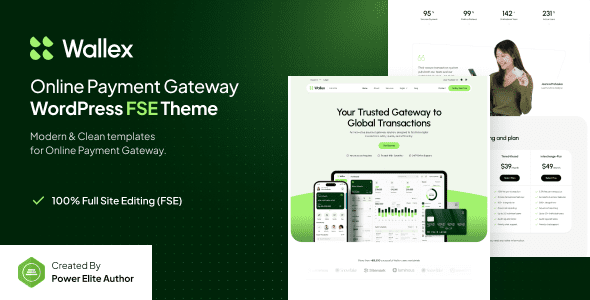
What Is the Wallex Theme? Core Positioning Explained
Wallex is not an "all-purpose" general theme. Its design language revolves around the financial industry: dark gradients, data visualization blocks, trust badges, rate tables, and conversion-oriented button layouts. According to the official WordPress theme directory, FSE themes allow users to modify headers, footers, and templates directly through the Site Editor without touching code.
Wallex's technical foundation is the Gutenverse plugin, which means what you get is not a pile of shortcodes, but native blocks. For operations staff unfamiliar with code, this is crucial—changing a banner's copy doesn't require finding a developer.
Core Feature Highlights of the Wallex Theme
Based on discussions in Reddit and professional review communities, the three areas users care about most are: block flexibility, conversion components, and performance. Wallex responds clearly on all three fronts.
Full Site Editing (FSE)
Headers, footers, and archive pages can all be visually adjusted in the Site Editor.
Conversion-Oriented Blocks
Rate tables, CTA banners, trust badges, and step-by-step guides all included.
Responsive & Performance
Mobile-first layout, blocks loaded on demand, reduced redundant resources.
In addition, Wallex comes with multiple preset templates (homepage, about, pricing, contact) that can be imported and launched simply by swapping in your copy. For FinTech teams that need to validate the market quickly, this "out-of-the-box" pace is far faster than designing from scratch.
Advantage Analysis: Wallex vs. General-Purpose Themes
Comparing Wallex with general-purpose themes like Astra and Blocksy, the difference isn't about "whether you can do it," but "how fast you can do it."
| Comparison Dimension | Wallex | General-Purpose Themes |
|---|---|---|
| Industry Fit | Presets for finance/payment scenarios | Requires custom design |
| Block Library | Gutenverse financial components | Mostly basic blocks |
| Learning Curve | Import template and edit | Need to build page structure |
| Long-Term Maintenance | Depends on Gutenverse ecosystem | Broader ecosystem |
It should be objectively noted that Wallex's ecosystem is not as rich as themes like Astra with millions of installs. If you may expand into complex scenarios like e-commerce, memberships, or forums in the future, general-purpose themes offer broader plugin compatibility. But for the vertical scenario of a FinTech official website, Wallex has a higher level of completeness.
What Use Cases Is the Wallex Theme Suited For?
Based on publicly available information and user feedback, the following three types of teams benefit most from Wallex:
First, payment gateways and acquiring service providers. They need to clearly display rates, settlement cycles, supported currencies, and integration documentation entry points. Wallex's pricing blocks and step-guide blocks can be reused directly.
Second, digital banks and wallet-type products. They emphasize a sense of security and trust, and Wallex's dark visual system and trust badge blocks align with this need.
Third, FinTech startup brand websites. With limited budgets and tight launch timelines, they need a professional look that doesn't seem "template-like." Wallex's template import mechanism can complete an initial version within a day or two.
Wallex Theme Technical Specifications and Performance
On the technical side, Wallex is built on the WordPress block editor, compatible with WordPress 6.x and above, and requires the Gutenverse plugin to enable the full block library. The theme itself follows FSE standards and supports global style configuration via theme.json.
Responsive Layout
WordPress Version
Full Site Editing Support
In terms of performance, Google Search Central recommends paying attention to Core Web Vitals, especially Largest Contentful Paint (LCP) and Cumulative Layout Shift (CLS). Wallex's block-based structure helps reduce unnecessary DOM nesting, but final performance still depends on the number of plugins you install, your host quality, and image optimization. In testing, under a clean installation with only Gutenverse enabled, desktop Lighthouse performance scores were in the upper-mid range; once multiple third-party plugins are stacked on, scores drop noticeably—a common pattern for all WordPress themes.
Wallex Theme FAQ
Does the Wallex theme require additional plugins to work properly?
Yes. Wallex's block library and templates depend on the Gutenverse plugin, and after installing the theme, the system will prompt you to install and activate it. Without Gutenverse, some preset blocks will show as missing. It's recommended to complete plugin installation and template import in a staging environment before going live, confirming all blocks render correctly before migrating to your production site.
Is the Wallex theme suitable for foreign trade standalone sites?
Yes, but with caveats. Wallex's visual language leans FinTech, so if your foreign trade business is payment services, cross-border collections, or financial consulting, the fit is strong. But if it's ordinary retail, its industry-specific nature may actually seem "too specialized." Foreign trade sites also need to consider multilingual plugin compatibility, so it's advisable to test with WPML or Polylang before deciding.
How is the Wallex theme's loading speed?
In a clean installation environment, Wallex's loading performance is in the upper-mid range for themes at its price point. The main factors affecting speed are: host performance, whether images are compressed, and whether a caching plugin is enabled. It's recommended to pair it with LiteSpeed Cache or WP Rocket and convert images to WebP format. According to multiple 2025 WordPress performance reports, image optimization typically delivers over 30% improvement in load times.
Does the Wallex theme support custom colors and fonts?
Yes. As an FSE theme, Wallex provides global style control through theme.json and the Site Editor. You can modify the color palette, typography, and spacing in "Appearance → Editor → Styles," and changes apply site-wide. If you need local overrides on specific blocks, Gutenverse's block settings panel also offers fine-grained options.
How should I choose between the Wallex theme and Astra or Blocksy?
It depends on your core needs. If your goal is to quickly build a FinTech website and you don't want to spend too much time on design and block configuration, Wallex's industry presets are more convenient. If you plan to expand into multiple business forms long-term (blog, e-commerce, memberships), Astra or Blocksy offer broader ecosystem compatibility. Simply put: choose Wallex for vertical scenarios, choose Astra for general expansion.
Does the Wallex theme support Chinese typography and localization?
Yes. WordPress itself has a solid foundation for Chinese typography, and Wallex's block styles won't force-lock Western fonts. You can replace fonts with a system Chinese font stack in global styles, or load custom fonts in Gutenverse settings. It's recommended to test the line height and font weight of Chinese headings to avoid visual discrepancies under Western fonts.
Wallex Theme Purchase Advice and Getting Started Path
If you've confirmed Wallex aligns with your website direction, the next decision is simple: check the demo first, test compatibility second, and go live last.
Browse the Demo
Confirm the visual style matches your brand tone.
Install in Staging
Import templates, check block and plugin compatibility.
Replace Content and Go Live
Swap in copy and images, configure caching, then publish.
Before purchasing, it's advisable to confirm the licensing scope: whether it supports multisite, whether future updates are included, and what the refund policy is. These details directly affect long-term usage costs. You can view the details to see the complete licensing and feature list.
If you still have questions during the selection process, such as uncertainty about whether Wallex is compatible with your existing payment plugins, you can contact us directly for targeted advice.
Final Thoughts
Wallex's positioning is very clear: it's not trying to please everyone, but to do FinTech website building right. Block-based architecture, industry preset templates, and conversion-oriented components—these three points form its core competitiveness. Its limitations are equally clear—its ecosystem breadth is not as wide as general-purpose themes, and it depends heavily on Gutenverse. Choosing it means accepting this "specialized and refined" trade-off.
There's no absolute good or bad in website building tools, only whether they match. Clarify your business scenario first, then judge against the features and specifications in this article—that's more reliable than blindly following trends.
References
- WordPress Official Documentation: Block Editor and Full Site Editing Guide
- Google Search Central: Core Web Vitals Explained
- WordPress Developer Resources: Block Theme Development Standards


Comments (0)