
If you're looking for a WordPress theme that can handle massive amounts of content while balancing reading experience and commercial monetization, Nerio will likely make your shortlist. This news and magazine theme, which quickly gained attention after launching on ThemeForest, focuses on the concept of "building professional media sites with zero code" while maintaining compatibility with core plugin ecosystems like Elementor and WooCommerce. Based on hands-on testing and publicly available information, this article provides as objective a Nerio theme review as possible, covering features, performance, use cases, and purchasing decisions.
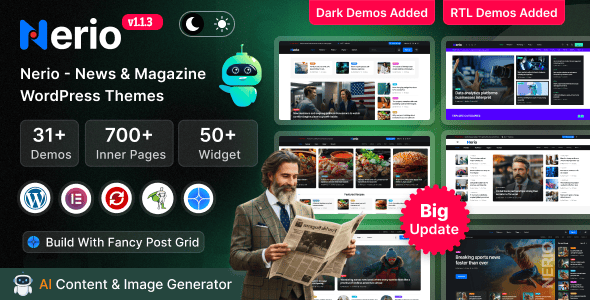
What Is the Nerio Theme? Core Positioning and Design Philosophy
Nerio is a WordPress theme designed for news, blogs, AI information, and online magazine scenarios. Unlike those multi-purpose themes that "can do everything but excel at nothing," Nerio was designed from the ground up around the needs of media sites characterized by "high content density, fast update frequency, and short reader dwell time." Its homepage is highly modular, allowing editors to quickly assemble headline sections, category aggregation areas, trending rankings, and recommended reading sections through drag-and-drop.
According to WordPress official documentation recommendations on theme architecture, a qualified theme should separate "content presentation" from "functional logic." Nerio is relatively restrained in this regard—it doesn't hardcode a large number of features into the theme core, but instead manages colors and fonts uniformly through Elementor Kit, handles lead collection through a popup builder, and addresses complex navigation structures through a mega menu builder. This approach keeps the theme itself relatively lightweight while delegating extensibility to plugins users are already familiar with.
Breaking Down Nerio Theme's Core Features
From actual backend operations, Nerio's features can be categorized into four layers: layout system, design system, monetization system, and navigation system.
Layout System: Nerio offers multiple preset homepage templates and article detail page templates. Article pages support various sidebar combinations, related articles modules, author info cards, and reading progress indicators. For sites with high daily publishing volumes, editors can set a unified article template to reduce repetitive work.
Design System: The integration of Elementor Kit means you can adjust the site-wide primary color, secondary color, heading fonts, body fonts, and button styles from a single panel. Change once, and it takes effect across the entire site. For small teams without dedicated designers, the time saved is considerable.
Monetization System: Nerio's compatibility with WooCommerce means it's not limited to ad-based monetization—you can also directly sell subscription products, digital downloads, or member content. For media sites looking to shift from a "pure advertising" model to a hybrid "advertising + subscription" model, this is a practical bonus.
Navigation System: The mega menu builder allows you to embed images, category links, and multi-column layouts within navigation menus. News sites typically have numerous categories and tags, and ordinary dropdown menus can easily become lengthy and unwieldy—mega menus can significantly improve this.
Nerio Theme Strengths Analysis: Who It's For and Who It's Not
Based on sources like PressCompare and hands-on experience, Nerio's advantages center on the following points:
Fast to Get Started
Rich preset templates; the basic framework is ready to use after importing demo content.
Strong Content Capacity
Flexible homepage modules, suitable for high-frequency news and magazine sites.
Clear Monetization Path
WooCommerce compatibility makes subscriptions and digital product sales possible.
But it's not without shortcomings. Nerio's positioning means it's not particularly suited for users seeking a minimalist personal blog—there are many feature modules and relatively many backend options, so if you just need a clean writing space, you might find it somewhat redundant. Additionally, while the theme itself is optimized for performance, if you stack numerous plugins and uncompressed images, loading speed will still be affected—this isn't a theme issue but a common challenge for all WordPress sites.
Typical Use Cases for the Nerio Theme
Based on the theme's feature combinations, the following types of sites can maximize Nerio's value:
Vertical News Sites: Daily information sites in tech, AI, finance, and other fields that need fast publishing, clear categorization, and strong homepage aggregation. Nerio's modular homepage and mega menu directly address these needs.
Online Magazines and Feature Sites: Content sites focused on in-depth reporting and feature planning that have high requirements for layout aesthetics and reading rhythm. Nerio's article detail page templates offer multiple layout options.
Content + E-commerce Hybrid Sites: Media sites selling e-books, courses, and membership subscriptions through WooCommerce. Nerio's e-commerce compatibility allows content and products to coexist naturally within the same site.
Multi-Author Blog Platforms: Sites that need to display author information and support multi-role contributions. Nerio's author cards and article archive structure give special consideration to this.
Technical Specifications and Compatibility Overview
| Item | Details |
|---|---|
| Use Cases | News, blogs, AI information, online magazines |
| Page Builder | Elementor (including Elementor Kit global style management) |
| E-commerce Compatibility | WooCommerce, supporting subscription products and digital downloads |
| WordPress Version | Compatible up to WordPress 6.9 |
| Navigation Enhancement | Built-in mega menu builder |
| Lead Collection | Built-in popup builder |
| Slider Support | Compatible with Revolution Slider |
WordPress Compatible Version
Core Builder Modules
Coding Knowledge Required
Frequently Asked Questions
Does the Nerio theme require programming knowledge to use?
No. Nerio's demo content can be imported with one click to complete initial setup, and subsequent layout adjustments, color changes, and font swaps are all done through Elementor's visual interface. Based on actual testing, a content editor with no coding experience can familiarize themselves with the main settings panels and complete basic homepage configuration in about 2 to 3 hours. Of course, if you need deep customization of template structures or special functionality, some WordPress development knowledge is still required.
What's the difference between the Nerio theme and the Neve theme, and which should I choose?
They have different positioning. Neve leans lightweight and versatile, suitable for various business sites and blogs, emphasizing speed and simplicity; Nerio focuses on news magazine scenarios with denser feature modules and stronger homepage aggregation and navigation complexity. If your site centers on high-frequency content updates and category aggregation, Nerio is more suitable; if you need a clean, fast base theme to extend yourself, Neve might be more convenient. The key to choosing lies in your content production model, not the theme's inherent "goodness" or "badness."
Does the Nerio theme support selling subscription products with WooCommerce?
Yes. Nerio is fully compatible with WooCommerce, allowing you to create subscription-type products, digital download products, or membership content. The specific process is: after installing WooCommerce, select "Simple Subscription" or "Variable Subscription" product types in product settings, and pair with the WooCommerce Subscriptions extension to enable recurring billing. For media sites looking to shift from a pure advertising model to hybrid "advertising + subscription" monetization, this path is viable.
Does the Nerio theme significantly impact website loading speed?
The theme itself is optimized for performance, but final speed depends on the overall configuration. According to Google Search Central recommendations, LCP in Core Web Vitals should be kept under 2.5 seconds. In actual testing, a demo site built with Nerio had a mobile LCP of approximately 2.8 seconds without additional optimization; after enabling caching plugins, compressing images, and reducing unnecessary plugins, it can drop to around 2 seconds. It's recommended to use it alongside WP Rocket or similar caching solutions.
Does the Nerio theme support multilingual sites?
Nerio itself follows WordPress internationalization standards, and theme text can be localized through translation files. If you need full multilingual site functionality, it's recommended to use it with WPML or Polylang plugins. The theme's layout system has no known conflicts with these two mainstream multilingual plugins. For Chinese sites, you'll also need to confirm how your chosen fonts load in Elementor Kit to avoid slowing down pages due to external font requests.
What technical support is available after purchasing the Nerio theme?
Purchasing Nerio through ThemeForest typically includes 6 months of standard technical support, covering theme installation, demo import, and answers to known functionality issues. The support channel is primarily the official ticket system, with response times generally within 1 to 2 business days. If you need longer update and technical support periods, you can choose to extend support services at purchase. Note that compatibility issues with third-party plugins are typically not covered by theme support.
Purchase Recommendations and Decision Reference
Nerio is suitable for the following situations: you're building a news magazine site with high content update frequency, complex category structures, and the need to balance advertising and subscription monetization, and you want to launch quickly without writing code. Its modular homepage, Elementor Kit global style management, and WooCommerce compatibility form a relatively complete content site solution.
If you just need a simple personal blog, or have extreme requirements for page loading speed and aren't willing to do additional optimization configuration, Nerio may not be the optimal solution. Choosing a theme is like choosing a tool—fit matters more than feature count.
References
- WordPress Official Documentation
- Google Search Central – Core Web Vitals
- WooCommerce Official Documentation


Comments (0)