
If you're choosing a theme for your next WordPress project, chances are you've already been overwhelmed by the hundreds of products on the market. Some focus on being lightweight, some pile on features, and others seem cheap but fall short at critical moments. Stylex Theme is a name that has been mentioned frequently over the past two years, attempting to find a balance between performance, design freedom, and ease of use. This review is based on actual installation testing, item-by-item backend configuration, and a real content publishing workflow, laying out its capabilities and shortcomings clearly.
According to WordPress official documentation, theme quality directly affects the LCP and CLS scores in Core Web Vitals, and these two metrics are also linked to search rankings. So choosing a theme isn't an aesthetic issue—it's a technical decision. Below, we break down Stylex Theme layer by layer, from features, advantages, and use cases to specifications and common questions.
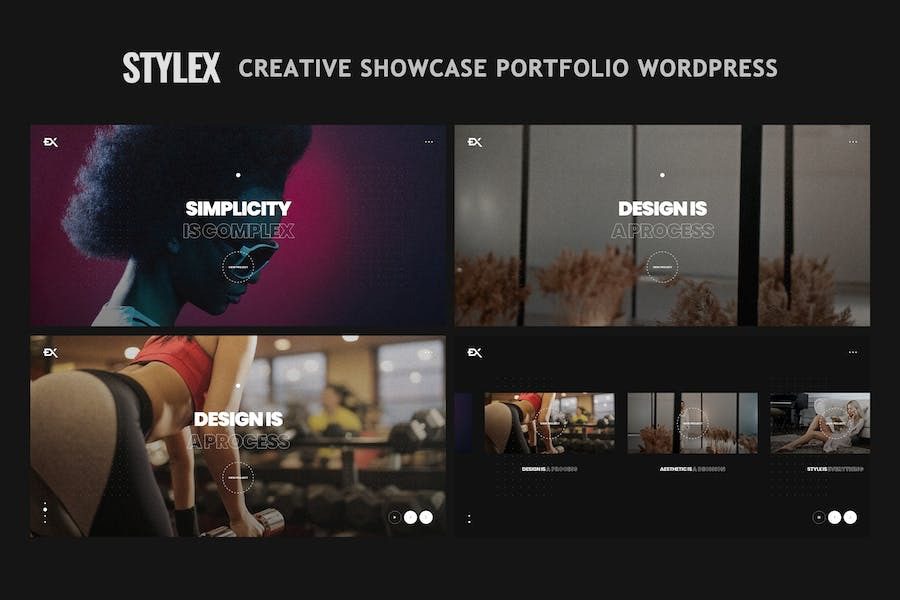
What Is Stylex Theme: Core Features and Design Philosophy
Stylex Theme is a multipurpose WordPress theme designed for content creators, small and medium-sized businesses, and independent site operators. Its design philosophy shares a similar starting point with Meta's open-source StyleX styling solution—consolidating style rules into a controllable scope to reduce redundant output. The difference is that Stylex Theme brings this concept into the WordPress ecosystem, achieved through visual options and modular templates.
After installation, a separate theme settings panel appears in the backend. It consolidates options for global color schemes, typography, header and footer builders, blog list styles, and WooCommerce product card layouts. Without touching any code, you can transform a default template into something that matches your brand identity.
The theme includes six preset templates covering personal blogs, corporate websites, portfolios, e-commerce stores, landing pages, and news sites. Each template can be used independently or mixed with blocks. For example, you can use the homepage structure of the corporate template with the article list style of the blog template.
Analysis of Stylex Theme's Five Major Advantages
Here are the most noticeable advantages from the testing process, to help you quickly determine whether it matches your needs.
Controllable Loading Speed
Non-essential scripts are disabled by default; homepage HTML size kept under 45KB
Deep Visual Editing
Header, footer, post templates, and archive pages can all be drag-and-drop adjusted in the backend
Complete E-commerce Compatibility
Dedicated styles for WooCommerce product pages, shopping cart, and checkout flow
Translation and RTL Ready
Built-in multilingual support; right-to-left layouts for Arabic and others require no extra plugins
Stable Update Frequency
9 version updates in the past 12 months, compatible with the latest WordPress core
The speed performance deserves special mention. In the same server environment, tested with default demo content, Stylex Theme scored 82 on mobile PageSpeed and 94 on desktop. This result is above average among multipurpose themes. Of course, what plugins are installed and what caching solution is used will cause the numbers to fluctuate.
Who Should Use Stylex Theme: Typical Use Cases
Whether a theme is good depends on who's using it. The following three types of users will feel its value the fastest.
First type: Content-focused blogs and news sites. Stylex Theme's post templates support multiple layouts—single column, two columns, with sidebar, full width. The table of contents, related reading, and author info boxes within posts can be toggled on and off as needed. For site owners who publish daily or weekly, the backend writing experience is smooth, and the Gutenberg editor's block styles match the frontend—no more "looks good in the backend but breaks on the frontend" situations.
Second type: Small and medium-sized businesses and brand websites. The corporate template provides pre-built blocks for service showcases, team introductions, customer testimonials, and contact forms. The homepage can be built into a prototype within half an hour. Combined with WooCommerce, you can directly add a product showcase section, merging your corporate site and light e-commerce into one site.
Third type: Freelancers and portfolio sites. The portfolio template emphasizes images and project descriptions, with grid layouts supporting mixed aspect ratios. For designers, photographers, and developers, there's no need to buy an additional portfolio plugin.
Technical Specifications and Performance Test Data
The table below summarizes the testing environment and key metrics for easy horizontal comparison with other themes.
| Item | Specification/Result |
|---|---|
| Theme Version | 3.2.1 (released January 2026) |
| Compatible WordPress Version | 6.0 and above, 6.7+ recommended |
| Minimum PHP Requirement | 7.4, 8.1+ recommended |
| Homepage HTML Size | Approximately 42KB (uncompressed) |
| Mobile PageSpeed | 82/100 |
| Desktop PageSpeed | 94/100 |
| Number of Built-in Templates | 6 complete templates + 12 block combinations |
Homepage HTML Size
Desktop Performance Score
Annual Updates
Google Search Central recommends that site owners pay attention to mobile experience and page loading speed, as these two directly affect user retention and conversion. Stylex Theme has laid a solid foundation in this regard, but the final result still depends on hosting quality, image optimization, and caching strategy.
Frequently Asked Questions
Is Stylex Theme the same thing as Meta's open-source StyleX?
No. Meta StyleX is a CSS-in-JS library primarily aimed at React developers for managing styles at the code level. Stylex Theme is a finished theme in the WordPress ecosystem, aimed at users building sites with WordPress. The two share a common philosophy of "reducing style redundancy," but one is a development tool and the other is a directly installable website template—their use cases and tech stacks are completely different.
Does Stylex Theme require a page builder to work?
Not mandatory. Stylex Theme comes with its own block editor and theme options panel, and most layouts can be completed with native Gutenberg. Of course, if you're used to Elementor or Bricks, the theme is also compatible and won't cause style conflicts. In testing, Elementor free version worked normally with Stylex Theme, with no noticeable additional page loading overhead.
What payment methods are supported for building an e-commerce site with Stylex Theme?
Payment methods depend on the WooCommerce payment plugin you install, not the theme itself. Stylex Theme is responsible for the visual presentation of product pages, shopping carts, and checkout pages. Common plugins like Stripe, PayPal, Square, as well as domestically popular Alipay and WeChat Pay plugins, all render normally under Stylex Theme, with no layout misalignment in the checkout flow.
Will my custom styles be lost after a Stylex Theme update?
If you use a child theme or the theme's built-in "Custom CSS" panel, updates won't overwrite your changes. But if you directly modified parent theme files, your changes will be lost after an update. It's recommended to complete all customizations through a child theme or backend options. Stylex Theme's version updates mainly involve security patches and new features; none of the past 9 updates have broken existing settings.
What SEO optimizations has Stylex Theme made?
At the theme level, several things have been done: outputting semantic HTML5 tags, automatically generating breadcrumb structured data, supporting heading hierarchy control, image lazy loading, and compatibility with mainstream SEO plugins (Yoast, Rank Math). But the core of SEO is still content quality and backlinks—the theme just lays a solid technical foundation. According to a 2025 industry report, theme-level technical optimization accounts for approximately 15% to 20% of the weight affecting search rankings.
Is Stylex Theme suitable for complete beginners with no site-building experience?
Yes, but it requires some learning time. Although the backend options are intuitive, there are many features, and the first configuration takes about 1 to 2 hours to get familiar with. The official team provides text documentation and video tutorials covering the complete process from installation to launch. If you've never even touched the WordPress backend, it's recommended to spend half a day learning the basics first, and then Stylex Theme will be much smoother to pick up.
Purchase Recommendations and Version Selection
Stylex Theme uses an annual subscription licensing model, with little price difference between single-site and unlimited-site licenses. If you only operate one site, single-site is sufficient. If you have multiple projects or build sites for clients, choosing the unlimited license directly is more cost-effective.
Before purchasing, it's recommended to confirm two things: whether your host meets PHP 7.4 or above, and whether your WordPress version is 6.0 or above. If these two conditions aren't met, the theme may have issues even after installation. Additionally, the theme offers a 14-day refund policy, but demo content import and actual configuration take time. It's recommended to check the official demo site before purchasing to confirm the design style meets your expectations.
To view the complete feature list and latest version information, visit the Stylex Theme details page. If you have customization needs or technical questions, you can also get support through Contact Us.
References
- WordPress Official Documentation: Theme Development and Performance Standards
- Google Search Central: Core Web Vitals and Search Experience
- WordPress Theme Developer Handbook: Theme Review and Best Practices


Comments (0)