
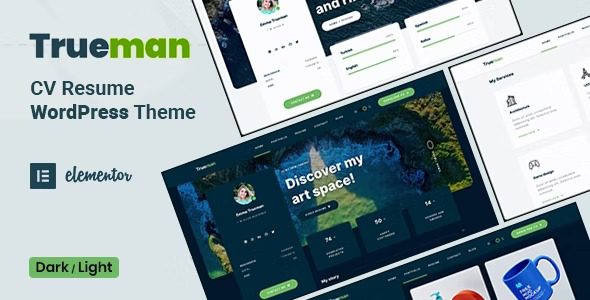
Trueman WordPress Theme: A Tailored Resume Solution for Digital Professionals
Trueman is a professional resume WordPress theme designed specifically for developers, designers, programmers, freelancers, artists, photographers, and other digital professionals. It offers a modern and creative design to help you quickly build a professional online presence. Whether you're just starting out or a seasoned expert, Trueman can make your resume stand out.
The theme includes both dark and light versions and supports a real-time UI toggle mode, allowing visitors to switch the appearance based on their preferences. You can choose between one-page or multi-page layouts and enhance the visual experience with transition page animations. The powerful portfolio feature lets you showcase your projects, while the Elementor Page Builder makes it easy to customize pages without any coding skills.
If you're looking for more high-quality WordPress resources, you can visit BoboHello Resource Site to get more themes and plugins.
Core Features and Advantages of the Trueman Theme
The Trueman theme integrates numerous practical features, making it an excellent choice for resume-style websites. Here are some highlights:
- Dark and Light Modes: Offers two color schemes with real-time switching to suit different users' visual preferences.
- One-Page and Multi-Page Layouts: You can choose between single-page scrolling or a traditional multi-page structure, adapting flexibly to different scenarios.
- Transition Page Animations: Smooth page transition animations enhance user experience and make the website more dynamic.
- Powerful Portfolio: Built-in portfolio functionality makes it easy to showcase your projects, case studies, or photography work.
- Elementor Page Builder: Drag-and-drop editing lets you customize page layouts and styles without writing any code.
- Responsive Design: Ensures perfect display on all devices, including desktops, tablets, and mobile phones.
These features make Trueman suitable not only for personal resumes but also for freelancers showcasing services, artists displaying works, and more. For more detailed information, please refer to the official page.
How to Create a Professional Resume Using the Trueman Theme
Using the Trueman theme is very simple. First, you need to install and activate the theme in your WordPress admin panel. Then, import the demo content (if provided) or start building pages from scratch using Elementor. The theme options panel allows you to set colors, fonts, layouts, and more. You can manage portfolio, experience, skills, and other sections by adding custom post types. With the real-time switcher, visitors can instantly toggle between dark/light modes, enhancing interactivity.
Installation and Basic Setup
Installing the Trueman theme takes just a few steps: In your WordPress dashboard, go to "Appearance" > "Themes" > "Add New," upload the theme ZIP file, and activate it. After that, install the recommended plugins (such as Elementor). Under "Appearance" > "Customize," you can configure the logo, menus, color schemes, and more. For specific steps, please refer to the official documentation.
Frequently Asked Questions
How do I install the Trueman theme?
You can install it by uploading the theme ZIP file through "Appearance" > "Themes" > "Add New" in the WordPress admin panel, or by uploading the theme folder to the /wp-content/themes/ directory via FTP. Simply activate it after installation. For details, please refer to the official documentation.
What use cases is the Trueman theme suitable for?
Trueman is ideal for personal resume websites, freelancer portfolios, online showcases for designers or photographers, and more. It supports both one-page and multi-page layouts, which can be flexibly chosen as needed.
Is the Trueman theme compatible with the latest version of WordPress?
The Trueman theme is regularly updated to ensure compatibility with the latest version of WordPress. It is recommended that you always use the latest version of the theme and WordPress core. For specific compatibility information, please refer to the official documentation.
How often is the Trueman theme updated?
The theme developer releases updates periodically to fix bugs, add new features, or adapt to new versions of WordPress. You can check the changelog on ThemeForest. For details, please refer to the official documentation.


Comments (0)