
Organiz v2.5 – Organic Store WooCommerce Theme In-Depth Review
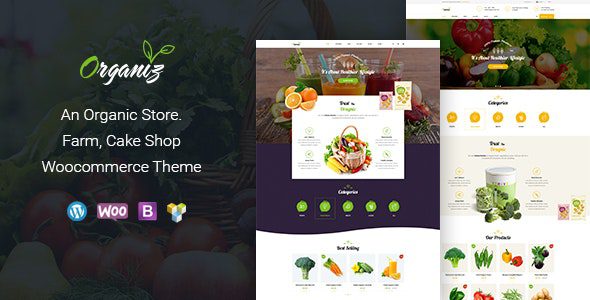
Organiz is a WordPress theme built specifically for organic farms, fresh produce direct sourcing, and health food brands. Powered by WooCommerce, it helps you quickly build a professional online store with a natural feel. Whether you're selling organic fruits and vegetables, cold-pressed olive oil, or artisan honey, Organiz enhances brand trust and conversion rates through its modern visual design and e-commerce features.
Core Positioning of the Organiz WordPress Theme
The Organiz theme is positioned for high-end organic eco-commerce, aiming to solve the problem of traditional agricultural templates being poorly designed and lacking a modern feel. It adopts a large-format whitespace aesthetic with natural color tones, providing modern agricultural enterprises and orchard direct-sourcing teams with a minimalist luxury e-commerce experience. The theme is compatible with WordPress 5.8+, PHP 7.4~8.2, and deeply integrates with the Elementor page builder, allowing you to customize page layouts without any code.
Key Feature Highlights
1. Product Multi-Attribute & Dynamic Inventory Management
Organiz supports capsule-style label linking for packaging sizes (e.g., 500g, 1kg, boxed) and ripeness options, with product images and stock status syncing in real time when switching options. Additionally, a built-in "Frequently Bought Together" feature intelligently recommends complementary products to effectively boost average order value. A dynamic free-shipping progress bar encourages buyers to add more items to their cart, increasing sales.
2. Eco Visual Typography & Micro-Animations
The theme offers two visual presets—eco green and pure white—with refined typography that delivers the quality feel of multinational retail giants. Product cards support hover-to-switch to a second close-up image and a quick-view drawer, letting customers browse as leisurely as in a high-end boutique.
3. Full-Device Responsiveness & Gesture Optimization
Whether on desktop or mobile, Organiz adapts and scales seamlessly to avoid horizontal overflow. It features safe-area adaptation for full-screen phones, with smooth one-handed swipe interactions that rival native e-commerce apps.
4. Lightweight & Performance Optimized
The theme's code is optimized with a streamlined DOM tree for fast first-screen loading. Fully compliant with the latest standards, it has no negative impact on Core Web Vitals, ensuring even large-image, long pages open in milliseconds.
Why Choose the Organiz WordPress Theme
For businesses engaged in organic agricultural product exports or local high-end fresh produce delivery, Organiz offers a professional out-of-the-box solution. Its GPL license ensures code customizability, allowing technical teams to dive into the underlying PHP template controllers to customize cold-chain shipping models and localized payment gateways. Before going live, it's recommended to prepare high-resolution product photography and detailed ingredient specification sheets, and to test the full mobile workflow. Compared with the architecture of classic WooCommerce themes like WoodMart e-commerce theme, Organiz excels in balancing visual presentation and performance, helping you seize the opportunities of the health consumption upgrade.
Standard Configuration vs. Advanced Operations Comparison
| Eco-Agriculture E-Commerce Dimension | Traditional General Merchandise Template | Organiz Professional Organic Ecosystem |
|---|---|---|
| Natural Pastoral Presentation | Cluttered layout, lacking modernity | Minimalist whitespace, eco light-and-shadow gallery, showcasing natural health |
| Product Specification Display | Information overload, no focus | Multi-dimensional agricultural product specification matrix, rich in images and text |
| Purchase Experience | Cumbersome redirects, long add-to-cart process | Side drawer cart, zero-refresh add-to-cart, seamless flow |
| Performance | Redundant code, slow loading | Lightweight optimization, Core Web Vitals green rating |
Frequently Asked Questions
How do I install the Organiz theme?
In the WordPress admin panel, go to "Appearance" -> "Themes" -> "Add New Theme" and upload the Organiz theme zip package to install. After installation, you need to install and activate the WooCommerce plugin and import the demo content as prompted. For detailed steps, please refer to the official documentation.
Which page builders does Organiz support?
Organiz deeply integrates with the Elementor page builder, allowing you to freely design page layouts with Elementor. The theme is also compatible with the WordPress default editor for quick content editing.
Is Organiz compatible with the latest version of WordPress?
Organiz v2.5 has been tested and is compatible with WordPress 5.8 and above, and supports PHP 7.4 to 8.2. It's recommended to use the latest versions of WordPress and WooCommerce for optimal performance and security.
How often is the theme updated?
The Organiz theme is regularly updated by the development team to fix vulnerabilities, add new features, and maintain compatibility with the latest WordPress versions. You can check the changelog in the theme settings or follow official channels for update notifications. For specific update frequency, please refer to the official documentation.


Comments (0)