
Complete Introduction to the WooCommerce Size Chart Plugin
WooCommerce Size Chart is a size chart plugin designed specifically for WooCommerce stores, published by BestWpDeveloper on CodeCanyon. It helps clothing, footwear, accessories, and sports equipment stores add custom size charts to product pages, and is also suitable for home goods and luggage categories that require specification dimensions. The plugin package includes plugin files, size chart templates, and documentation; the version provided on this site is the Chinese version of the plugin. For e-commerce websites, a clear size guide can significantly reduce return rates and improve the shopping experience.
Structure and Customization of the WooCommerce Size Chart Size Tables
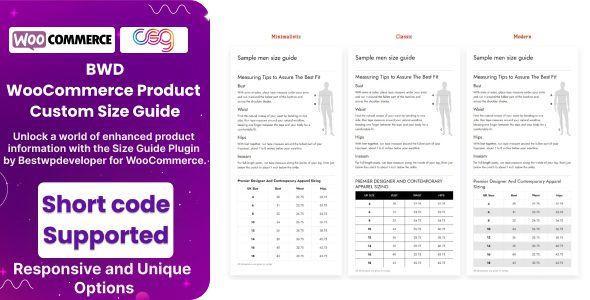
A size chart consists of a table plus a section of measurement notes. The table is organized by columns such as size, chest, waist, hip, and garment length, with values freely adjustable by category; the notes area can contain measurement methods, body type comparisons, and sizing recommendations. The plugin comes with several preset samples for men's, women's, and children's clothing—apply one and modify the values to go live quickly. Table styling follows the theme, width is adaptive, and mobile devices support horizontal scrolling without squeezing product images. The backend uses visual editing, so modifying rows, columns, and text requires no coding, making it very friendly to non-technical users.
Mounting Methods and Display Positions of the WooCommerce Size Chart
Size charts can be set individually per product, or a single table can be applied uniformly by category and then overridden for individual products. There are two mounting positions: the tab area or below the description on the product details page, switched via the position option in the plugin settings; or the size chart can be made into a standalone page and embedded anywhere using a shortcode, or opened in a popup. Shortcodes can be embedded into the text modules of page builders and are compatible with mainstream page builders. This flexibility lets merchants freely arrange how size charts are displayed according to their store design.
Applicable Categories and Cross-Border Sales of the WooCommerce Size Chart
Clothing can be divided into separate tables for tops, pants, and skirts; footwear can be mapped by foot length against EU sizes; accessories can be listed by circumference and length. For home goods and luggage, the table can be changed to capacity, load-bearing weight, and external dimensions. For cross-border sales, different regional sizing systems can be listed side by side in the same table, letting visitors choose sizes according to their own habits. A general note such as "if you're between two sizes, we recommend sizing up" can be added below the table to reduce customer service inquiries. For more WordPress resources, see other content on this site.
Technical Composition and Compatibility of the WooCommerce Size Chart
The plugin depends on WooCommerce and automatically appears on the product edit page after installation. It is compatible with mainstream themes, and shortcodes can be embedded into the text modules of page builders. The package files consist mainly of PHP and front-end assets, and the backend interface is responsive. The plugin changelog includes compatibility fixes; after upgrading to a major WooCommerce version, it is recommended to first verify on a staging site whether the size chart still displays properly. For the official page, refer to the product description on CodeCanyon.
Specifications at a Glance for the WooCommerce Size Chart
| Item | Description |
|---|---|
| Resource Type | WooCommerce size chart plugin |
| File Contents | Plugin files, size chart templates, documentation |
| Dependencies | WordPress, WooCommerce |
| Use Cases | Clothing and footwear stores, accessories and luggage, home goods specifications |
Usage Tips for the WooCommerce Size Chart
- Size values should be measured from actual sample garments; copying supplier tables as-is can easily lead to batch returns.
- The same size number may vary between factories; re-verify the table after changing suppliers.
- Cross-border sites need to specify the sizing system to avoid displaying EU sizes as US sizes.
- When placing the size chart in the tab area, pay attention to the order relative to the product description tab so visitors don't have to click an extra time.
Frequently Asked Questions
How do I install the WooCommerce Size Chart?
Go to the Plugins page in the WordPress backend, upload the plugin ZIP file, and activate it. After activation, make sure WooCommerce is installed and activated; the plugin settings options will appear under the WooCommerce menu. For detailed steps, please refer to the official documentation.
Can size charts be set uniformly by product category?
Yes. The plugin supports applying a single size chart uniformly by category and then overriding it for individual products, which is suitable for clothing stores with many categories.
Is it compatible with mobile display?
Yes. The table width is adaptive, and mobile devices support horizontal scrolling without squeezing product images, ensuring a good mobile shopping experience.
How often is the plugin updated?
The plugin changelog includes compatibility fixes. It is recommended to verify on a staging site before upgrading to a major WooCommerce version. For the specific update frequency, please refer to the official documentation.


Comments (0)