
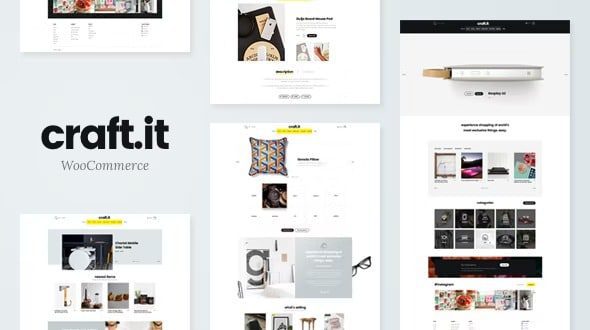
Craftit WordPress Theme In-Depth Review: A Complete Solution for Handmade E-Commerce
Craftit is a professional WordPress theme designed specifically for handmade e-commerce, aimed at independent small shops selling handmade jewelry, wooden furniture, and home accessories. It emphasizes image presentation and product storytelling, and integrates Ajax search, shopping cart, and filtering features to avoid page refreshes. This site provides a complete version of the Craftit theme for download, helping you quickly build a professional handmade shopping website.
Official page information is limited; the following details are based on publicly distributed documentation: The theme uses the Unyson framework paired with a proprietary drag-and-drop builder, rather than Elementor or WPBakery; it includes four homepages, four Revolution Slider sliders, native WooCommerce integration, a portfolio custom post type, and Ajax popups for search, cart, login/registration, and product filtering, along with sticky navigation and multi-level menus, in a high-contrast minimalist color scheme. Please refer to the actual files in the package; do not treat the distribution notes as a complete promise. Whether demo images are included in the package is not specified—please verify within the package; the official documentation does not mention multi-vendor, custom ordering, or quotation features, so searching for these panels will yield nothing; if you look for an editing canvas based on Elementor or WPBakery, it will not match at all.
Understand the Editor Before Modifying the Site
| Common Misconceptions | Actual Situation |
|---|---|
| Following Elementor tutorials to install components will let you edit pages | It uses Unyson with a proprietary drag-and-drop builder; those components are incompatible |
| Importing all four homepages is more cost-effective | Choose one and fill in content; importing all will cause menu conflicts |
| Ajax popups mean a complete account system | Login/registration popups are just entry points; membership rules need separate configuration |
| The portfolio post type can handle custom orders | The portfolio only displays past works; custom quotations are not mentioned officially |
Define the category dictionary first, then enter your first handmade item. Material, craft, size, maker, customizability, and production cycle should each use a consistent naming convention; writing the same material as three different values will cause chaos in product filtering. Second, walk through the entire order process: create a test product → find it via Ajax search → filter by material → open the portfolio page to check the image gallery → add to cart → complete a small test order and verify the order, emails, and inventory → then check product card cropping on narrow screens. The most common mistake is following Elementor tutorials to install a bunch of components, only to find the pages are all Unyson blocks and modifications don't work. Also images: handmade shops rely on images; whether demo images are included is not specified, so main images, detail shots, and process photos need to be taken yourself with confirmed authorization.
Compliance Boundaries
Handmade products are most prone to disputes over materials and production time. Material and origin labeling, size and handmade tolerance disclaimers, return/exchange rules for custom products, avoiding guaranteed delivery dates for production cycles, qualifications and labels for food and cosmetics categories, copyright for author works and patterns, and consent for portraits in process photos—all need to be verified independently; this article only explains features and deployment prerequisites, does not constitute compliance or legal advice, and does not recommend directly publishing the placeholder products, prices, and images from the demo.
Four Things to Do Before Launch
- Upload the theme from Appearance, modify it using the editor actually available in the package, and import only one demo. Re-save permalinks, check menus and the static homepage, and delete sample products and demo images; installing components following Elementor or WPBakery tutorials will be completely ineffective; verify page basics according to the actual package to avoid buying Elementor Pro only to find it unusable; for slider guidance, refer to Slider Revolution resources (the public distribution notes include four sliders); multi-vendor, custom ordering, or quotation panels do not exist and are not mentioned in the official documentation; back up the entire site and verify restoration, referring to WP Staging Pro and UpdraftPlus Premium.
- Refine categories, fields, and assets. Use ACF Pro or Meta Box AIO to standardize naming for material, craft, size, maker, customizability, and production cycle; supplement the portfolio archive and filtering with field conventions from WP Grid Builder and FacetWP; use Ninja Tables Pro for size comparison charts; for bulk product uploads, check the relevant tools.
Frequently Asked Questions
How do I install the Craftit theme?
In the WordPress admin, go to Appearance → Themes → Add New, upload the theme package, activate it, import one demo content set, and modify it using the editor actually included in the package. For specific steps, please refer to the official documentation.
What use cases is the Craftit theme suitable for?
It is suitable for handmade e-commerce websites, such as independent small shops for handmade jewelry, woodwork, and home accessories, emphasizing image presentation and product storytelling.
Which page builders is the Craftit theme compatible with?
It uses the Unyson framework with a proprietary drag-and-drop builder and is not compatible with Elementor or WPBakery. For details, please refer to the official documentation.
How often is the Craftit theme updated?
The update frequency is not specified in public information; it is recommended to follow official channels for the latest version. For details, please refer to the official documentation.


Comments (0)