
Among all independent site issues, website speed optimization is arguably the factor that most impacts conversion rates, yet it's also the most overlooked.
If your website isn't fast enough, you'll face three serious consequences:
-
High user churn: If a page takes over 3 seconds to load, 53% of visitors will leave immediately.
-
Higher ad costs: Facebook/Google ads lower the quality score for slow pages.
-
Lower search rankings: Google explicitly includes loading speed as a ranking factor.
But here's the good news: Website speed optimization is much easier than you think—no coding required, and no need to buy expensive plugins.
This article will guide you step-by-step, from basics to advanced, on how to make your website run faster.
🔧 1. Core Principles of Website Speed Optimization (Easy-to-Understand Version)
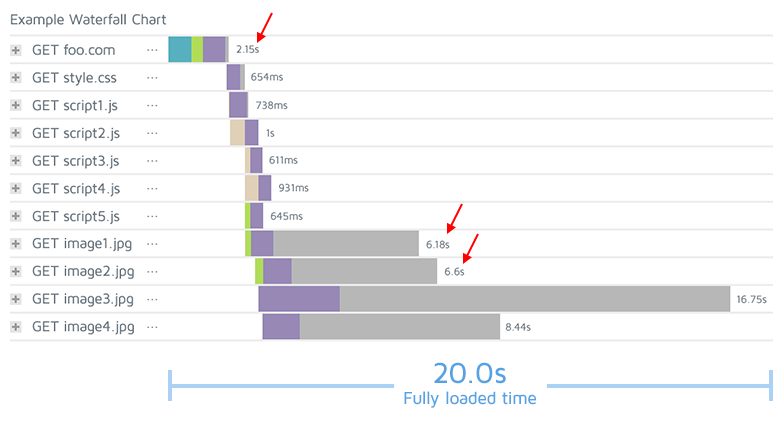
1. Server Response Speed
How quickly the server "reacts."
The stronger the server, the closer its geographic location, and the smoother the network, the faster the loading speed.
2. Page Resource Size
If images are too large or CSS/JS files are too many, the browser will load slowly.
3. Website Architecture
Bloated themes, excessive plugins, and redundant code can drag down overall speed.
4. Network Transmission Path
A Content Delivery Network (CDN) allows global users to load from nearby nodes, improving speed.
Understanding these four points gives you the core logic behind all website speed optimization.
🚀 2. Most Effective Website Speed Optimization Plans (Prioritized for Cross-Border Sellers)
Below are the most worthwhile optimization measures to invest time in—all requiring no programming.
🥇 ① Upgrade to a High-Performance VPS (Most Noticeable Effect)

If you're using Shared Hosting, slow speeds are normal.
Upgrading to VPS will immediately give you:
-
Faster CPU performance
-
Dedicated resources, no competition with others
-
Ability to install faster web services like OpenLiteSpeed
Recommended servers (sorted by value for money):
| Brand | Advantage | Best For |
|---|---|---|
| CloudCone | Fast, good nodes, supports OLS | General cross-border e-commerce |
| Hostinger VPS | Simple to use, great value | Beginners |
| Contabo VPS | Cheap, strong hardware | Budget-conscious users |
If your budget is limited, start with Hostinger; for strong stability, choose CloudCone.
🥈 ② Use LiteSpeed + LSCache Plugin (WordPress Performance Ceiling)
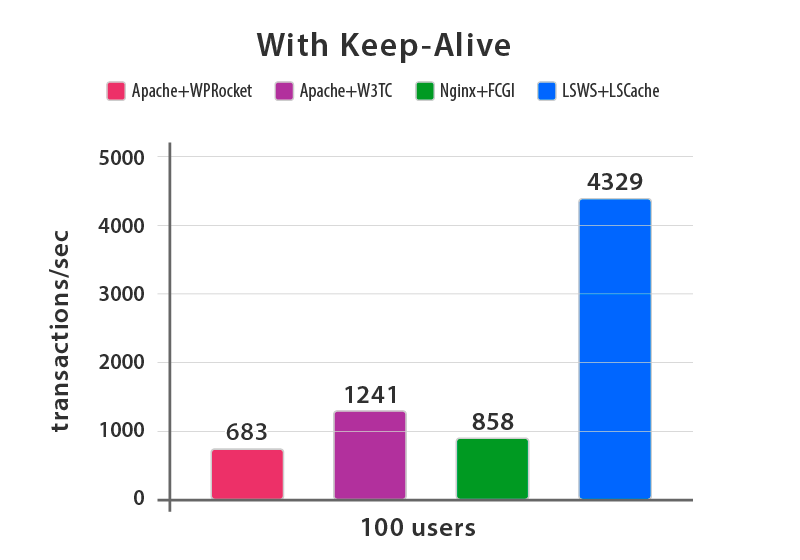
If your server supports LiteSpeed / OpenLiteSpeed, your speed can reach a new level.
LSCache plugin features include:
-
Page caching
-
Lazy loading for images
-
CSS/JS optimization
-
WooCommerce-friendly
-
Automatic WebP image conversion
This is a one-click website speed optimization solution.
🥉 ③ Image Compression + WebP Format

Images typically account for 60–80% of a page's size, making them the biggest cause of slowness.
Optimization methods:
-
Compress before uploading (use TinyPNG)
-
Convert to WebP (via EWWW, Imagify, or LSCache)
-
Use reasonable resolutions (Banner 1920px, product images 800–1200px)
Optimizing images can instantly slim down a page—from 10MB to 1MB is common.
🧱 ④ Streamline Plugins + Use a Lightweight Theme
The more plugins, the slower the site.
Ask yourself these 3 questions:
-
Is this feature essential via a plugin?
-
Is there a lighter plugin alternative?
-
Does the theme include too many unnecessary modules?
Recommended themes:
-
GeneratePress (Lightest)
-
Astra
-
Hello Elementor (Great for Elementor users)
If you're using WoodMart, you can also speed it up by disabling unused modules.
🌍 ⑤ Enable CDN (Essential for International Independent Sites)
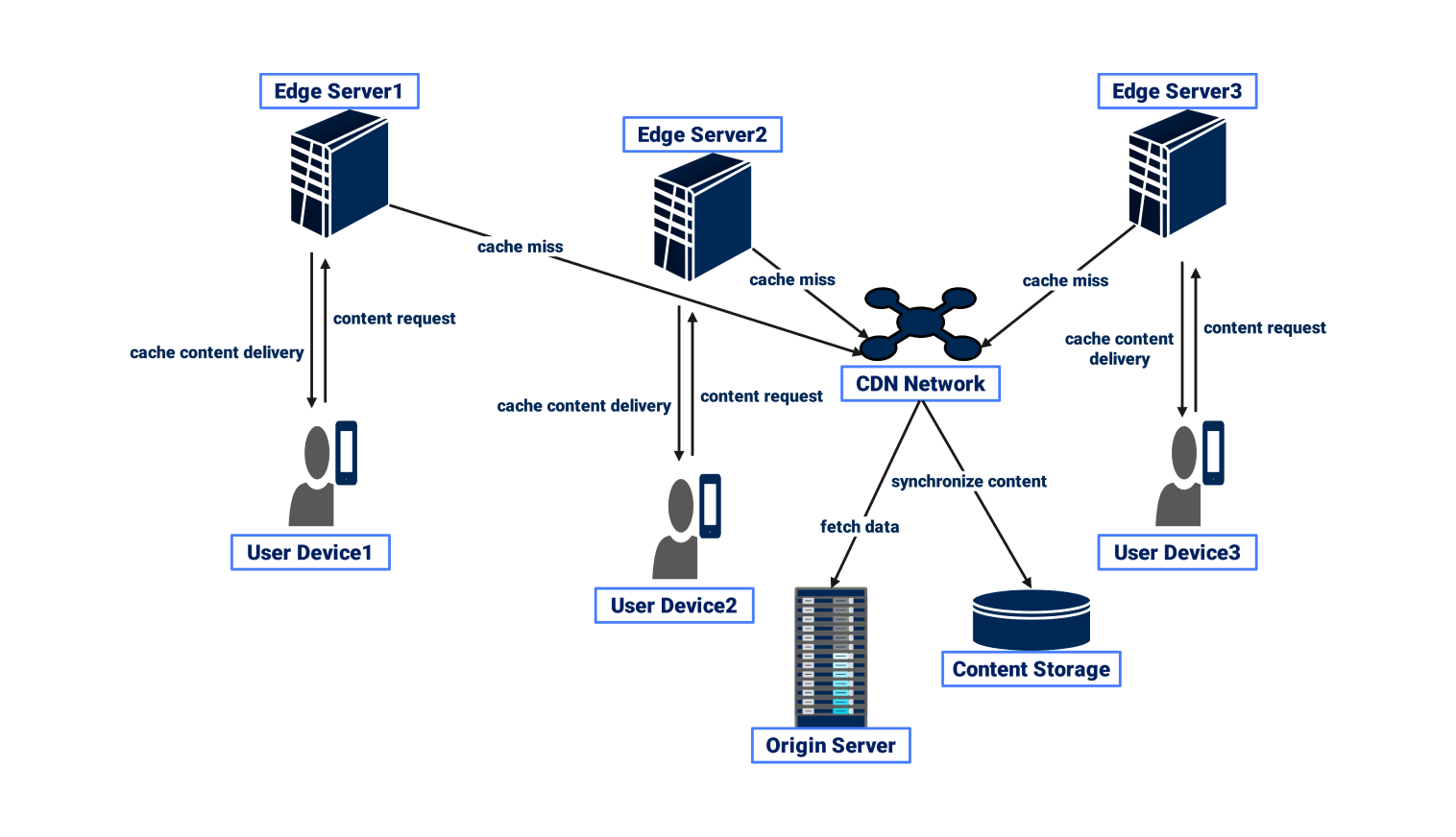
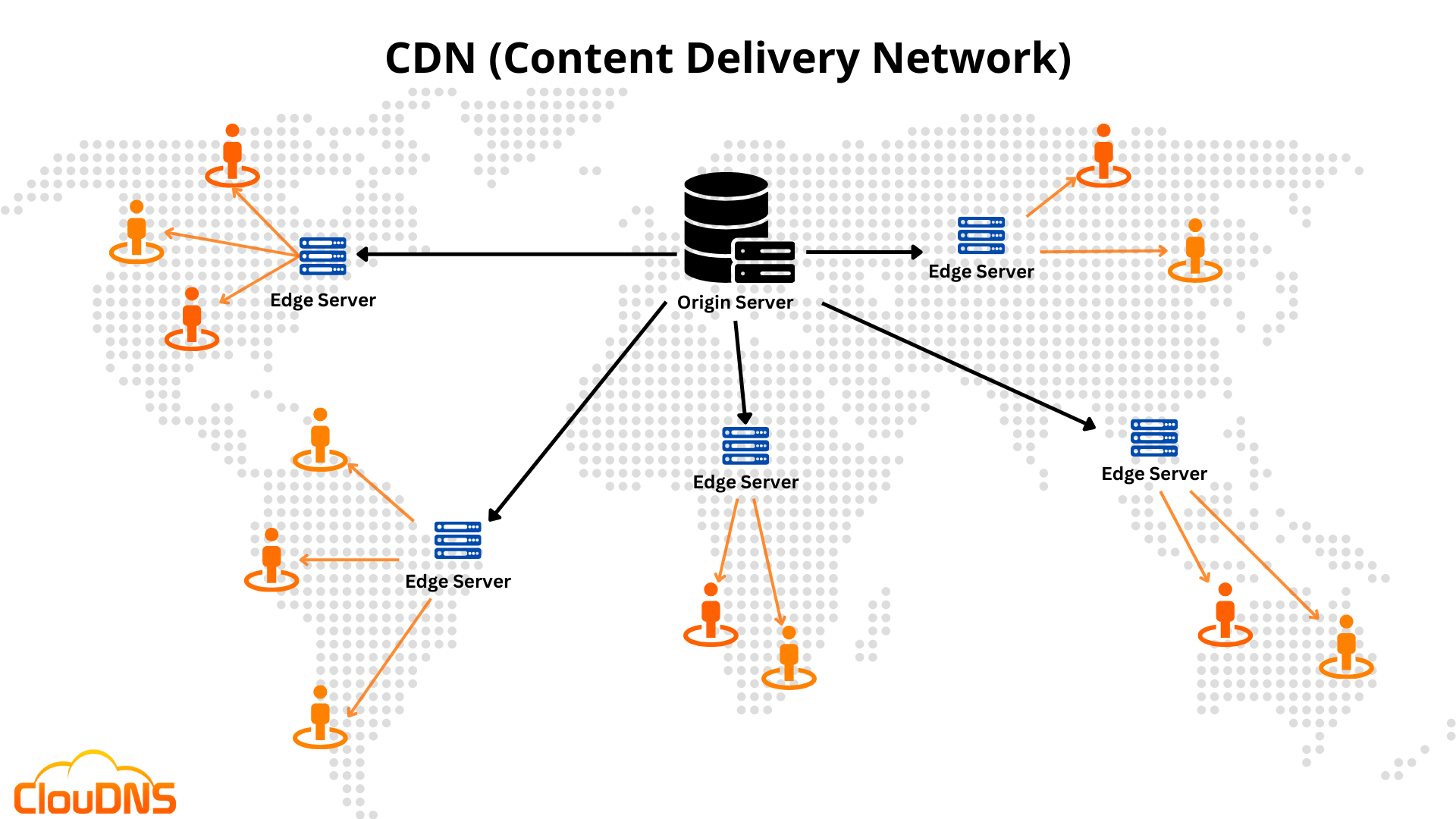
A CDN automatically caches your website content on nodes worldwide.
CDNs suitable for cross-border sellers:
-
Cloudflare (Free, powerful)
-
QUIC.cloud (Excellent for OLS / LiteSpeed)
After enabling a CDN, users in the US and Europe will experience much faster access.
🔌 ⑥ Disable Unnecessary Features (Easy to Overlook)
-
Disable WordPress Emoji (loads extra scripts)
-
Disable Heartbeat API (smoother backend)
-
Disable XML-RPC (improves security + reduces resource usage)
-
Disable WP-Cron and use system Cron
These can be implemented with WPCode or Perfmatters.
📊 3. How to Measure Website Speed Optimization Results?
Essential tools:
| Tool | Purpose |
|---|---|
| Google PageSpeed Insights | Google's official speed score |
| GTmetrix | More detailed loading waterfall chart |
| Pingdom | Test speed from global nodes |
Recommended testing method:
-
Test desktop + mobile
-
Test multiple times from the same node
-
Compare scores after optimization
Typically, after optimization, mobile scores can improve from 30–40 to 70+, and desktop scores can reach 90+.
🎯 4. Three Speed Maintenance Tasks Cross-Border Sellers Must Stick To
-
Image management: compress before uploading
-
Regularly clean up unused plugins
-
Database optimization (WP-Optimize)
Speed optimization isn't a one-time task, but once the basics are done, monthly maintenance is sufficient.
🏁 Conclusion: Website Speed Optimization Equals Higher Conversion Rates
If you're running ads daily, improving your website speed will directly lower your customer acquisition costs.
The faster the speed:
✔ Longer user dwell time
✔ Smoother browsing
✔ Lower cart abandonment rate
✔ Better search rankings
✔ Cheaper ads
Website speed optimization is the most cost-effective and worthwhile optimization work.
More great content:
1.Build your first website in just 15 minutes—super simple, zero code!
2.Step-by-step website building tutorial, from deployment to optimization, all covered in one go


Comments (0)