
In the context of globalization, building a website that supports multilingual features has become a standard for cross-border e-commerce and content websites. However, many users of the GTranslate plugin encounter a problem:
👉 The Globe-style language switcher causes layout chaos, icon misalignment, and a poor user experience after clicking.
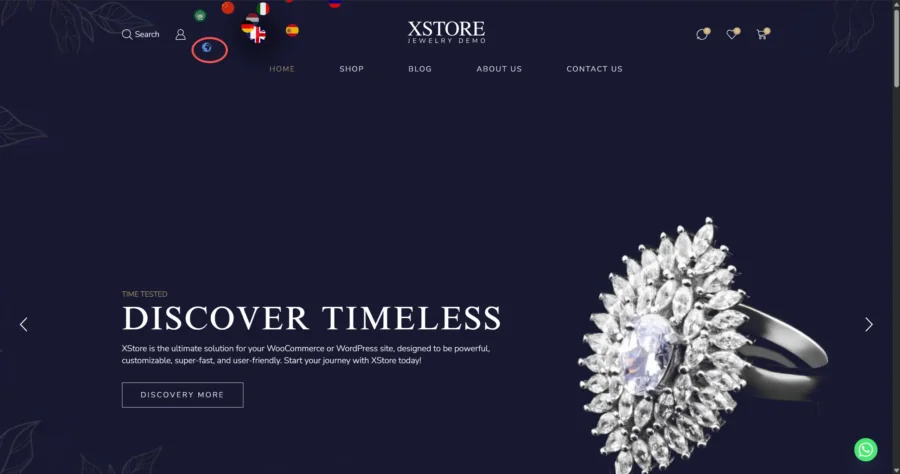
This article will guide you step by step:
- How to fix the Globe icon offset
- How to achieve a neat multilingual layout
- How to create a more professional language switching UI
1. Common Multilingual Problem Analysis
When using GTranslate's Globe mode, the default issues include:
- ❌ Flags arranged in a circle (unattractive)
- ❌ Layout disorder after clicking
- ❌ Globe icon position gets pushed aside
- ❌ Not suitable for e-commerce/professional websites
The reason is:
👉 The plugin uses absolute positioning with left/top to forcibly place each flag
2. Optimization Goals
We aim to achieve:
- ✅ Globe icon stays fixed
- ✅ Languages neatly expand on the right side
- ✅ Maximum of 4 per row, with automatic wrapping
- ✅ More aesthetically pleasing UI
3. Core Solution (CSS)
Add the following code to WordPress Custom CSS:
.gtranslate_wrapper {
    position: relative !important;
}

.gtranslate_wrapper .gglobe {
    position: relative;
    z-index: 2;
    cursor: pointer;
}

.gtranslate_wrapper .gsatelites a {
    position: static !important;
    left: auto !important;
    top: auto !important;
    transform: none !important;
}

.gtranslate_wrapper .gsatelites {
    position: absolute !important;
    top: 0;
    left: 40px;

    width: 160px;

    display: grid !important;
    grid-template-columns: repeat(4, 1fr);
    gap: 10px;

    padding: 12px;
    background: #fff;
    border-radius: 10px;
    box-shadow: 0 8px 20px rgba(0,0,0,0.15);

    opacity: 0;
    visibility: hidden;
    transition: all 0.25s ease;
}

.gtranslate_wrapper:hover .gsatelites,
.gtranslate_wrapper.active .gsatelites {
    opacity: 1;
    visibility: visible;
}

.gtranslate_wrapper .gsatelites img {
    width: 20px;
    height: 20px;
}
4. Click to Expand (JS Enhancement)
<script>
document.addEventListener("DOMContentLoaded", function () {
    const wrapper = document.querySelector(".gtranslate_wrapper");
    const globe = wrapper.querySelector(".gglobe");

    globe.addEventListener("click", function (e) {
        e.stopPropagation();
        wrapper.classList.toggle("active");
    });

    document.addEventListener("click", function () {
        wrapper.classList.remove("active");
    });
});
</script>
5. Effect Enhancement (UI Optimization)
You can further optimize:
- Add hover effects
- Use frosted glass effect
- Adjust spacing and size
.gtranslate_wrapper .gsatelites {
    backdrop-filter: blur(6px);
    background: rgba(255,255,255,0.9);
}
6. Multilingual Website Optimization Tips (SEO Focus)
To excel in multilingual support, it's not just about the switch button:
1️⃣ URL Structure
- /en/
- /fr/
- /de/
2️⃣ hreflang Tags
Improve Google indexing
3️⃣ Content Localization
Don't rely solely on machine translation
4️⃣ Page Speed
Multilingual features can affect loading speed
Conclusion
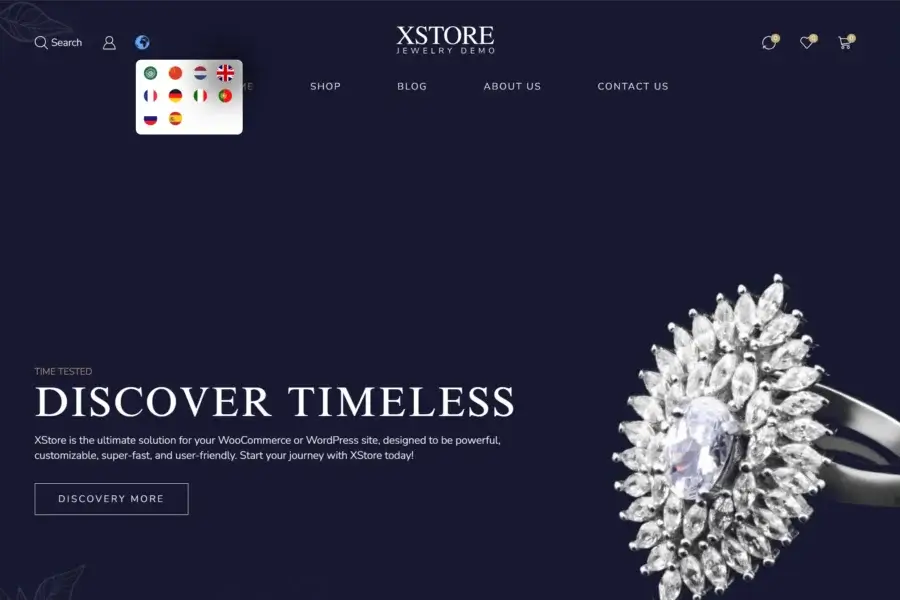
Through this optimization, you can upgrade a basic multilingual switcher into a professional-grade UI component.
👉 Better user experience = Higher conversion rates
👉 More standardized structure = Stronger SEO results


Comments (0)