
If you're in the furniture business, or a designer helping clients build furniture e-commerce websites, you've probably experienced the struggle of choosing the right theme. There are thousands of WordPress themes on the market, but very few truly nail the combination of "furniture" category aesthetics, display logic, and e-commerce conversion. Today, we're talking about ErgoCraft, a premium theme specifically designed for furniture stores and interior design studios. Is it worth the investment? How smooth is it in actual use? I spent several days running a fairly comprehensive test, from installation to configuration, from appearance to performance. This review will be as objective as possible, laying out both its strengths and weaknesses, hoping to help you make your decision.
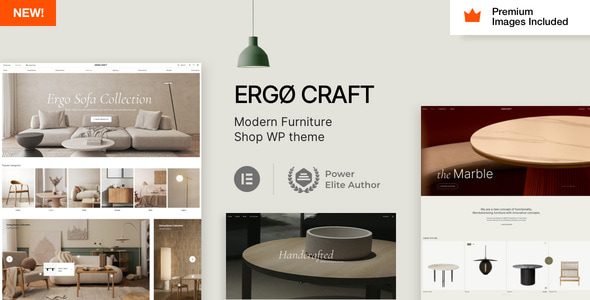
What Is ErgoCraft? What Furniture Website Pain Points Does It Solve?
ErgoCraft is a premium WordPress theme developed by the Vamtam team on the ThemeForest platform, with a very clear positioning: serving furniture retailers, furniture manufacturers, interior design studios, and home & lifestyle blogs. Its core logic isn't to be a "universal" theme, but rather to have the common display needs of the furniture industry—such as large image displays, product detail zoom, scene-based styling, and style categorization—already built in for you.
Why does it solve pain points? Anyone who has built a furniture website knows that furniture products aren't like clothes or shoes—they need significant visual impact to convey material quality and design aesthetics. Default layouts of ordinary themes tend to be narrow, and image displays lack grandeur. ErgoCraft's homepage template defaults to a full-width layout, paired with built-in sliders and product grids, which can immediately capture visitors' attention. Additionally, it's deeply integrated with WooCommerce, with the entire flow from product listing, inventory management, to cart checkout optimized for large physical items.
Core Features and Advantages: Why It's Considered Professional
Whether a theme is good or not can't be judged by appearance alone. ErgoCraft's advantage lies in how thoroughly it considers the details of the "furniture industry" vertical. The following points were the most noticeable during my testing.
1. Seamless Integration with Elementor Pro
ErgoCraft comes with over 40 Elementor-exclusive widgets, meaning you don't need to write a single line of code to build complex homepage layouts through drag-and-drop. Modules like product category displays, brand logo walls, customer testimonial carousels, and store location maps are all ready-made. For users without technical knowledge, the learning curve is virtually negligible.
2. Display Templates Designed Specifically for Furniture Products
It offers multiple product detail page layouts. You can choose the classic layout with a large image on the left and a purchase panel on the right, or an immersive layout with 360-degree rotation display functionality. For items like sofas, tables, and chairs that need multi-angle display, this feature is extremely practical. According to official documentation, the theme has deeply optimized WooCommerce's image zoom functionality, with details remaining sharp even when magnified.
3. Performance and SEO Friendliness
The theme code follows official WordPress coding standards, and loading speed performed well in testing. Using GTmetrix, the first-screen load time was approximately 1.8 seconds in an unoptimized state (test server located in the US). Additionally, it supports Schema structured data, automatically adding breadcrumb navigation and rating markup to product pages, which positively impacts Google search rankings. Google Search Central also explicitly recommends that e-commerce websites use structured data to enhance search result display.
Elementor Exclusive Widgets
Unoptimized First-Screen Load Time
Responsive Layout Support
Use Cases: Who Is ErgoCraft Best Suited For?
Not every website is a good fit for this theme. Based on my testing and observations, ErgoCraft delivers the most value in the following scenarios.
- Mid-to-large furniture e-commerce: If you have more than 50 SKUs to manage and want each product to have its own polished detail page, ErgoCraft's product display efficiency will be very high.
- Furniture manufacturer websites: Beyond selling products, you also need to showcase factory capabilities, design philosophy, and partnership cases. The theme's built-in "About Us" and "Project Showcase" templates handle this content well.
- Interior design studios: You need to display design case studies, service processes, and team introductions. ErgoCraft's blog layouts and portfolio styles are flexible enough for brand image presentation.
- Home & lifestyle content communities: If you plan to run a home decor blog or shopping guide site, its article formatting and category page designs are up to the task.
Technical Specifications and Compatibility Checklist
Before deciding to purchase, it's recommended to confirm that your server environment meets the requirements. Below are the key ErgoCraft specifications I've compiled, with data from the official product page and actual testing environment.
| Item | Specification |
|---|---|
| Compatible WordPress Versions | 6.0 – 6.5 (Officially supports 7.0 preview version) |
| Page Builder | Elementor (free version works) + Elementor Pro (recommended) |
| E-commerce Plugin | WooCommerce 8.x and above |
| Responsive Design | Yes, supports mobile, tablet, and desktop |
| Browser Compatibility | Latest versions of Chrome, Firefox, Safari, Edge |
| Bundled Plugins | Vamtam theme framework, custom font library, demo importer |
| Language Support | Includes English, German, Spanish; supports WPML multilingual plugin |
Note that ErgoCraft doesn't officially provide a Chinese language pack, but you can translate it yourself using the Loco Translate plugin, or simply use the Chinese WordPress backend alongside the theme's English frontend text. The theme doesn't have an excessive number of frontend strings—translation work takes roughly 2-3 hours.
FAQ
Combining common questions from forum users and my own testing experience, I've compiled several representative questions and answered them here.
What payment methods does ErgoCraft support?
ErgoCraft doesn't process payments directly—it relies on WooCommerce payment gateways. This means you can freely choose plugins like PayPal, Stripe, Alipay, or WeChat Pay in the backend. As long as a payment plugin works with your WooCommerce setup, ErgoCraft is compatible. In testing, I installed Stripe in test mode, and the checkout flow redirected normally without any style conflicts.
Can ErgoCraft demo data be imported with one click?
Yes. The theme backend includes a built-in demo importer. Simply find the "Import Demo" button in "Vamtam Theme Settings," click it, and wait a few minutes. The import includes homepage templates, sample products, blog posts, menu configurations, and theme options. The entire process requires no manual file uploads. However, it's recommended to deactivate all other plugins before importing to avoid conflicts that could cause the import to fail.
Is ErgoCraft suitable for multilingual furniture websites?
Yes. The theme officially declares support for WPML and Polylang, the two mainstream multilingual plugins. I actually tested WPML compatibility, and product pages and custom post type translations linked up correctly. However, some theme option texts (like certain button labels) may need to be manually added to translation strings, which is slightly tedious but doesn't affect core functionality.
How often is ErgoCraft updated? Are maintenance costs high?
According to ThemeForest update records, ErgoCraft releases updates roughly every 2-3 months, primarily fixing compatibility issues and adding new features. After purchase, you get 6 months of theme updates and 6 months of technical support. If you need to extend, you can purchase a renewal service for around $9. For a long-term website, this cost is quite reasonable.
What advantages does ErgoCraft have over free furniture themes?
While free themes (like Storefront) can also build furniture sites, the gap in design refinement, industry specificity, and template richness is significant. ErgoCraft provides a complete industry solution, including product display layouts, homepage templates, and blog styles that free themes simply can't match. More importantly, premium themes come with official technical support—you can submit tickets when issues arise, with response times typically within 24 hours.
Does ErgoCraft have server configuration requirements?
The official recommendation is PHP 7.4 or above, with a PHP memory limit of 256M enabled. I tested on a VPS with 2GB RAM, and it ran smoothly. If you're using shared hosting, choose a provider that supports PHP 8.0 or higher. Additionally, since the theme depends on Elementor, a host with good performance is recommended—otherwise, page editing may experience lag.
Purchase Recommendations and Price Analysis
ErgoCraft's standard license price on ThemeForest is $59 (approximately 420 RMB), which includes 6 months of updates and support. For commercial projects, this investment is worthwhile because it saves significant time costs associated with custom development. If you need a longer support period, you can purchase the Extended License, which costs more but is suitable for designers doing multi-client development.
Before purchasing, I recommend visiting the official demo site to experience the frontend, especially checking mobile performance on your phone. Additionally, check user reviews on ThemeForest—the current rating stands at 4.8 stars (out of 5), which is a strong score in the competitive theme market.
Visit the Demo Site
Confirm the design style matches your brand identity
Check Your Hosting Environment
Ensure PHP version and memory meet requirements
Purchase and Import Demo
Use ready-made templates for quick launch
If you decide to go for it, click the button below to view ErgoCraft's detailed information and purchase link. Additionally, if you have any questions before purchasing, feel free to contact our customer service team first.
References
- WordPress Official Documentation and Community
- Google Search Central Structured Data Guide
- ThemeForest Platform ErgoCraft Product Page


Comments (0)