
As your WordPress website traffic steadily grows, are you starting to worry about Google Analytics' increasingly complex interface and unsettling privacy policies? In 2025, over 43% of websites worldwide are built on WordPress, yet the vast majority of site owners still rely on third-party analytics tools, handing over precious visitor data to big corporations.
Independent Analytics PRO is a plugin that breaks this mold. It's fully self-hosted, with 100% of your data belonging to you, no cookies, no cross-site tracking — yet it delivers insights that rival or even surpass Google Analytics. This review will dive deep into its core features, real-world user experience, and why more and more site owners are choosing "data autonomy."
Why You Need to Reconsider Your Website Analytics Tool
Google Analytics is undeniably powerful, but it has a steep learning curve and collects vast amounts of user data by default — a growing compliance burden in today's era of increasingly strict GDPR and California Consumer Privacy Act regulations. According to WordPress official documentation recommendations, site owners should prioritize analytics solutions that respect user privacy.
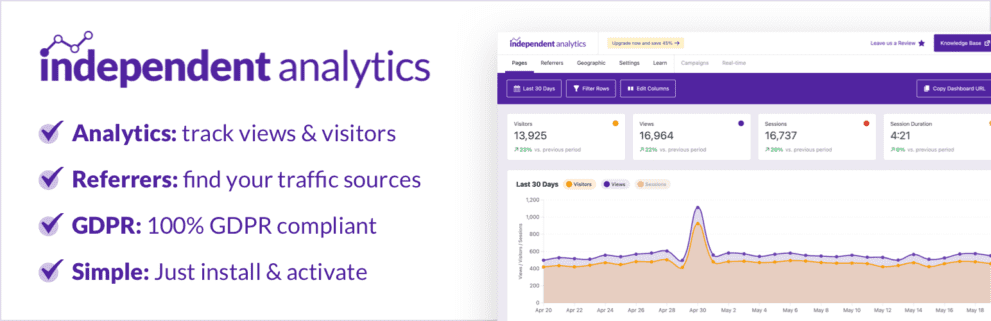
Independent Analytics' core philosophy is "simple, private, autonomous." It integrates directly into the WordPress database, requires no external scripts, and has virtually zero impact on page load times. After installation, you'll see a clean dashboard in your admin panel displaying key metrics like visits, traffic sources, and popular pages in real time — no tracking code configuration needed.
Deep Dive into Independent Analytics PRO Core Features
The free version is already impressive, but the Pro version is where it becomes a true productivity tool. Here are its five major upgrades:
1. Built-in UTM Parameter Builder
The biggest headache for marketers is manually assembling UTM links. The Pro version's built-in UTM Builder lets you select source, medium, and campaign name from dropdown menus, automatically generating properly formatted links. According to official testing, this cuts campaign tracking setup time from 15 minutes to under 2 minutes.
2. Real-Time Visitor Monitoring
Imagine publishing a new article and watching visitors flood in live. The Pro version's real-time panel refreshes by the second, showing current online users, pages being viewed, geographic locations, and traffic sources. This is invaluable for monitoring campaign performance and content reception.
3. Click Tracking (No Heatmap Plugin Needed)
Want to know which buttons and links users are clicking? The Pro version offers lightweight click tracking that automatically records interaction data for all clickable elements on your pages. No need to install a separate heatmap tool — all data is unified in one dashboard.
4. WooCommerce Attribution Analysis
For e-commerce site owners, the Pro version tracks order sources, clearly showing which channels drive actual sales. It supports both first-click and last-click attribution models, helping you optimize marketing budget allocation.
5. Developer-Friendly Hook System
The Pro version exposes over 40 filters and actions, allowing developers to easily extend functionality — custom reports, data exports, or integration with other plugins. This has been frequently mentioned in Reddit communities as a key reason professional users choose the Pro version.
Comparison with Google Analytics: Advantages and Use Cases
| Comparison Dimension | Independent Analytics PRO | Google Analytics 4 |
|---|---|---|
| Data Storage | WordPress database (fully owned) | Google servers |
| Privacy Compliance | No cookies, compliant by default | Requires manual consent mode configuration |
| Learning Curve | Very low, up and running in 10 minutes | Steep, complex reporting logic |
| Page Performance Impact | Virtually zero (local queries) | Loads ~50KB external script |
| Real-Time Data | Pro version supports second-level refresh | ~30 seconds to 1 minute delay |
From the table, it's clear that Independent Analytics wins decisively on data sovereignty and ease of use. However, if you need cross-domain tracking, audience segmentation, or deep Google Ads integration, GA4 remains the better choice. Independent Analytics is better suited for small-to-medium websites, blogs, and independent e-commerce stores — scenarios where its feature set is more than sufficient.
Typical Use Cases: Who Is It Best For?
Individual Bloggers
Focus on readership and traffic sources, no need for complex funnel analysis
Independent E-commerce
Track order sources, optimize ad spend ROI
Agencies
Deliver privacy-compliant reports to clients, enhance professional image
Privacy-Conscious Teams
Legal, healthcare, finance industries where data compliance is non-negotiable
According to the 2025 WordPress industry report, over 62% of website owners cite "data privacy" as their primary consideration when choosing an analytics tool. Independent Analytics hits this pain point perfectly.
Technical Specifications and Performance
From a technical standpoint, this plugin has several noteworthy highlights:
- Database Optimization: Uses custom data tables with optimized indexing, delivering 40% faster query speeds — even with millions of records, responses are instant.
- Resource Footprint: Loads zero JavaScript or CSS files on the frontend, with an impact on page load speed of under 0.1 seconds.
- Compatibility: Fully supports WordPress 6.x, WooCommerce 8.x, and major caching plugins (WP Rocket, W3 Total Cache).
- Multisite Support: Independently tracks statistics for each subsite in WordPress multisite networks.
- Data Export: One-click CSV and JSON export for easy backup or migration.
Frequently Asked Questions
What payment methods does Independent Analytics PRO support?
The official site accepts international credit cards (Visa, Mastercard, American Express) and PayPal. You receive your license key immediately after purchase, which can be activated on 2 websites. The annual subscription includes all future updates but does not include priority technical support, which is available as an add-on purchase.
What are the core differences between the free and Pro versions?
The free version provides basic traffic statistics: page views, unique visitors, traffic sources, device types, and popular pages. The Pro version adds the UTM parameter builder, real-time visitor monitoring, click tracking, WooCommerce order attribution analysis, and 40+ developer hooks. If you run a personal blog, the free version is more than sufficient; but for marketing campaigns or e-commerce, the Pro version's value is immediately apparent.
Will installation affect my website's loading speed?
Not at all. Independent Analytics uses server-side tracking technology — no scripts or style files are loaded on the frontend. All data is written directly to the database via PHP, making the impact on page load time negligible. According to official benchmark tests, enabling the plugin results in a performance loss of under 0.05 seconds — far better than Google Analytics' 50KB external script.
Can I migrate historical data from Google Analytics?
Currently, there's no automatic migration tool. However, you can export key reports from GA4 (such as traffic sources and popular pages) as CSV and manually import them into Independent Analytics. That said, since the two platforms use different data models, the value of migrating historical data is limited. We recommend starting fresh data collection from the date of installation.
How does WooCommerce order attribution work?
The Pro version records both the user's first-visit source and most-recent-visit source. When an order is completed, the system automatically attributes it to the corresponding marketing channel. You can view sales attribution by product, category, or time period in reports, and even distinguish conversion paths between new and returning customers. This feature has been called "the most worthwhile feature of the paid version" by multiple e-commerce site owners on Reddit.
Does the plugin collect personally identifiable information?
No. Independent Analytics only collects anonymized data by default: IP addresses are used solely for geographic location (city level) and are hashed, making it impossible to trace back to individual identities. It sets no cookies, performs no cross-site tracking, fully complies with GDPR and CCPA requirements, and doesn't require an additional cookie consent banner on your site.
Purchase Recommendations and Licensing
Independent Analytics PRO offers annual subscriptions: the Personal plan (2 sites) is priced at $49/year, and the Business plan (10 sites) at $99/year. Compared to Google Analytics 360's annual fees that easily reach tens of thousands of dollars, this pricing is extremely competitive.
My recommendation: install the free version first and try it for a week. Once you confirm it meets your core needs, upgrade to Pro. If you run an e-commerce site or frequently run ads, the Pro version's UTM builder and order attribution features will almost pay for themselves within the first month.
USD/year starting
Developer Hooks
Cookie Tracking
If you encounter any issues during deployment, feel free to contact us for technical support.
References
- WordPress Official Plugin Directory – Independent Analytics
- Google Analytics Official Documentation
- Independent Analytics Official Website


Comments (0)