
If you run a chiropractic clinic, massage therapy studio, physiotherapy center, or a comprehensive wellness management center, then your website isn't just an "online business card"—it's more like a reception room that stays open 24 hours a day. Patients search for "chiropractor near me" late at night, and compare pricing for different therapy options on weekends. Flexora v12 is a WordPress theme built precisely for these needs—it packages the visual language, appointment conversion paths, and content presentation logic of the healthcare industry right out of the box, so practitioners without a technical background can still build a highly professional site. This review will give you a straightforward basis for judgment, covering features, advantages, use cases, technical specs, and purchasing advice.
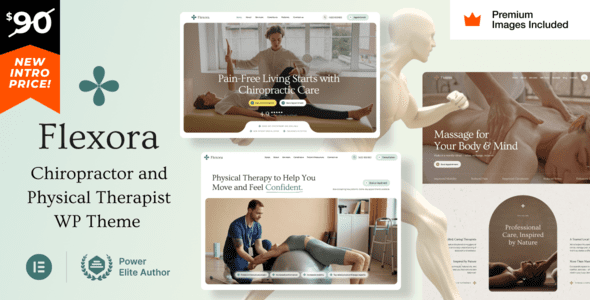
What Is Flexora v12: A Dedicated Theme for the Health & Therapy Industry
Flexora isn't the kind of generic theme that "fits any industry." According to descriptions from review platforms like PressCompare, it's clearly positioned in the niche segments of chiropractic, massage therapy, physiotherapy, and wellness center. The direct benefit of this positioning is: you don't have to design color schemes, layouts, and modules from scratch—the theme's built-in templates are already arranged according to the logic of "put people at ease, build trust, and guide bookings."
The v12 version strengthens compatibility with Elementor and Elementor Pro on top of the original foundation. In other words, you can adjust page structure through drag-and-drop while retaining the theme's preset healthcare industry visual standards. For clinics that want personalization but don't want their site to look like a "jack of all trades, master of none," this "semi-custom" approach is actually more hassle-free.
Breaking Down Flexora v12's Core Features
Looking at the features individually, Flexora v12's value is mainly reflected in four areas: page building, appointment guidance, content presentation, and performance foundation.
In terms of page building, the theme is deeply integrated with Elementor, offering preset blocks tailored to the therapy industry, such as "treatment service cards," "practitioner team introductions," "patient testimonial carousels," and "business hours and address." These blocks don't require you to piece together from blank sections—just replace the text and images and you're ready to go live.
In terms of appointment guidance, Flexora v12 reserves call-to-action buttons and contact form areas in multiple template positions. For the therapy industry, the shorter the path from "learning about services" to "calling/filling out a form to book," the higher the conversion rate. The theme compresses this path into the hero section and fixed positions on every service detail page.
In terms of content presentation, it supports service category classification, team member profiles, and FAQ modules. These three types of content correspond exactly to the three questions patients care about most when making decisions: what can you treat, who will treat me, and what should I pay attention to before and after treatment.
In terms of performance foundation, the theme follows WordPress's official theme development standards, and the code structure is relatively clean. According to WordPress official documentation's recommendations on theme performance, reducing unnecessary script loading is key to improving Core Web Vitals. Flexora v12 has implemented conditional loading in this regard, so redundant resources on non-essential pages won't drag down the entire site.
Choose a template
Import the industry preset homepage, replace brand colors and logo
Fill in services
Enter treatment items, duration, pricing, and applicable symptoms
Take bookings
Configure forms and phone entry points, test submission notifications
Optimize
Compress images, enable caching, submit to search engines
Flexora v12's Pros and Cons: Insights from Real Discussions
On Reddit and multiple review sites, discussions about Flexora center on a few points. Positive reviews generally mention "out-of-the-box industry fit"—one therapy practitioner said in a discussion that he had struggled with a generic theme for two weeks, but after switching to Flexora, he had his appointment page live in three days. Negative voices mainly point to "extension dependency": if you need a more complex membership system or online payment for treatment packages, the theme itself doesn't provide it, and you'll need plugins to fill the gap.
Another repeatedly mentioned advantage is Elementor compatibility. For users already familiar with Elementor, the learning curve is almost zero; for beginners who haven't used a page builder, drag-and-drop operation is far friendlier than editing code. However, note that some advanced modules in Elementor Pro require a separate license—the theme itself doesn't include a Pro license.
On the downside, some users report that the default demo content is excessive. If you directly import the full template set, you'll need to spend time removing unnecessary blocks. Additionally, the theme's default optimization for Chinese typography isn't particularly outstanding. It's recommended to manually specify a Chinese font stack in the font settings to avoid inconsistent line heights and font weights.
| Comparison Dimension | Flexora v12 | Generic Themes |
|---|---|---|
| Industry templates | Built-in therapy/massage/chiropractic templates | Need to design yourself or buy sub-templates |
| Appointment conversion path | Fixed entry points on hero + service pages | Need to manually add forms and buttons |
| Elementor compatibility | Deep integration, preset blocks | Basic compatibility, no industry blocks |
| Time to launch | About 1-3 days to go live | Typically 1-2 weeks |
Who Is Flexora v12 Best For: Four Typical Scenarios
The first category is single-location therapy studios. For teams with limited budgets and no dedicated technical staff, Flexora v12 lets you build a complete site with service introductions, practitioner profiles, and appointment forms in a single weekend.
The second category is multi-location wellness centers. The theme supports creating separate pages for each location, and with the address and business hours modules, patients can quickly find the branch closest to them.
The third category is practitioners transitioning from platforms to self-hosted sites. Those who previously relied on third-party booking platforms faced high commissions and weak brand presence. After building a self-hosted site with Flexora v12, booking data stays in your own hands, which is more controllable in the long run.
The fourth category is health content creators. If you both provide therapy services and publish educational content, the theme's blog templates and FAQ modules can be reused, so you don't need to maintain a separate content site.
days to complete basic launch
industry preset templates
lines of code to adjust layout
Technical Specifications and Compatibility
Flexora v12 is developed based on WordPress's standard theme architecture and is compatible with WordPress 6.x and above. Page building relies on the free version of Elementor to complete most layouts, while Elementor Pro is used to unlock more advanced form and dynamic content modules. PHP version 7.4 or above is recommended, with 8.0 or higher preferred for better performance.
The theme has built-in responsive design, with fixed positioning for appointment buttons and phone entry points on mobile. According to Google Search Central's recommendations, mobile usability is an important factor in search rankings, and Flexora v12's default configuration in this regard meets mainstream standards. Browser compatibility covers recent versions of Chrome, Firefox, Safari, and Edge.
If you need a more detailed feature list and demo address, you can visit the Flexora v12 theme detail page for complete information.
Frequently Asked Questions
Which page builders does Flexora v12 support?
It primarily supports Elementor and Elementor Pro. The theme's preset templates and blocks are all built on Elementor, and the free version of Elementor is enough to complete most page building. If you've already purchased Elementor Pro, you can further use its forms, popups, and dynamic content features. The theme doesn't natively support Beaver Builder or WPBakery, and mixing them may cause style conflicts.
Is Flexora v12 suitable for therapy practitioners without a technical background?
Yes. The theme was designed with the intention of letting non-technical people launch quickly. You only need to know how to replace text, upload images, and drag blocks. Typically, 1 to 3 days is enough to complete a basic site with a homepage, service pages, team page, and appointment form. If you encounter complex requirements like multilingual support or a membership system, it's advisable to find an assistant with WordPress experience.
How is Flexora v12 different from generic WordPress themes?
The biggest difference is industry fit. Generic themes give you a blank canvas, while Flexora v12 gives you templates already arranged according to therapy industry logic. Specifically, it has built-in modules for treatment service cards, practitioner profiles, patient testimonial carousels, and appointment guide buttons, saving you the time of designing from scratch. The trade-off is that if you want a completely atypical website structure, you may need more adjustments.
Does Flexora v12 support online booking and payment?
The theme itself provides display positions and styles for appointment forms, but the processing logic after form submission needs to be completed with plugins. You can use WPForms or Contact Form 7 to receive appointment requests, and WooCommerce or Simple Pay to handle online payments for treatment packages. The theme doesn't have a built-in payment gateway, which is to avoid conflicts with payment habits in different regions.
Does Flexora v12 affect website speed?
The theme code follows WordPress official standards and implements conditional loading, so scripts on non-essential pages won't load site-wide. Actual speed also depends on your hosting environment, image compression, and caching configuration. It's recommended to use it with caching plugins and image optimization plugins. On standard shared hosting, the homepage load time after optimization can typically be kept under 2 seconds.
Do I get updates and technical support after purchasing Flexora v12?
Purchasing through official channels typically includes updates and technical support for a certain period. The specific duration and scope depend on the license type you choose. It's recommended to confirm before purchasing whether Elementor Pro authorization is included, since the theme itself doesn't come with a Pro license. If you need long-term operation, choosing a license plan that includes ongoing updates is more cost-effective.
Purchasing Advice: When It's Worth Buying
If you meet two or more of the following three conditions, Flexora v12 is worth considering: your business falls under health and therapy; you want your website live within a week; you don't want to spend too much time on design and layout. Conversely, if what you need is an extremely complex membership management platform, or your industry has nothing to do with therapy, then evaluating a combination of a generic theme plus industry plugins may be more flexible.
On pricing, it's recommended to compare quotes from official licenses and third-party marketplaces, and note whether update services are included. Before purchasing, it's best to look at the demo site first to confirm that the template style matches your brand tone. If you're unfamiliar with technical configuration, you can also contact us first to consult on a suitable solution.


Comments (0)