
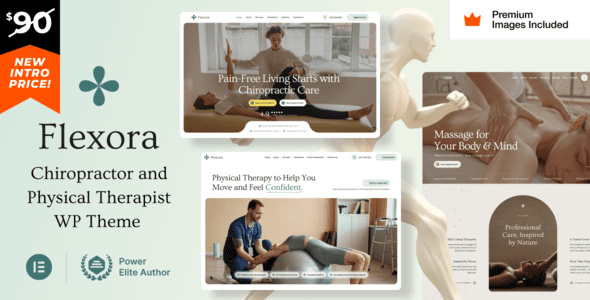
Flexora v16 is a WordPress theme built specifically for chiropractors, physical therapists, massage clinics, and holistic wellness practitioners. It combines a calm, professional visual language with flexible page-building capabilities, allowing wellness brands to convey a trustworthy healing atmosphere online. Whether you run a chiropractic center, a sports rehabilitation studio, or a comprehensive wellness space offering massage and mind-body therapy, Flexora helps you quickly build a professional website that matches your industry's tone.
Core Positioning and Use Cases of the Flexora WordPress Theme
Flexora is not a general-purpose theme—its design logic revolves around the health and wellness industry. The color palette features low-saturation natural tones, and the typography emphasizes whitespace and a sense of breathing room, avoiding the cold feel common to medical websites. The theme includes built-in modules for service listings, therapist team introductions, appointment guidance, and patient testimonials, making content organization more aligned with the real needs of chiropractic and physical therapy practices.
If you're looking for more website-building solutions suited to health and local service industries, you can refer to the categorized recommendations in the WordPress Theme Resource Library and choose based on your business stage.
What Types of Health Practitioners Is Flexora Suited For
From chiropractic clinics and physical therapy centers to massage therapy studios and holistic wellness workshops, Flexora's page structure covers them all. It's equally suitable for individual practitioners, such as independent massage therapists or rehabilitation consultants, who can build online trust through concise service introduction pages and appointment entry points.
Key Features and Design Highlights of Flexora v16
Flexora offers responsive layouts, ensuring patients can browse smoothly on mobile phones, tablets, and desktops. The theme typically includes multiple pre-built page templates, such as homepage, service details, team introduction, pricing plans, blog, and contact pages, reducing the time cost of building from scratch. For physical therapists, clear treatment descriptions and appointment pathways are key to conversion, and Flexora's modular design allows this information to be presented intuitively.
The theme also emphasizes compatibility with mainstream page builders, making it easy to adjust layouts and content without writing code. For specific supported builders and plugins, please refer to the official documentation.
How to Get Started with the Flexora Theme
Installing Flexora follows the same process as regular WordPress themes: go to the Appearance menu in your dashboard, select Add New Theme, upload the theme package and activate it, then import demo content or manually configure pages based on the guidance. After activation, it's recommended to first set your brand colors, logo, and navigation menu, then gradually replace demo images and copy to ensure your website content aligns with your clinic or studio's positioning.
If you'd like to learn about official release channels and update notes, visit the Flexora official page for the latest version information.
Frequently Asked Questions
How do I install the Flexora theme?
In your WordPress dashboard, go to "Appearance > Themes > Add New Theme," upload the Flexora theme zip file and activate it. Some versions may require installing companion plugins first—please refer to the official documentation for details.
What use cases is Flexora suitable for?
It's primarily designed for chiropractic clinics, physical therapy centers, massage therapy studios, and holistic wellness workshops. It's also suitable for individual therapists building a professional image website.
Is Flexora compatible with mainstream page builders?
Flexora is generally compatible with common page builders for visual page editing. For specific compatibility scope and version requirements, please refer to the official documentation.
How often is the Flexora theme updated?
Theme updates depend on the official release schedule. It's recommended to enable official update notifications or regularly check the version changelog on your purchase channel to stay informed about compatibility and feature improvements.

