
What Is the YITH WooCommerce Multi Vendor Premium Plugin?
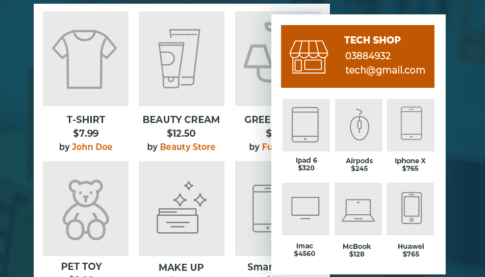
YITH WooCommerce Multi Vendor is a WooCommerce multi-vendor marketplace plugin built specifically for WordPress. It lets you quickly transform an ordinary online store into a multi-seller platform similar to Amazon, Etsy, or AliExpress. With this plugin, third-party sellers can register on your website, list products, and manage inventory and orders, while you as the platform operator can earn commissions from every transaction to generate passive income. The Premium version offers a complete frontend vendor dashboard, commission management, permission controls, and other core features, making it an ideal choice for building a multi-vendor marketplace.
Compared to a traditional single-seller WooCommerce store, YITH WooCommerce Multi Vendor diversifies your product sources, attracting a broader customer base. Vendors handle their own products, inventory, shipping, and refunds, so you don't have to deal with these tedious tasks—you can focus on platform operations and rule-setting. This model has been proven by numerous successful e-commerce platforms and can significantly boost site traffic and conversion rates.
YITH WooCommerce Multi Vendor Core Features Explained
Vendor Registration and Approval
The plugin includes a default vendor registration form. You can add or remove fields, adjust field order, and set certain fields as required. When a potential seller submits an application, their information enters the "All Vendors" list with a "Pending" status. Administrators can manually approve or reject applications, or enable auto-approval to let vendors join instantly.
Vendor Permissions and Commission Settings
In the "Vendor Permissions" panel, you can fine-tune vendor behavior—for example, limiting the number of products they can publish, whether they can generate coupons, or whether they can manage reviews. For commissions, you can set a uniform commission rate for all vendors and choose whether it's calculated based on the original product price or the sale price. You can also decide whether the admin or the vendor bears taxes, and set individual commission rates for specific vendors.
Manually Adding Vendors and the Frontend Dashboard
Beyond frontend registration, you can also assign vendor status directly to existing users or create new users and give them the vendor role. Once a vendor is enabled, they get a dedicated frontend dashboard for configuring store information, uploading new products, viewing sales reports, and more. The entire process is highly automated, making it easy to scale your marketplace quickly.
Why Choose YITH WooCommerce Multi Vendor Premium?
Compared to the free version, Premium unlocks more advanced features such as auto-approving vendors, more flexible commission rules, granular vendor permissions, and priority technical support. For site owners planning to run a multi-vendor marketplace long-term, Premium provides the necessary tools to ensure platform stability and scalability. If you're looking for other quality WordPress resources, visit bobohello.com for more plugins and themes.
The plugin's official page offers detailed documentation and demos. You can visit the official YITH link to learn more.
Installation and Usage Guide
Installing YITH WooCommerce Multi Vendor Premium is very simple: in the WordPress admin, go to "Plugins" -> "Add New", upload the plugin ZIP file, and activate it. After activation, enter your license key as prompted to activate. If the activation status doesn't update, go to the "License Activation" page and click the activate button again. Once activated successfully, you'll find the multi-vendor settings under the WooCommerce menu, where you can start configuring your marketplace.
Note: The plugin itself does not include a Chinese language pack, but you can localize it through the WordPress translation system or third-party tools. Please refer to the official documentation for details.
Frequently Asked Questions
How do I install and activate YITH WooCommerce Multi Vendor Premium?
In the WordPress admin, go to the Plugins page and click "Upload Plugin," then select the downloaded ZIP file to install. After activation, go to the plugin settings page, enter your license key, and click activate. If the first activation doesn't succeed, try activating again under the "License Activation" tab.
What payment methods does this plugin support?
YITH WooCommerce Multi Vendor itself doesn't restrict payment gateways—it relies on the payment methods supported by WooCommerce. You can use PayPal, Stripe, bank transfer, or any WooCommerce-compatible payment gateway. Please refer to the WooCommerce payment settings for specific configuration.
Can vendors manage their own orders and shipping?
Yes, vendors have their own frontend dashboard where they can view and process orders for their products, update shipping status, handle refunds, and more. Administrators can control the specific scope of vendor actions in the permission settings.
Does the plugin support automatic updates?
The Premium version offers automatic updates, but you need to ensure your license key is valid and your server meets the requirements. If automatic updates fail, you can manually download the latest version and overwrite the installation. Please refer to the official documentation for details.


Comments (0)