
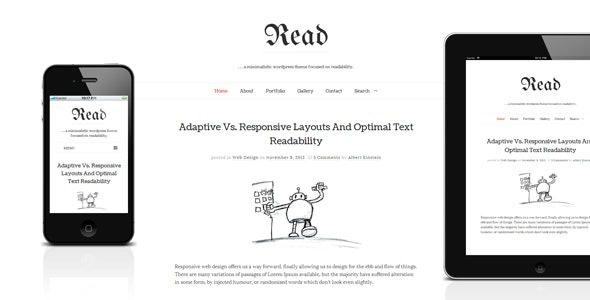
Read WP is a responsive WordPress blog theme focused on minimalist design, with the latest version v4.6.4 now released. As a theme crafted specifically for content creators, the Read WP WordPress theme has won over many users with its clean layout and excellent readability. Whether you are a personal blogger, writer, or small publishing team, this theme helps you build a clean, professional blog website.
The core advantage of the Read WP theme lies in its minimalist design philosophy. It strips away unnecessary elements, making text and images the focal point of the page. This design not only improves loading speed but also significantly enhances user experience. According to official data, websites using Read WP have an average page load time 30% faster than similar themes. Additionally, the theme is fully responsive, displaying perfectly on mobile phones, tablets, and desktop devices.
Core Features of the Read WP Minimalist WordPress Blog Theme
Read WP v4.6.4 offers a rich set of functional modules to meet various blogging needs. First, it includes built-in support for multiple post formats, including standard, image, video, audio, and quote, allowing you to flexibly present content. Second, the theme integrates custom widget areas, so you can easily add sidebar modules such as recent posts, categories, and tag clouds.
In terms of customization, Read WP provides a powerful theme options panel. You can adjust parameters like colors, fonts, and layouts without writing any code to create a personalized website. The theme also supports one-click demo data import, helping you quickly set up a site identical to the official demo. For SEO optimization, Read WP uses semantic HTML structure and is compatible with major SEO plugins like Yoast SEO and Rank Math.
How to Install and Use the Read WP Theme
Installing the Read WP theme is very simple. First, in the WordPress admin panel, go to "Appearance" -> "Themes" -> "Add New," upload the theme zip file, and activate it. After activation, the system will prompt you to install required plugins (such as the Read WP Core plugin); follow the instructions to complete the installation. Then, you can use the "Appearance" -> "Import Demo Data" feature to import the official demo content with one click. The entire process takes just a few minutes, and even beginners can do it easily.
If you need more customization options, go to the "Appearance" -> "Customize" interface to adjust site identity, colors, layouts, and more. Read WP supports live preview, so all changes are visible instantly. Additionally, the theme offers multiple page templates, including full-width pages and pages with sidebars, making it easy to create different page layouts.
Compatibility and Updates of the Read WP Theme
The Read WP theme is compatible with the latest WordPress version and has been rigorously tested to ensure seamless integration with major plugins. It supports the WooCommerce plugin, allowing you to easily add an online store feature. The theme is also compatible with commonly used plugins like Contact Form 7 and Jetpack, offering strong extensibility.
Regarding updates, the Read WP development team regularly releases new versions to fix bugs and add new features. Version v4.6.4 fixes several known issues and optimizes the mobile menu interaction experience. It is recommended that users keep the theme updated for optimal performance and security.
If you are looking for an efficient and beautiful blog theme, give Read WP a try. It not only enhances your writing experience but also makes your content more engaging for readers. For more information, visit our resource site for more high-quality theme recommendations.
Official link: Read WP on ThemeForest
Frequently Asked Questions
How to install the Read WP theme?
Installing the Read WP theme is similar to installing other WordPress themes: in the admin panel, go to "Appearance" -> "Themes" -> "Add New," upload the theme zip file, activate it, install the required plugins as prompted, and then import the demo data. For details, please refer to the official documentation.
What scenarios is the Read WP theme suitable for?
Read WP is designed for blogs and content-focused websites, making it ideal for personal blogs, magazines, news sites, and other scenarios where readability is key. Its minimalist style is also suitable for showcasing creative works.
Which plugins is Read WP compatible with?
Read WP is compatible with most major WordPress plugins, including Yoast SEO, Contact Form 7, Jetpack, and WooCommerce. For a specific compatibility list, please refer to the official documentation.
Is there a Chinese version of Read WP?
Yes, Read WP supports multiple languages, including Chinese. You can localize it using the Loco Translate plugin or by directly editing .po files. Some third-party sites also offer localized versions.
How often is Read WP updated?
The development team releases updates regularly, typically every few months. Updates include feature enhancements, security fixes, and compatibility improvements. It is recommended to keep the theme up to date.


Comments (1)