
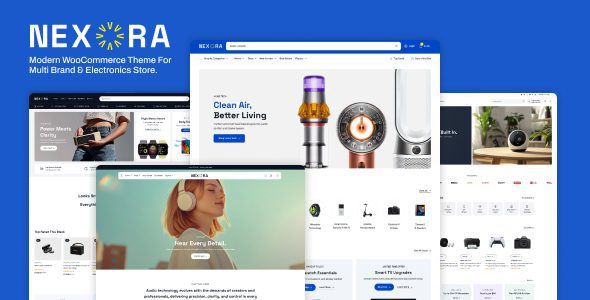
Nexora Shop: A Professional WooCommerce Theme for Multi-Brand Electronics Stores
Nexora Shop is a WooCommerce theme built specifically for multi-brand electronics stores, and it's also suitable for fashion, lifestyle, digital product marketplaces, department stores, and large product catalog websites. It's built on the WordPress block editor and supports Full Site Editing (FSE), allowing you to quickly build a professional e-commerce website without writing any code.
The theme offers 4 homepage layouts, 90+ ready-to-use block templates, 4 header and footer layouts, as well as flexible design options such as product showcase sections, promotional layouts, and category display areas. Whether you're a startup brand or an established online store, Nexora Shop provides a solid visual and functional foundation. For more WordPress resources and tutorials, visit bobohello.com.
Core Features and Design Highlights of Nexora Shop
Nexora Shop's biggest advantage lies in its deeply integrated block editor and full site editing capabilities. You can adjust headers, footers, product grids, and promotional modules directly in the site editor with real-time preview. The theme's 90+ built-in block templates cover common scenarios from homepage carousels to product detail pages, significantly reducing setup time.
Layout Flexibility for Multi-Brand Electronics Stores
To address the common multi-brand, multi-category needs of electronics stores, Nexora Shop provides dedicated category display areas and product showcase layouts. You can quickly create brand walls, best-selling product grids, and promotional banners through block templates without additional plugins. The 4 homepage layouts and 4 header/footer combinations let every store achieve a unique visual style.
How to Install and Configure the Nexora Shop Theme
Installing the Nexora Shop theme follows the same steps as any regular WordPress theme: go to "Appearance > Themes" in the admin panel, upload the theme ZIP file and activate it, then follow the prompts to install the recommended WooCommerce plugin and block template package. Once activated, you can import preset homepage layouts in the site editor or customize from scratch. It's recommended to test the theme's compatibility with your existing plugins in a staging environment before going live.
For more configuration tips on WooCommerce themes, refer to the relevant tutorials on WordPress resource site. The official page provides detailed theme documentation and changelogs; for specifics, please refer to the official documentation.
Use Cases and Compatibility of Nexora Shop
Nexora Shop is suitable for electronics stores, fashion stores, lifestyle stores, digital product marketplaces, department stores, and large product catalog websites. It's fully compatible with the WordPress block editor and supports full site editing, meaning you can use the latest WordPress features to manage your entire site's appearance. The theme's WooCommerce integration is optimized to ensure a smooth experience across product pages, shopping cart, and checkout flow.
In terms of performance, Nexora Shop follows lightweight coding principles, but actual loading speed also depends on the plugins you use, image optimization, and your hosting environment. It's recommended to pair it with caching plugins and image compression tools.
Frequently Asked Questions
How do I install the Nexora Shop theme?
In the WordPress admin panel, go to "Appearance > Themes > Add New Theme," upload the theme ZIP file and activate it. After activation, follow the prompts to install the recommended plugins and template packages. For detailed steps, please refer to the official documentation.
What page-building methods does Nexora Shop support?
The theme is built on the WordPress block editor and supports Full Site Editing (FSE). You can customize headers, footers, and content templates directly using the block editor without any additional page builder.
Is Nexora Shop compatible with the latest version of WooCommerce?
Nexora Shop is designed specifically for WooCommerce and generally maintains compatibility with the latest version. It's recommended to check the theme's changelog or official compatibility notes before updating WooCommerce.
How often is the theme updated?
Update frequency depends on the developer's release schedule. For specifics, please refer to the official documentation or the update records on the ThemeForest page.

