
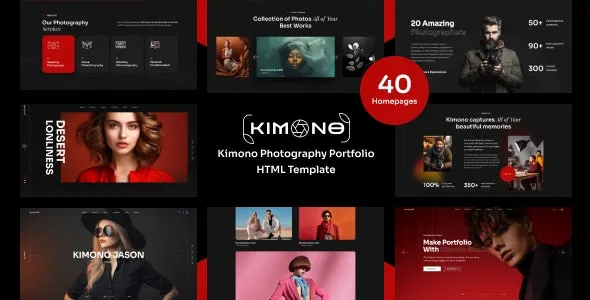
Kimono Photography Portfolio WordPress Theme: The Ideal Choice for Professional Photographers
Looking for a WordPress theme that perfectly showcases your photography? The Kimono Photography Portfolio WordPress Theme is specifically crafted for modern photographers and creative professionals. With its stunning design and rich feature set, it helps you quickly build a professional and visually impactful online portfolio. Whether you're a portrait photographer, landscape photographer, or a commercial photography studio, Kimono provides the perfect stage for your work. This article offers a comprehensive guide from installation to usage.
Key Highlights and Features of the Kimono Theme
The Kimono theme's design fully considers the unique needs of showcasing photography, with key highlights including:
- Multiple Portfolio Layouts: Offers grid, masonry, slideshow, and other display formats, flexibly adapting to different styles of work.
- Fullscreen and Parallax Effects: Supports fullscreen display and parallax scrolling, enhancing immersive browsing and visual impact.
- Highly Customizable: Through the theme customizer, you can easily adjust colors, fonts, layouts, and more—no coding knowledge required.
- Responsive Design: Perfectly adapts to mobile, tablet, and desktop devices, ensuring outstanding performance on any screen.
- SEO Optimized: Clean code structure and fast loading times help improve search engine rankings.
Additionally, the Kimono theme integrates social sharing, image lazy loading, custom menus, and other features to comprehensively meet photographers' website-building needs.
Kimono Theme Installation and Configuration Tutorial
Step 1: Install the Theme
In the WordPress admin panel, go to "Appearance" > "Themes" > "Add New Theme," click the "Upload Theme" button, select the downloaded Kimono theme zip file (kimono.zip), upload, and activate. The installation process is straightforward and can be completed easily even without a technical background.
Step 2: Install Required Plugins
After activating the theme, follow the prompts to install all required plugins online, such as the page builder and portfolio plugin. These plugins are essential components of the theme's functionality—ensure they are fully installed to unlock all features.
Step 3: Import Demo Content
To quickly build your website, it's recommended to import the theme's built-in demo templates. Find the "Import Demo Data" option in the theme settings and import with one click to get the same page layouts as the official demo. After importing, you can modify text, images, and configurations as needed to create a personalized website.
Kimono Theme Usage Tips and Best Practices
To maximize the potential of the Kimono theme, here are some practical suggestions:
- Optimize Image Sizes: Use compression tools to optimize your portfolio images, ensuring both clarity and faster loading speeds.
- Utilize Custom Page Templates: Choose appropriate page templates for different sections (such as "Portfolio," "About Me," "Contact") to enhance functionality and aesthetics.
- Configure SEO Plugins: Combine with plugins like Yoast SEO to set unique titles and descriptions for each portfolio page, improving search engine visibility.
- Enable Caching Plugins: Using caching plugins (such as WP Rocket) can significantly boost website performance and improve user experience.
Additionally, regularly update the theme and plugins to the latest versions to ensure security and compatibility. For more theme customization and expansion ideas, you can refer to related resources for more WordPress website-building inspiration.
Frequently Asked Questions
How do I install the Kimono theme?
After downloading the theme zip file, upload and activate it in the WordPress admin under "Appearance" > "Themes" > "Add New Theme," then install the required plugins and import the demo data.
What use cases is the Kimono theme suitable for?
Kimono is specifically designed for photography portfolios, making it ideal for photographers, designers, artists, and other creative professionals to showcase their work. It's also well-suited for photography studios and creative agencies' official websites.
Is the Kimono theme compatible with the latest version of WordPress?
Yes, the Kimono theme is continuously updated to remain compatible with the latest WordPress version and supports mainstream plugins. We recommend regularly updating the theme to maintain optimal compatibility.
How often is the theme updated?
The theme receives regular updates on the official platform, including new features, improvements, and fixes. Please check the official changelog and update promptly.
How can I get support if I encounter issues?
You can visit the official theme page for documentation and forum support, or contact the author for assistance. Please refer to the official documentation for details.

