
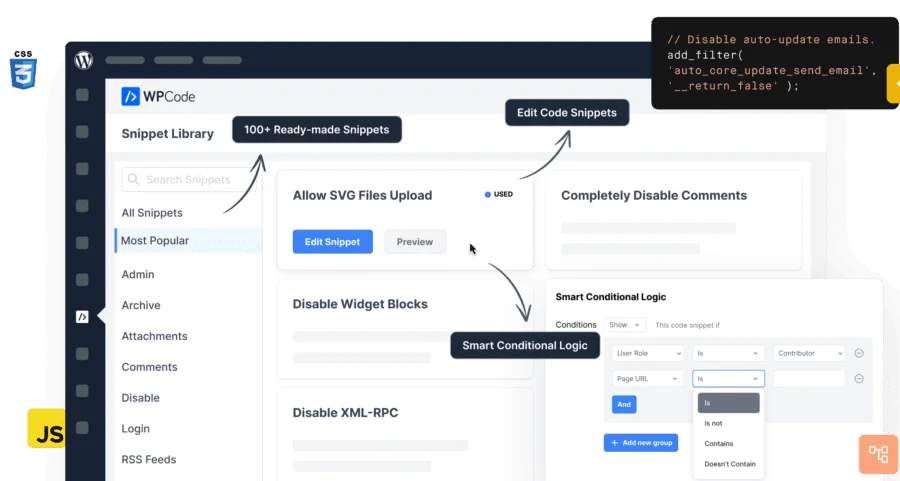
In-Depth Analysis of the WPCode Pro WordPress Code Manager Plugin
WPCode Pro (formerly Insert Headers and Footers) is a WordPress code manager plugin trusted by over 1 million websites worldwide. It lets you safely insert custom code snippets into your site's header, footer, and other areas without modifying your theme's functions.php file, including Google Analytics, Facebook Pixel, custom CSS/JS/PHP, and more. This Chinese version is based on the v2.4.1 core release and integrates the Conversion Pixels v1.2.5 extension, helping you efficiently manage all your code needs.
Why Choose WPCode Pro to Manage Code Snippets?
Traditionally, adding code to your theme's functions.php file is not only messy but also causes you to lose all custom functionality whenever the theme is updated. WPCode Pro provides an intuitive code snippet management interface through its dashboard, and its smart validation feature prevents common code errors to keep your site safe. You can manage all header and footer scripts from a single screen, organize snippets with tags, and add reminder notes. The cloud library feature (Pro version) even lets you reuse code snippets across sites, boosting development efficiency.
A Complete Code Library and Flexible Insertion Methods
WPCode Pro includes a library of code snippets curated by experts, covering common needs such as disabling the REST API, disabling XML-RPC, and allowing SVG uploads—all applied with a single click. The auto-insert feature supports multiple conditions: front-end only/back-end only, site-wide header and footer, before/after post content, before/after specific paragraphs, after specific archive pages, or after WooCommerce features (Pro version). In addition, you can manually output code via shortcodes for precise control.
For users who need finer control over when code executes, WPCode Pro's conditional logic and priority settings offer great flexibility. You can combine it with WordPress optimization tips to use code snippets alongside caching plugins, CDNs, and other tools to further improve site performance.
Import/Export and Multisite Management
WPCode Pro supports importing and exporting code snippets, making it easy to migrate between multiple websites or staging environments. You can also save snippets to WPCode Cloud (Pro version) for reuse across projects. Switching from Woody Code Snippets or Code Snippets Pro? The auto-import feature helps you seamlessly migrate your existing snippets.
Typical Use Cases
WPCode Pro is suitable for a wide range of scenarios: inserting Google Analytics tracking code, Facebook Pixel and conversion pixels, Google AdSense ad code, social media verification meta tags, custom CSS/JS/HTML, and disabling unnecessary features (such as XML-RPC, REST API, and comments) without extra plugins. In short, it lets you eliminate dozens of feature plugins while keeping full functionality.
The official plugin page provides detailed documentation and examples: WPCode official link.
Frequently Asked Questions
How Do I Install WPCode Pro?
In the WordPress admin, go to "Plugins" -> "Add New," upload the WPCode Pro ZIP file, and activate it. After installation, you can manage all your code from the "Code Snippets" menu. For detailed steps, please refer to the official documentation.
What Code Types Does WPCode Pro Support?
It supports PHP, JavaScript, CSS, HTML, and text snippets, and you can set conditional logic and priority. You can insert code in the header, footer, before/after post content, and other locations.
Is WPCode Pro Compatible with Multisite Networks?
Yes, WPCode Pro supports multisite networks, but specific features may vary depending on network settings. We recommend checking the multisite compatibility notes in the official documentation.
How Often Is WPCode Pro Updated?
The WPCode team releases updates regularly to stay compatible with the latest WordPress versions and fix issues. You can get the changelog through official channels. For specific update frequency, please refer to the official documentation.

