
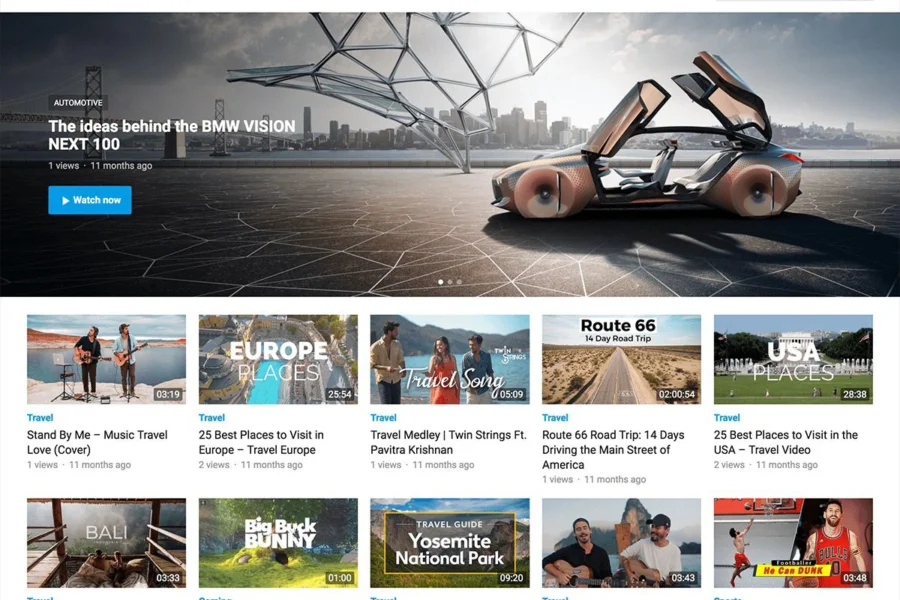
What Is the VideoShare Pro WordPress Theme?
VideoShare Pro is a responsive WordPress video theme launched by WPEnjoy, designed specifically for video content websites. It supports publishing content around videos from different sources, offering options such as embed fields, video duration, and related posts, helping visitors discover content worth watching and find the next relevant video after viewing. Whether for tutorials, special topics, or vertical video content sites, VideoShare Pro brings video entry points, text descriptions, and category organization together, making content management more efficient.
For users who want to build a video site, choosing a suitable theme is crucial. bobohello.com offers a wealth of WordPress resources to help you quickly find the tools you need. VideoShare Pro is positioned to make video content the core of the website, rather than simply stacking players. When building a site, you should first determine the content direction, then arrange the layout of the homepage and playback detail pages.
VideoShare Pro's Core Features and Content Organization
What Information Does Each Video Need?
A video can't just have a player. The title should explain the topic, the summary should cover what's worth watching, and background and related links should be provided when necessary. Tutorials can note applicable tasks and main steps, interviews can introduce participants and discussion scope, and showcase videos can explain the specific subject. Text helps users judge whether it's worth investing time and allows them to quickly review key points after watching. Different sections should have unified filling rules to reduce the situation where some videos on the same site have complete information while others only have a link.
Duration information helps users plan their viewing but needs to correspond to the actual video. Covers should ideally express the content, avoiding using the same generic image for all entries. You can compare video and magazine layouts on the WordPress theme resources page, then test with your own long titles, covers, and descriptions. Whether a layout suits real content is more worth prioritizing than how many cards the demo homepage has.
How Do Categories and Related Recommendations Form a Viewing Path?
Categories can be established around stable content directions, such as basic tutorials, case studies, and special topics—there's no need to set every tiny topic as a separate section. Tags help associate specific topics, and names should remain consistent. Official product comparison introductions organize related content by category and tags, and recommendations should have actual relevance when used. After watching a basic piece of content, visitors should be able to naturally move to the next step rather than being taken to videos on completely different topics.
- First entry: Title, cover, and summary help determine whether the content is relevant.
- While watching: Necessary background and descriptions don't interfere with player operation.
- After watching: Related topics and next-step content have clear connections.
Series videos can explain the order in their descriptions so that people entering individually from search also know the sequence. Don't just arrange a series entry on the homepage while making it completely unclear on detail pages which part it belongs to. If old content no longer suits current information, you can add notes or adjust recommendation placement. The value of a video site comes not only from publishing frequency but also from whether accumulated content remains easy to find and understand.
Video Sources and Embedding Stability
Videos from different sources may have different players and access conditions, so you should actually open and verify them before publishing. Check covers, sound, fullscreen, and mobile operation—especially for external platform content—and don't just confirm that the link format is correct. How embed fields work with the body text should also be checked with real articles to avoid multiple identical players appearing in one piece of content. Necessary text should be placed in clear positions so users know the video topic even if they temporarily can't play it.
On mobile, pay attention to player proportions, page scrolling, and main buttons to avoid floating components covering the screen. Placing multiple full players on the homepage simultaneously increases loading and operation burden; you can use covers to guide users into detail pages first. Images, fonts, and third-party embeds all affect the actual experience, so they should be checked under normal network conditions. After external videos change or become invalid, the site still needs someone to handle them regularly—the theme won't automatically guarantee that all sources remain available long-term.
Coordination of Text, Interaction, and On-Site Search
The official comparison also introduces display directions such as mobile search, ratings, and sharing, which can be enabled based on content site needs. Search terms should be tested using names that readers would actually type to see whether core content can be found. Ratings and comments need a handling approach—you can't just add buttons without anyone responding. For tutorial content, questions that repeatedly appear in comments can be added to the description to help later users avoid detours.
When further supplementing interaction or ad management, you can evaluate supporting options through the WordPress plugin resources page and confirm the division of labor with the theme's existing capabilities. Pages shouldn't display multiple sharing or rating components simultaneously, leaving visitors unsure which one works. Adding operational positions after content priorities are clear can prevent players and body text from being fragmented by large amounts of irrelevant elements.
Content management can start with unified cover proportions, summaries, and section rules. Check the source, duration, category, and related articles with each publish, and regularly review old videos. If editors can maintain content according to the same structure, it will be easier to organize special topics as content volume grows. Accurate information and valid links have more practical value than simply keeping many new entries displayed on the homepage.
VideoShare Pro is suitable for organizing videos into a WordPress content site that's sustainable to browse. By first getting each video's information, playback experience, and related paths right, then expanding interaction and operational features, you can help visitors more easily discover and continue watching. A stable catalog and helpful text descriptions are what make video pages content entry points worth revisiting.
Frequently Asked Questions
How Do I Install the VideoShare Pro Theme?
To install the VideoShare Pro theme, you need to first download the theme file, then upload and activate it in the WordPress admin under "Appearance" -> "Themes" -> "Add New." Please refer to the official documentation for specific steps.
What Video Sources Does VideoShare Pro Support?
VideoShare Pro supports publishing content around videos from different sources, including self-hosted videos and external platform embeds. Please refer to the official documentation for specific supported ranges.
Is VideoShare Pro Compatible with the Latest WordPress Version?
VideoShare Pro is regularly updated to maintain compatibility. It's recommended to use the latest version of WordPress for the best experience. Please refer to the official documentation for specific compatibility information.
How Often Is VideoShare Pro Updated?
WPEnjoy releases theme updates from time to time to fix issues and add new features. It's recommended to follow the official changelog for the latest information.


Comments (0)