
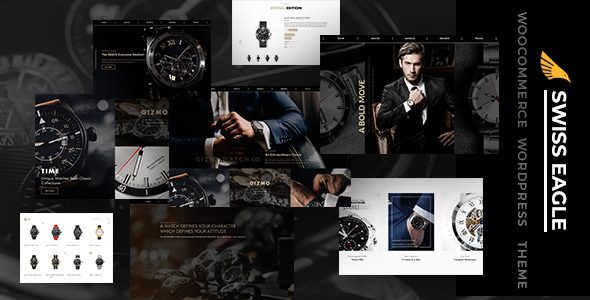
Swiss Eagle WooCommerce Store Theme: An E-commerce Solution for Watches and Fine Accessories
Swiss Eagle is a WooCommerce store theme developed by DesignThemes, designed specifically for e-commerce scenarios such as watches and fine accessories that require detailed product presentation. It integrates product display, brand storytelling, and shopping functionality into a single WordPress interface, helping visitors efficiently compare differences in size, movement, strap, and collection while browsing the visual appearance. For stores that want to communicate both style visuals and product information clearly, Swiss Eagle provides a well-structured starting point.
Differentiated Reading Tasks for Store, Model, and Brand Pages
Swiss Eagle presets different page directions for content such as stores, watches, models, and brands. The store page helps visitors browse the full product range, the model page focuses on specification differences within a series, and the brand page explains the background and product line context. These pages should not simply be the same set of products with a different title: brand content should answer "why choose this product line," while series content should help users distinguish suitable sizes and usage scenarios, then naturally connect to specific products.
Mega menus are suitable for displaying catalogs with substantial content in grouped form. For example, dividing first by brand or series and then providing corresponding entry points can help visitors with clear goals take fewer detours. If the number of products is small, the menu does not need to fill every area. The category structure should remain consistent with actual product information, avoiding navigation that uses style names while the product list is categorized by material, which would force users to re-understand the structure after entering the next level.
The theme's clean dark visuals can highlight metal, leather, and dial details, but what truly influences purchase decisions is the image content. Front-facing images convey overall style, side images show thickness, wearing images help understand proportions, and detail images explain markers and clasps. When each image serves a different purpose, users do not need to zoom into the same promotional image to find all the information, and it becomes easier to match the styles they see with the specifications.
Analysis of the Shopping Components in the Swiss Eagle Store Theme
YITH Compare compatibility allows visitors to add multiple products to a comparison table and view differences by unified attributes. For watch stores, this especially depends on accurate fields: case diameter, thickness, movement type, and strap material should maintain the same units and formatting. If only some products have complete information, the comparison table will show many empty items, so organizing attributes first and then providing the comparison entry point is more valuable than placing the button on every card.
Quick View is used to quickly view brief introductions and important features, suitable for reducing the number of times users open detail pages back and forth during the browsing stage. Quick View should prioritize information that helps determine style, while complete specifications, delivery contents, and service descriptions remain on the detail page. For products with multiple straps or sizes, users should also be clearly informed which option they are currently viewing, avoiding the impression formed in Quick View differing from the configuration shown after entering the detail page.
The wishlist handles products that have not yet been decided on, while the shopping cart handles choices ready for purchase—the two correspond to different decision stages. Visitors may first save several watches and then return to compare sizes and styles, so the save entry point should remain consistent with product names and images. The wishlist can retain intent, but it cannot replace clear inventory and delivery information, which should still be provided by the store's business configuration.
- Brand pages explain series background, avoiding duplication of product short descriptions.
- Product attributes use unified units and names, giving the comparison table practical meaning.
- Quick View provides the key points needed for browsing, while the detail page carries complete specifications.
- The wishlist saves candidate styles, while the shopping cart corresponds to actual purchase choices.
How Page Editing, Content Blocks, and E-commerce Fundamentals Work Together
Swiss Eagle provides theme core components and rich content block directions, including tabs, accordions, icon descriptions, timelines, and reviews. These can respectively carry specifications, maintenance instructions, brand development, and customer feedback. Long materials do not necessarily need to be entirely placed in accordion areas—core parameters should still be easy to see; timelines should also use real milestones, letting the content format help explain rather than breaking ordinary paragraphs into more decoration.
The official product page lists documentation branches for Elementor and WPBakery separately. When choosing the actual demo and files, confirm the corresponding editing system and maintain pages in the same way; do not hand a layout generated by one editor to another editor for repeated rebuilding. Websites with substantial existing content should especially check the shortcodes and component sources of the original pages to avoid losing brand materials and product descriptions when switching interfaces.
Transaction fundamentals can be understood in conjunction with WooCommerce e-commerce resources; the theme handles appearance and display organization, while products, orders, and actual payments require store configuration. Contact Form 7 is suitable for collecting pre-sales questions, and forms can be designed around models, inquiry matters, and contact information. If operating repair services, the arrangements after submitting an inquiry should be clearly explained, and an ordinary form should not be described as a confirmed appointment.
If product images require more display methods, you can further explore WooThumbs product gallery resources and verify actual theme compatibility. Swiss Eagle is suitable for building relationships among series, brands, and products centered on watches. By combining accurate attributes, clear images, and shopping components, visitors are in a position to judge style differences rather than merely seeing a set of beautiful visuals. For more theme and plugin resources, refer to the bobohello resource site.
Frequently Asked Questions
How do I install the Swiss Eagle theme?
In the WordPress admin, go to "Appearance → Themes → Upload Theme," upload the Swiss Eagle theme zip file, and activate it. Before installation, it is recommended to confirm that the server PHP version and WordPress version meet the theme requirements, and to back up existing website data in advance. For specific installation steps, please refer to the official documentation.
What usage scenarios is Swiss Eagle suitable for?
Swiss Eagle is primarily aimed at WooCommerce stores such as watches and fine accessories that require detailed product presentation. Its dark visual style is suitable for highlighting the texture of metal, leather, and dials, and the differentiated design of store, model, and brand pages is also suitable for brand e-commerce that needs to tell product line stories.
Which page editors is Swiss Eagle compatible with?
According to official information, Swiss Eagle provides documentation branches for two editing systems: Elementor and WPBakery. When using it, confirm the editor type corresponding to the demo and files, and maintain pages in the same way to avoid layout issues caused by mixing. For specific compatible versions, please refer to the official documentation.
How often is the Swiss Eagle theme updated?
The theme update frequency is determined by the developer DesignThemes, which typically releases version updates and compatibility fixes through official channels. It is recommended to follow the official changelog and verify in a testing environment before applying to the production site. For specific update policies, please refer to the official documentation.


Comments (0)