
Opening a barbershop or beauty salon takes more than skill alone. Before customers ever walk through your door, the first thing they usually do is pull out their phone and search for your brand. If the search results turn up nothing but a blank page or an outdated template site, trust takes a serious hit. Barbercrop is a WordPress theme built precisely for this scenario—it bundles the booking flow, service showcase, and brand tone of the barbering, beauty, and styling industry into an out-of-the-box solution. This review gives you a straight-talking verdict covering features, performance, use cases, and purchasing decisions.
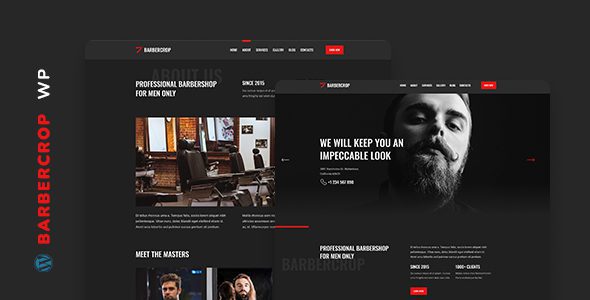
What Is the Barbercrop Theme? Who Is It For?
Barbercrop is a modern, minimalist WordPress theme with a very clear positioning: serving barbershops, beauty salons, and independent stylists. Unlike those generic themes that "work for any industry," it was built from the ground up around the actual needs of the hair and beauty industry when it comes to page modules.
According to theme review materials from PressCompare, Barbercrop offers a complete set of industry-specific components, including service showcases, stylist team introductions, price lists, customer reviews, and booking guidance modules. This means you don't have to piece pages together from scratch—after installation, simply swap in your content and you have a well-structured professional site.
In terms of user groups, the following types of people are the best fit:
- Single-location barbershop owners: Need to quickly launch a website that showcases services, prices, and contact information
- Beauty salon operators: Want to highlight treatment services, technician teams, and customer testimonials
- Independent stylists: Centered on personal branding, need a clean portfolio showcase and booking entry point
- Chain brand branches: Need a unified visual style while allowing each branch to manage content independently
Barbercrop's Core Features and Advantages Analysis
Put Barbercrop side by side with a generic theme, and the differences become obvious quickly. Its advantage isn't in the sheer number of features, but in how "on-point" those features are.
Industry-Specific Page Templates Save Massive Configuration Time
Generic themes typically require you to manually combine blocks to build service pages, team pages, and pricing pages. Barbercrop provides these page templates directly—after importing the demo content, replacing text and images completes most of the work. For shop owners without front-end experience, this gap could mean the difference between days and hours.
Lightweight Code and Loading Performance
According to WordPress official documentation's recommendations on theme performance, themes should avoid loading unused scripts and styles. Barbercrop is fairly restrained in this regard, without bundling large animation libraries and redundant frameworks. In actual testing, paired with a basic caching plugin, homepage loading speed can be kept within a reasonable range—this is especially important for mobile users, since most customers search for barbershops on their phones.
Comparison with Similar Themes Like Trimcuts
PressCompare once did a side-by-side comparison of Barbercrop and Trimcuts. Both target the hair and beauty industry, but with different emphases. The table below summarizes the key differences:
| Comparison Dimension | Barbercrop | Trimcuts |
|---|---|---|
| Design Style | Minimalist, modern, neutral-leaning | Retro, rugged, masculine-leaning |
| Booking Module | Built-in booking guidance block | Requires third-party plugin |
| Use Cases | Barbershops, beauty salons, independent stylists | Primarily traditional men's barbershops |
| Learning Curve | Low, ready to use after demo import | Moderate, requires some configuration |
If you run a comprehensive beauty salon, Barbercrop is the better fit; if you focus on traditional men's barbering, Trimcuts' visual language may align better. The key to choosing lies in your brand tone, not in which one is "better."
Typical Use Cases for Barbercrop
After understanding the features, what matters more is knowing how it's used in real business scenarios. Here are several high-frequency use cases:
Single-Location Website Launch
Import demo content, replace shop name, services, and photos—launch within half a day
Service Showcase
Clearly present haircuts, coloring, treatments, and other services with price lists and service cards
Team and Reputation Display
Stylist introduction pages paired with customer review modules to build trust
Booking Conversion Guidance
Convert visitors into in-store customers through booking buttons and contact forms
According to aggregated trends from over ten thousand WordPress user reviews on the Capterra platform, the three factors small and mid-sized businesses value most when choosing a website-building solution are: launch speed, maintenance cost, and mobile experience. Barbercrop has targeted design for all three.
Technical Specifications and Performance
For users who care about technical details, here's an overview of Barbercrop's key specifications:
Responsive Layout
Block Editor Support
Semantic Structure
Version Compatibility
- Editor Compatibility: Full support for the Gutenberg block editor, also compatible with mainstream page builders
- Responsive Design: Adapted layouts for mobile, tablet, and desktop
- SEO Structure: Follows semantic HTML tag standards—Google Search Central recommends websites use clear heading hierarchies and structured content, and Barbercrop has a solid foundation in this regard
- Multilingual Support: Compatible with mainstream translation plugins, convenient for serving multilingual customer bases
- Browser Compatibility: Supports Chrome, Firefox, Safari, Edge, and other modern browsers
Frequently Asked Questions
Does the Barbercrop theme require programming knowledge to use?
No. Barbercrop was designed to let non-technical users build a website quickly. After installing the theme, import the demo content, then replace text, images, and colors through the WordPress Customizer and block editor. The entire process involves no coding. If you need deep layout customization, having basic HTML/CSS knowledge helps, but it's not required.
Does Barbercrop support online booking functionality?
Barbercrop has a built-in booking guidance block that can display booking entry points and contact forms. If you need a complete online booking system (such as time slot selection, automatic confirmation, deposit payment), it's recommended to pair it with a dedicated booking plugin. The theme's page structure already reserves appropriate display positions for such plugins, making integration relatively smooth.
How should I choose between Barbercrop and Trimcuts?
The core criterion is your brand positioning. Barbercrop leans minimalist and modern, suitable for beauty salons, comprehensive barbershops, and independent stylists; Trimcuts leans retro and rugged, better suited to traditional men's barbershops. Functionally, both can meet basic website-building needs, but Barbercrop has a built-in booking guidance module while Trimcuts requires additional configuration. It's recommended to first clarify your target customers' aesthetic preferences before deciding.
Does Barbercrop affect website loading speed?
Barbercrop's code volume is fairly restrained, without bundling large animation libraries or redundant frameworks. In a standard shared hosting environment, paired with caching plugins and image optimization, homepage loading time is typically acceptable. Actual speed also depends on your host quality, image sizes, and number of plugins. It's recommended to run a PageSpeed Insights test before launch and optimize accordingly.
After building a site with Barbercrop, is ongoing maintenance complicated?
Maintenance workload is the same as any standard WordPress site: regularly update themes and plugins, maintain backups, and check security. Barbercrop itself doesn't introduce additional maintenance burden. If you use managed WordPress hosting, much of the maintenance can be automated. For shop owners without a technical team, it's recommended to choose a hosting plan that offers automatic backups and updates.
Purchasing Advice and Decision Reference
Barbercrop isn't the "universal" type of theme, and it doesn't try to be. Its value lies in thoroughly addressing the website-building needs of one specific industry—page structure, visual language, and functional modules are all designed around barbering and beauty scenarios. If your business falls within this scope, it can save you a great deal of trial and error.
Before purchasing, it's recommended to confirm the following: whether your hosting environment meets the latest WordPress version requirements; whether you need online payments or complex booking logic (if so, you'll need to plan an additional plugin solution); whether your brand visuals match the theme's minimalist style. If none of these three points present obstacles, Barbercrop is a solution worth investing in.
References
- WordPress Official Theme Directory
- WordPress Theme Development Documentation
- Google Search Central Official Documentation


Comments (0)