
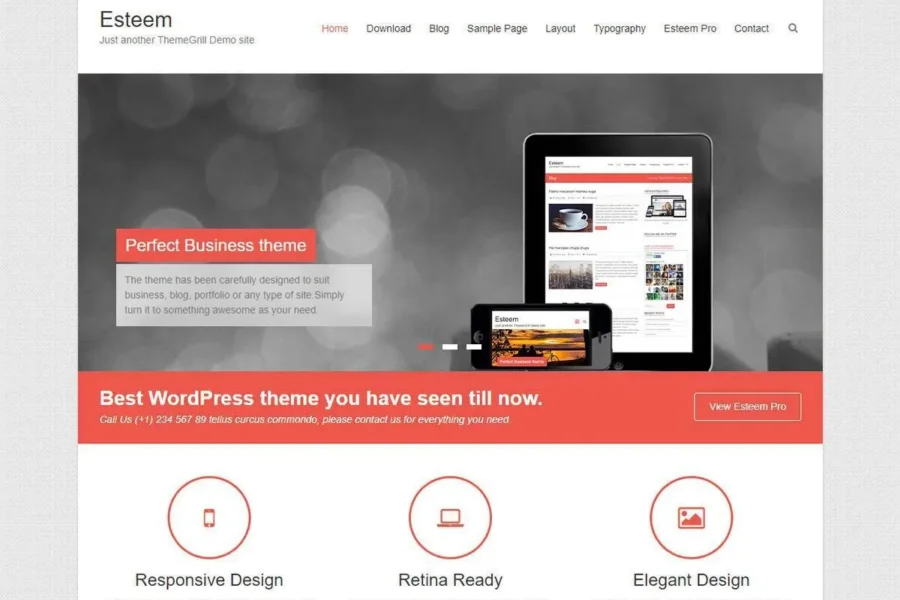
If you're looking for a lightweight and efficient WordPress theme, the Esteem Pro WordPress theme is a worthy option to consider. Although official support has been discontinued, this theme still offers many essential features needed for modern websites, making it suitable for users who prefer a clean design.
The Esteem Pro theme is designed for blogs, business websites, and magazine-style sites, offering a responsive layout, extensive customization options, and SEO-friendly structure. Through this guide, you'll learn how to install, configure, and maximize the use of this theme.
Core Features of Esteem Pro
Esteem Pro comes with multiple homepage layouts, custom widget areas, and color schemes, allowing you to create a personalized website without writing any code. Its lightweight code ensures fast loading speeds, which positively impacts user experience and search engine rankings.
How to Install the Esteem Pro WordPress Theme
The installation process is simple: In the WordPress admin panel, navigate to "Appearance" > "Themes" > "Add New Theme," upload the theme ZIP file, and activate it. After activation, you can adjust layouts, colors, and fonts via the "Customize" panel. For more assistance, refer to the official documentation or visit related resource sites for detailed tutorials.
Localization and Chinese Translation of Esteem Pro
For Chinese users, Esteem Pro supports localization via .po/.mo files. You can download language packs from the official repository or use the Loco Translate plugin to translate directly in the backend. After translation, the theme's frontend interface will display fully in Chinese, enhancing visitor experience.
Compatibility and Update Notes
Since the theme is no longer updated, it's recommended to check compatibility with the latest WordPress version in a test environment. Some third-party plugins may require additional adjustments. The official team has released alternative themes; please refer to the official retired theme page for details.
Frequently Asked Questions
How to install the Esteem Pro theme?
In the WordPress admin panel, go to "Appearance" > "Themes" > "Add New Theme," click "Upload Theme," select the theme's .zip file, then click "Install Now" and activate it.
What types of websites is Esteem Pro suitable for?
This theme is suitable for blogs, business showcases, magazines, and news websites, offering multiple homepage layouts to meet different needs.
Does Esteem Pro support Chinese localization?
Yes, the theme supports localization through language files. You can use the Loco Translate plugin or manually edit .po files to achieve a Chinese interface.
Is Esteem Pro compatible with the latest WordPress version?
Since the theme has been discontinued, there may be compatibility issues. It's recommended to test it before installation or consider using the official recommended alternative theme.
Will Esteem Pro receive updates?
The official team has announced that this theme is retired and will no longer receive updates. For new features and security patches, it's advisable to migrate to another maintained theme.


Comments (0)