
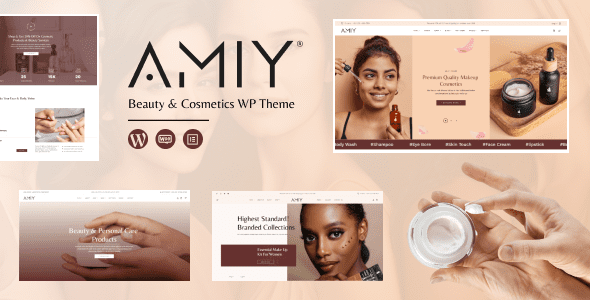
Amiy Theme Overview: A WordPress Solution Built for Beauty Stores
Amiy is a WordPress theme designed specifically for the beauty and cosmetics industry, developed by venusweb and suited for cosmetics, fragrances, and related product stores. It deeply integrates WooCommerce and Elementor, helping merchants quickly build product showcase and online purchasing pages. Whether for a brand's direct store or a multi-brand product catalog, Amiy can effectively connect collection images with specific product details through clear visual hierarchy and flexible layouts. When using the Amiy theme, it's recommended to first prepare real product information to ensure visual presentation serves purchasing decisions, avoiding situations where customers face similar packaging but struggle to distinguish product differences.
Amiy Theme's Catalog Organization Strategy
Makeup, skincare, fragrances, and beauty tools each have different purchasing logic, so the catalog structure should first be divided by clear categories, then supplemented with feature pages based on real collections or usage scenarios. Category names should use expressions familiar to customers, avoiding internal product codes. Collection pages can include brief text descriptions of key features to help users quickly decide whether to continue browsing. For small brands, there's no need to create too many empty categories—a small number of well-populated entry points are easier to maintain and help new customers understand your main offerings. Amiy supports page editing and demo import; when choosing a structure, you can first add your own images, Chinese names, and specification data, and actually check how long product names, different packaging ratios, and temporarily out-of-stock items display. You can refer to other store themes in the WordPress theme resource library and use the same product data to compare differences. Demo images only provide visual reference—only a real catalog can verify whether the theme suits daily updates.
How Product Pages Can Clearly Present Product Differences
Product titles should clearly state the name, the main image should show the appearance, and detailed content should explain specifications and usage features. Makeup needs clear shade distinctions with corresponding images, fragrances can describe scent notes and volume, and beauty tools should emphasize dimensions, materials, and usage methods. Different categories should not copy the same description paragraph. Important parameters should be kept as text, which is convenient for mobile viewing and easy to modify later, avoiding the use of a single long image to carry all information. Specifically, pay attention to the following points:
- Shades and options: Names, images, and actual selections should be consistent, reducing the need for customers to guess based on codes.
- Volume and combinations: Clearly state what single items, sets, or other specifications include.
- Usage and storage: Use accurate information to answer common pre-purchase questions.
Beauty copy should separate product facts from brand expression. Ingredients, materials, and specifications should be filled in based on real information, without replacing explanations with unfounded efficacy claims. Differences that customers frequently ask about can be organized into the corresponding product pages. When displaying images of skin tones, packaging, or textures, they should help understanding of the product rather than letting visual processing obscure the actual state. The more specific the content, the easier it is for users to judge whether a product meets their needs.
Synergy Between WooCommerce and Wishlist Features
The Amiy theme runs around WooCommerce and can be combined with WooCommerce resources to plan products, orders, and checkout processes. It's recommended to first complete configuration for both single-specification and multi-specification products, verifying option changes, prices, inventory, and order information. Payment, shipping, and discounts need to be set according to actual business needs—you can't assume the process is ready just because the theme pages display a purchase button. Verifying with real test orders is more reliable than just looking at backend settings. The official introduction mentions YITH wishlist-related compatibility, suitable for letting customers temporarily save products of interest. When actually enabling it, check behavior before and after login, for out-of-stock products, and when deleting items. The wishlist should help customers continue choosing and shouldn't appear alongside multiple synonymous favorite components. Recommended products should also have clear relationships, such as same collection or actual pairings, rather than repeatedly displaying unrelated products just to fill an area and increasing users' decision burden.
Elementor Pages Should Maintain Consistent Content Rules
Brand introductions, collection banners, and campaign pages can be assembled with the Elementor editor, but image ratios, titles, and button rules should be kept as consistent as possible. Product pages handle parameters and purchasing functions, brand pages explain background, and campaign pages explain specific scope—each with clear tasks. Don't pile all promotional content onto the homepage, making important collection entry points hard to find. When there's less material, keep it simple—it's easier to reuse the structure when adding products later. On mobile, focus on checking shade selection, long titles, and the shopping cart. Popups, menus, and floating contact components must not cover specifications or submit buttons. Images need to balance detail and loading size, especially for collection lists—not every image needs to use an oversized original. When customers enter product pages from articles or external links, they should also be able to find collections and other related products without returning to the homepage to start over.
For new releases, prepare names, images, specifications, parameters, and delivery notes according to a fixed information checklist. After campaigns end, clean up old entry points, and when products change, check feature pages and recommended content accordingly. Add common inquiries to the corresponding pages in a timely manner, letting customer service experience in turn improve the catalog. Amiy is suitable for building a clean beauty store with WordPress—accurate product information and a smooth selection path are what allow the theme's visual design to remain effective long-term. For more WordPress themes and plugin resources, visit BoboHello Resource Site. To learn about Amiy official details, please visit the Amiy official page (please refer to the official documentation for specifics).
Frequently Asked Questions
How do I install the Amiy theme?
In the WordPress admin, go to Appearance - Themes - Add New Theme, upload the Amiy theme zip file, and activate it. After activation, you can install required plugins (such as WooCommerce and Elementor) according to the prompts, and import demo content to quickly build pages. Please refer to the official documentation for specific steps.
What use cases is the Amiy theme suitable for?
Amiy is designed specifically for beauty and cosmetics, fragrance, and beauty tool e-commerce websites, suitable for brand direct stores, product catalog sites, or multi-brand beauty stores. It enables product sales through WooCommerce and uses Elementor to build personalized pages.
Is the Amiy theme compatible with the latest version of WordPress?
The Amiy theme is regularly updated to be compatible with the latest versions of WordPress and WooCommerce. It's recommended to back up your website before updating and check the official changelog to confirm compatibility. Please refer to the official documentation for specific compatibility information.
How often is the Amiy theme updated?
Update frequency depends on the development team, and compatible versions are usually released after major WordPress or WooCommerce updates. You can get update notifications through official channels; please refer to the official documentation for specifics.


Comments (0)