
Ecofa WordPress Theme In-Depth Review: A Professional Website Solution for Environmental Nonprofits
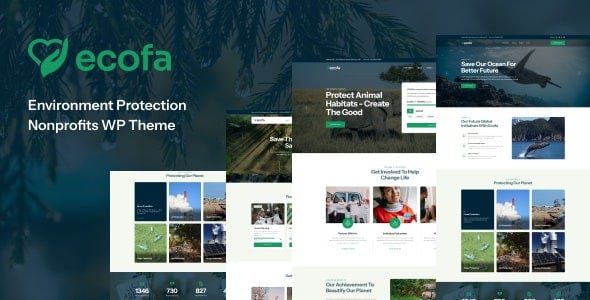
Ecofa is a WordPress theme built specifically for environmental protection, ecological initiatives, nonprofit organizations, and charitable projects. Its page structure is designed around the real needs of nonprofit organizations, clearly presenting organizational missions, environmental projects, volunteer activities, fundraising goals, and news updates. For organizations that need to showcase projects online and accept donations, Ecofa provides a complete and easy-to-use set of page starting points. If you are looking for a WordPress theme focused on the nonprofit sector, Ecofa is worth a closer look.
Ecofa Core Features and Page Components
- Elementor page editing: Flexibly adjust the homepage, project introductions, and content sections through drag-and-drop, building pages without writing any code.
- Nonprofit homepage demos: The product page offers 3+ homepage demos for environmental protection and nonprofit organizations, covering different nonprofit scenarios.
- Donation page styles: Built-in display layouts for various nonprofit projects and donation themes, helping organizations quickly establish fundraising entry points.
- Header and footer: Pre-built multiple headers, footers, and common functional pages to reduce repetitive configuration work.
- Blog and news: Supports publishing environmental actions, organizational announcements, project progress, and activity records to keep website content continuously updated.
- GiveWP compatible: Works with the GiveWP donation plugin to build fully functional donation forms.
- Contact forms: The product page lists Contact Form 7 related components, making it easy for visitors to get in touch with the organization.
It is important to note that the theme itself handles page design and display, while business logic such as donation amounts, payment methods, donation records, and receipts is typically handled by GiveWP and payment gateways. Installing the theme does not mean the donation functionality is automatically configured—organizations still need to complete the follow-up setup.
What Types of Organizations Is Ecofa Suitable For
Ecofa is suitable for environmental associations, ecological protection projects, animal and nature conservation organizations, community nonprofit activities, and various types of nonprofit institutions. The homepage can display the organizational mission, key projects, and donation entry points; project detail pages should explain how funds are used, execution progress, and result feedback, so donors clearly understand what the project specifically does and where the funds go. This information transparency is essential for building donor trust.
Donation Process Configuration Steps
- Install the Ecofa theme, Elementor, and the companion plugins required by the product documentation.
- Install and configure GiveWP, and create the corresponding donation forms.
- Configure payment gateways, currency, receipt emails, and donor information fields.
- Place donation entry points on project pages, clearly stating the purpose of funds and the target amount.
- Use test transactions to check the complete flow of successful payments, failed payments, and refunds.
- Regularly update project progress and disclose necessary information about fund usage.
If the website needs to support multilingual fundraising, additional translation plugins must be configured, and the translation accuracy of donation form fields should be carefully verified. For page design, you can refer to Elementor Pro to extend more layout possibilities. For more organizational website templates, browse the WordPress corporate website theme collection.
Things to Keep in Mind When Using Ecofa
Nonprofit websites involve donor information and fund flows, so privacy policies, refund statements, and donation purposes should be clearly stated. Images and project stories must be authorized, and when involving beneficiaries, unnecessary personal information should be avoided. If the organization needs membership management, volunteer scheduling, or project financial management, other systems typically need to be integrated to meet these extended requirements.
Frequently Asked Questions
Does Ecofa include a payment gateway?
The product page lists GiveWP Donation Plugin Ready, indicating compatibility with the GiveWP donation plugin. Actual payment collection still requires configuring a payment gateway account and callback settings. Please refer to the official documentation for details.
Can the demo images be used directly after installation?
Do not assume demo images come with redistribution authorization. Before commercial use, verify the usage licenses for images, icons, fonts, and third-party assets to avoid copyright risks.
Is Ecofa compatible with the latest version of WordPress?
The theme's ThemeForest product page shows subsequent update records. It is recommended to check the official changelog to confirm compatibility with the current WordPress version. Older download packages may have compatibility differences with newer versions of Elementor or GiveWP, so it is advisable to install and verify on a test site first.
How often is Ecofa updated?
For specific update frequency, please refer to the update records on the ThemeForest product page. Typically, theme authors release updates based on WordPress core version and plugin compatibility requirements.
Version and Acquisition Information
The main table resource indicates the specific version of Ecofa, and the ThemeForest product page shows subsequent update records. It is recommended to install and verify on a test site before deploying to a production environment. GPL-related information should be verified separately from the licenses for images, fonts, and bundled plugins to ensure compliant use.
Official product page: Ecofa ThemeForest Page.


Comments (0)