
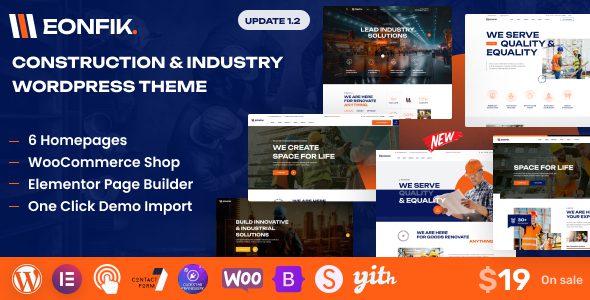
Eonfik Construction & Industrial WordPress Theme: A Professional Showcase Platform for Engineering Companies
Eonfik is a WordPress theme designed specifically for construction, engineering contracting, industrial services, and related businesses. It provides a complete showcase solution for company introductions, engineering projects, service capabilities, team profiles, and contact information, making it especially suitable for corporate websites centered on project case studies and business inquiries. Whether you're a construction company, renovation contractor, or industrial equipment service provider, Eonfik helps you quickly build a professional corporate website.
Eonfik Core Features and Page Structure
- Multiple homepage layouts: The official release offers 6 homepage styles and various header designs to meet different corporate style needs.
- Elementor visual editing: Adjust page sections, images, and text through drag-and-drop without writing code.
- One-click demo content import: Quickly establish the basic page structure, then replace it with your company's real content.
- Service and project showcase modules: Ideal for presenting construction types, engineering case studies, equipment capabilities, and service processes.
- WooCommerce e-commerce support: Extend store functionality if you need to sell products or service packages.
- Contact forms and multilingual compatibility: Compatible with Contact Form 7 and supports multilingual layouts.
The product page also mentions components such as Modina Core, Codestar Framework Pro, and pre-built widgets. Be sure to enable the theme's companion plugins according to the documentation during installation, otherwise some modules or theme options may not display properly. For more flexible page layouts, you can refer to the site's Elementor Pro Chinese version related resources.
Which Businesses Are Suited for Eonfik
Eonfik is suitable for construction companies, renovation contractors, industrial equipment service providers, engineering consulting firms, and construction contractors. The homepage should highlight core business offerings, project photos, service areas, and inquiry entry points. Project case study pages should specify project type, service content, and completion status—avoid posting only images without searchable text information, as this is crucial for SEO optimization.
Key Steps for Configuring the Eonfik Theme
- First decide on the homepage demo and header style, then install the core plugins required by the theme.
- After importing demo content, remove irrelevant sample projects and fictional team profiles.
- Create service categories and engineering case study pages using real images and project descriptions.
- Configure Contact Form 7 and test whether inquiries reach your business email.
- If online sales are needed, configure WooCommerce products, payments, and order workflows.
- Check the display of project images, menus, buttons, and forms on mobile devices.
Theme Functional Boundaries
Eonfik handles website presentation—it is not a project management or engineering ERP system. Project progress, procurement, work hours, contracts, cost accounting, and construction site management require separate business systems. If your company only needs to showcase service capabilities and capture inquiries, Eonfik can handle the foundational front-end presentation work. For official information, refer to the Eonfik ThemeForest page.
Frequently Asked Questions
Is Elementor required?
The product page explicitly lists the Elementor page builder. Demo pages and pre-built widgets may depend on Elementor and Modina Core. It's recommended to install the companion versions according to the documentation.
Is multilingual content generated automatically?
The theme is marked as Translation Ready, meaning it can be used with translation plugins—this does not mean pages are automatically translated. Language content and SEO metadata still need to be maintained separately.
How do I install the Eonfik theme?
Installation requires uploading the theme package and enabling companion plugins such as Modina Core and Codestar Framework. Please refer to the official documentation for specific steps.
Is Eonfik compatible with the latest version of WordPress?
The theme undergoes compatibility testing with WordPress version updates. It's recommended to use the latest version for the best experience. Please refer to the official documentation for specific compatibility information.
How often is the Eonfik theme updated?
Update frequency depends on the developer's maintenance schedule and typically includes feature improvements and security fixes. Please refer to the official documentation or ThemeForest changelog for details.


Comments (0)