VPS性能测试

Why I Need VPS Performance Testing: Specs Alone Aren't Enough When Buying a VPS for Your Website

After running independent sites and tech blogs for a while, you'll notice a common pattern: constantly buying cloud servers. Whether it's launching a new site, migrating an old one, scaling up, disaster recovery, running CI, setting up a reverse proxy, or executing scripts, you'll need a VPS. The problem is, there are too many products on the market, and their landing pages all start to look the same: vCPU, RAM, NVMe, bandwidth, optimized routing... The specs look impressive on paper, but it's hard to tell which one is truly right for your business. So, I started making VPS performance testing the first thing I do after buying a server: using a unified method to turn subjective experience differences into comparable data.
Many pitfalls only reveal themselves when you actually run things: the same number of cores might lead to sluggish performance during peak traffic due to overselling and throttling; the same NVMe label might hide slow random read/write speeds that bottleneck your database; the same advertised high bandwidth might mean high latency and packet loss during peak evening hours, making backend operations feel like a lottery. For website building, you're not buying a spec sheet; you're buying "long-term, stable service experience." That's the true value of VPS performance testing.

What is the Project: What VPS Performance Tests Can VPS_Benchmark_Project Do?

VPS_Benchmark_Project is an automated testing and analysis project for VPS/cloud servers. Its goal isn't just to show off benchmark scores, but to engineer the "server selection" process: use a one-click script to collect key metrics, then aggregate, compare, score, rank, and output intuitive reports, helping you quickly choose the server best suited for your website among many options.
The project results emphasize comparability and reproducibility: the same script, the same output structure, allowing machines from different providers, data centers, and batches to be measured with the same yardstick. The difference between testing A and B is no longer based on feeling, but on the results of VPS performance testing.
Project Address: https://github.com/bobohello/vps-benchmark

What Dimensions Does the Project Cover: Understand Strengths and Weaknesses at a Glance with a Radar Chart

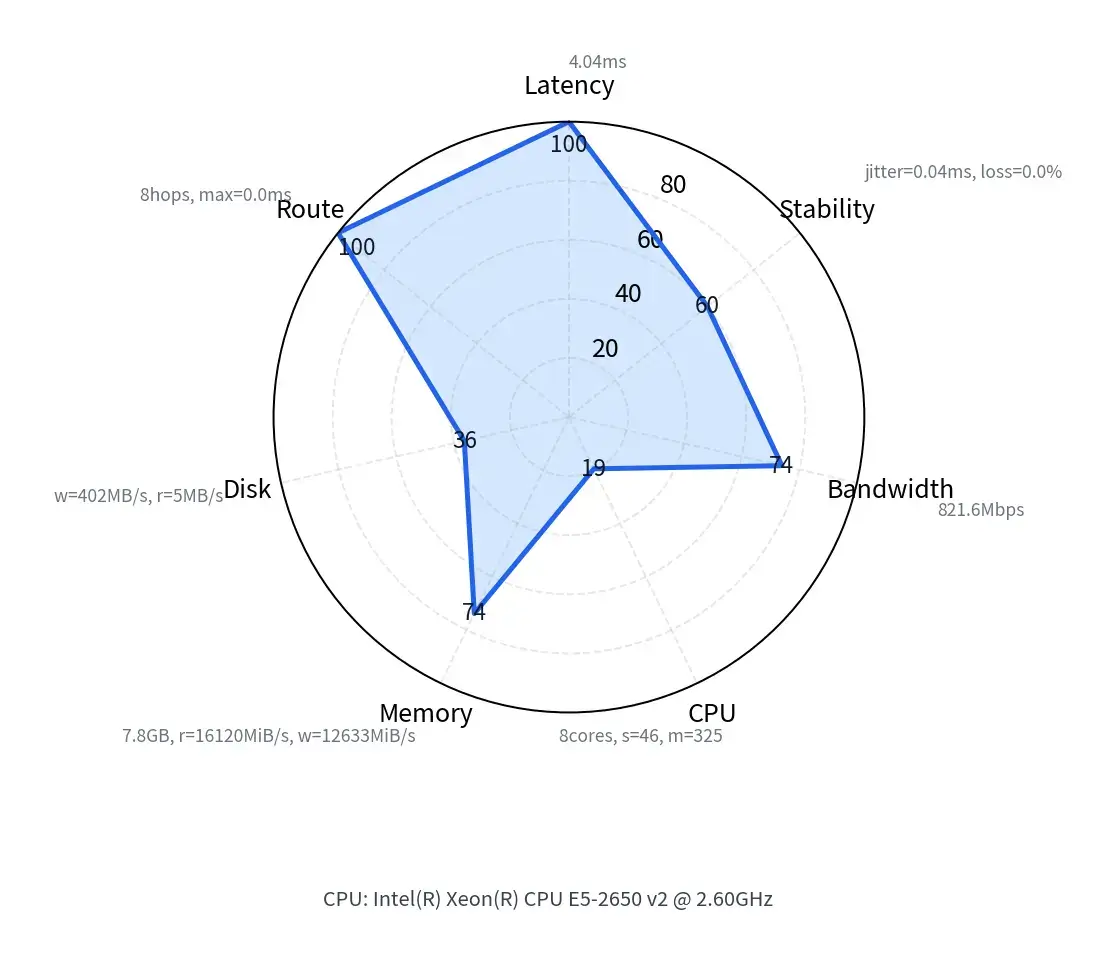
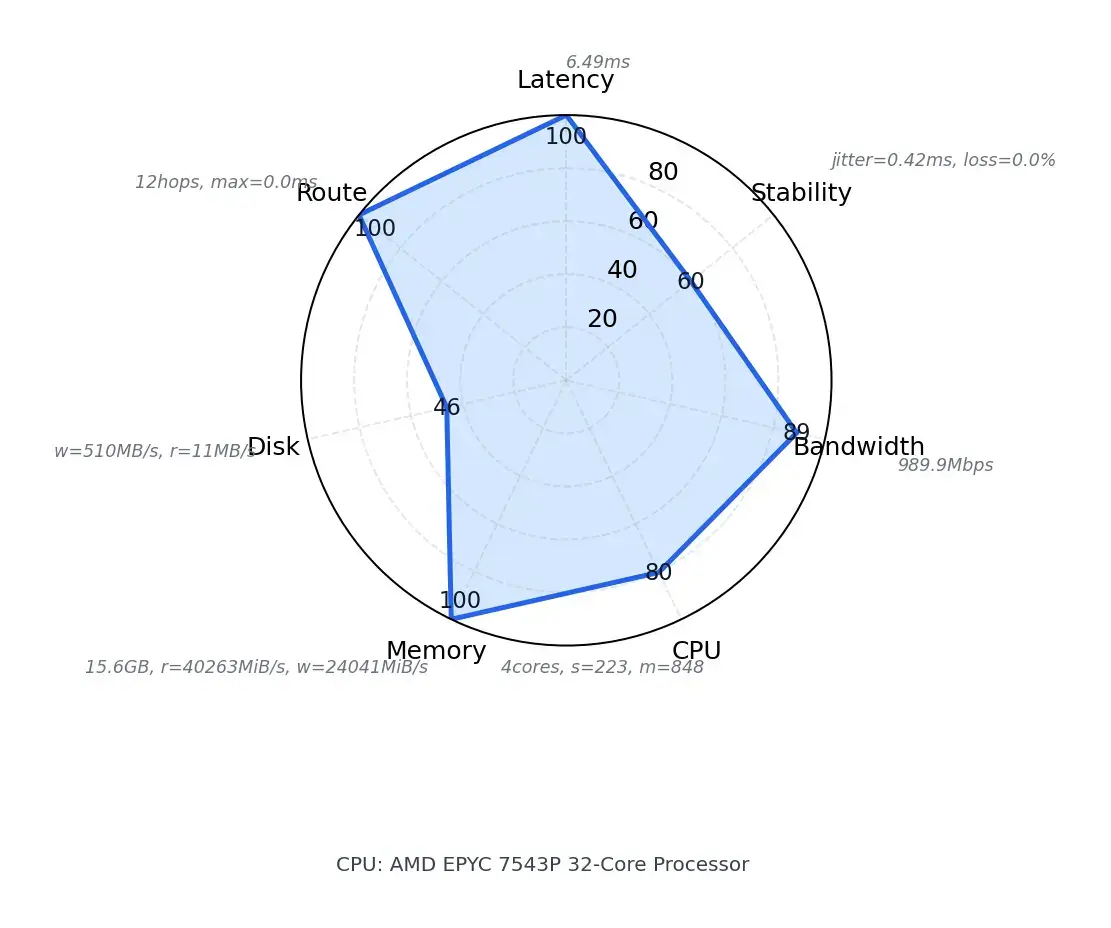
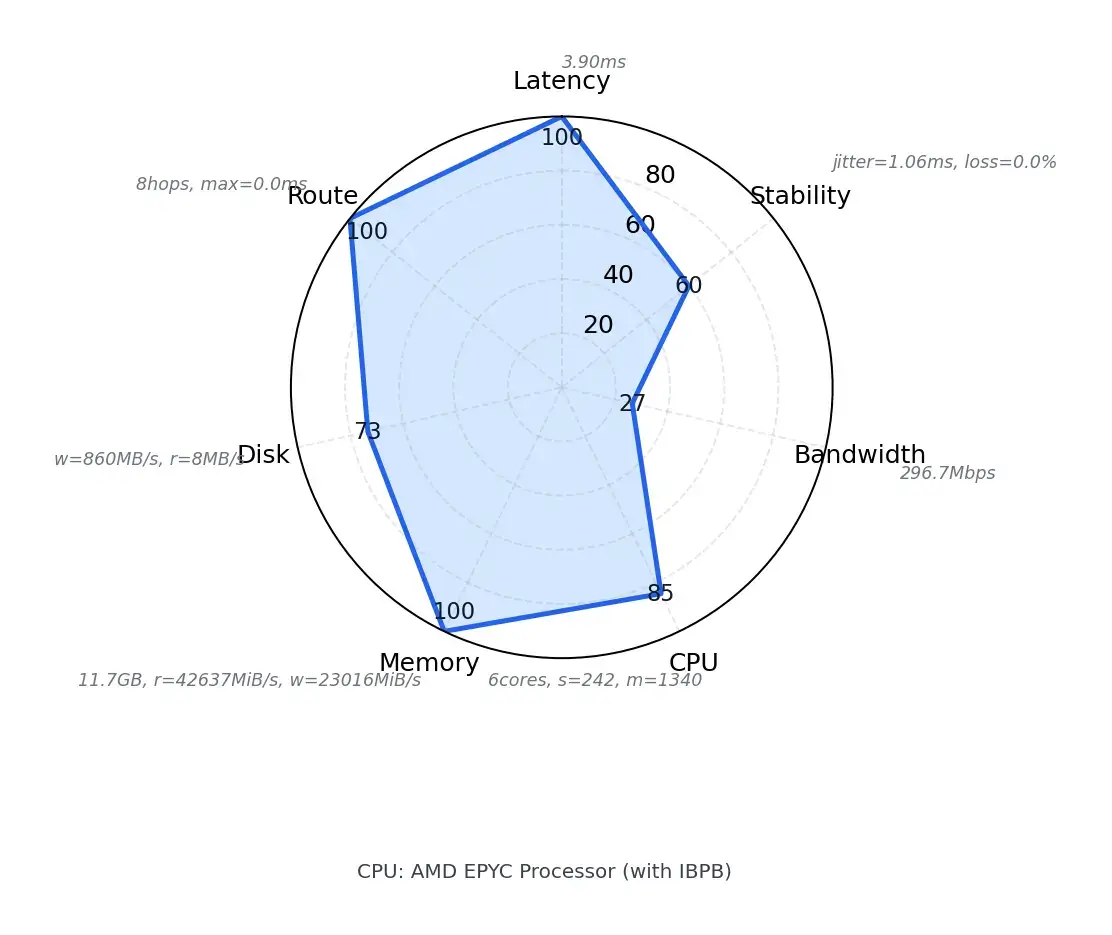
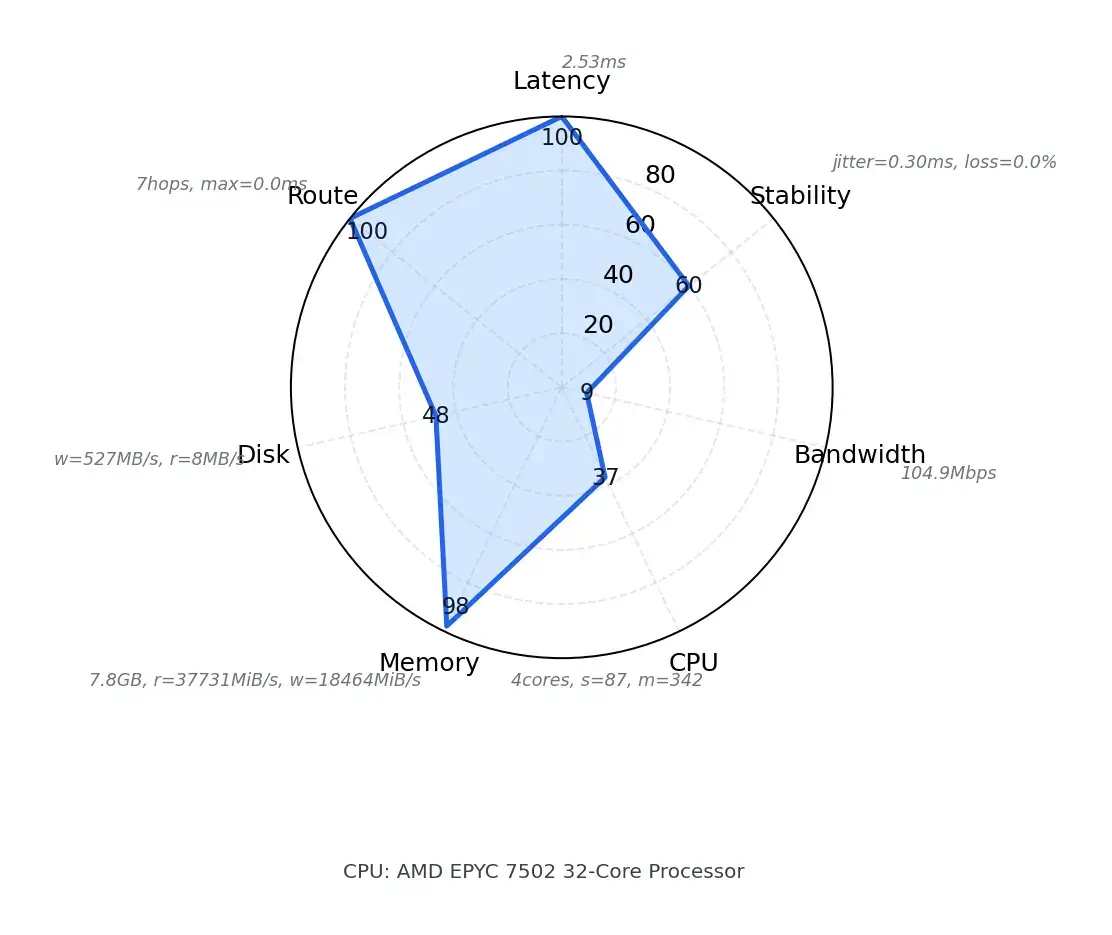
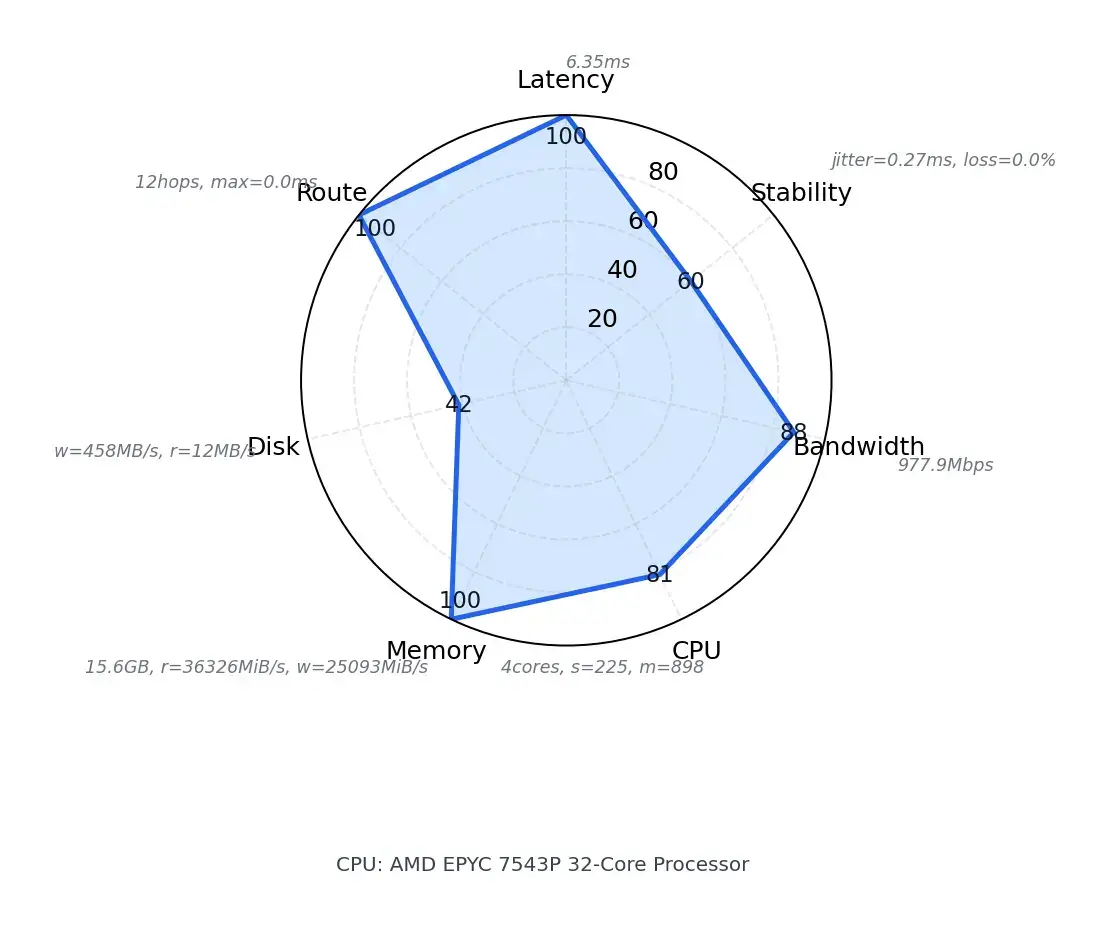
A very practical aspect of this project is turning results into readable HTML reports and using a radar chart to display core capabilities. The radar chart covers seven dimensions: Latency, Stability, Bandwidth, CPU, Memory, Disk, Route. Its value lies in "spotting weaknesses at a glance": when a dimension is clearly sunken in, you can quickly determine if this machine is suitable for hosting a website or if it will struggle during peak times.
For those who frequently build websites, the worst-case scenario is "strong in individual areas but poor overall." For example, the CPU might be good, but if the disk's random IO is weak, database and backend writes will lag; bandwidth might be decent, but if the routing is circuitous, cross-regional access experience will be unstable. With a unified VPS performance test + visual report, it's easier to identify the real bottleneck.

① Why Latency and Stability Affect User Experience

Latency affects Time to First Byte (TTFB), backend operation delays, and API response times. Stability affects fluctuations, packet loss, and evening peak hour experience. Many servers perform well during the day, but during peak evening hours, latency spikes and jitter increases, leading to a noticeable drop in visitor experience and potentially affecting search engine crawling. Including these two metrics in VPS performance testing provides a closer measure of "real-world usability," rather than just looking at a single peak value.

② Bandwidth and Route Determine the Access Path

Bandwidth determines the capacity for loading resources, syncing backups, and pulling images during peak times. Route determines the path data packets take. The same bandwidth number can result in vastly different latency and jitter depending on the route. This is especially true for websites targeting domestic visitors or handling cross-border traffic. Therefore, VPS performance testing doesn't just look at speed; it also examines routing characteristics to get closer to the real user access experience.

③ CPU, Memory, and Disk Determine if Your Website "Runs Smoothly"

CPU determines the ability to generate dynamic pages and handle plugin computations. Memory determines cache space and concurrent load capacity. Disk determines the throughput of the database and file system; random read/write performance is particularly critical for websites: publishing articles, writing comments, placing orders, writing logs, and running scheduled tasks all constantly hit the disk. If the Disk is weak, even the strongest CPU will be held back. By comparing CPU, Memory, and Disk within the same VPS performance test, you can avoid being misled by a single strong metric.

How to Use This Project: A Complete Loop from Collection to Comparison

The workflow of VPS_Benchmark_Project can be understood in two phases: Collection and Analysis. On the collection side, a script runs on the server to gather system and performance-related data. On the analysis side, results from multiple servers are aggregated to generate comparison pages, ranking pages, and visual reports. This way, you don't need to manually cross-reference scattered logs; you can quickly draw conclusions from unified results.

Method 1: One-Click Deployment (Simplest, Recommended)

If you are testing on a brand new VPS, simply run the following command:

curl -fsSL https://raw.githubusercontent.com/bobohello/vps-benchmark/main/quickstart.sh | bash

The script will automatically complete:

  • Environment check

  • Dependency installation

  • Performance testing

  • Generate complete test results and radar chart

Method 2: Download the Script and Run It

If you prefer not to use the pipe method, you can download the script first and then execute it:

wget https://raw.githubusercontent.com/bobohello/vps-benchmark/main/quickstart.sh
bash quickstart.sh

The effect is exactly the same as Method 1, just a different execution method.

Method 3: Manual Steps (Suitable for Users Who Want to Understand the Process)

If you prefer to control the entire process step by step, you can use the following method:

# Clone the project
git clone https://github.com/bobohello/vps-benchmark.git
cd vps-benchmark

# Install dependencies
bash install.sh

# Run the test
bash run.sh

This method is more suitable for:

  • Users who want to study the testing logic

  • Or scenarios where you plan to do secondary development or compare multiple VPSs later


Uses of VPS Performance Testing: Selection, Migration Evaluation, and Long-Term Health Checks

The most common use of this tool is "horizontal comparison after buying multiple servers." With the same budget, different providers, and different data centers, which one is truly better for building a website? With a single VPS performance test, you can often see the differences: which one is more stable overall, which one has a clear weak point, which one is better as the main site, and which one is better as a reverse proxy or backup node.
The second use is migration evaluation. Many people only realize after migrating that the new machine has worse IO and more network jitter, forcing them to migrate back. Running a round of VPS performance testing before migration can significantly reduce this risk.
The third use is long-term health checks. You can treat VPS performance testing as "regular inspections": test again during peak evening hours, retest after business growth, and test again before renewal. Using data to track long-term trends reflects true quality better than a single benchmark score.

Conclusion: Shift from "Reading Marketing" to "Reading Data" When Choosing a VPS

The VPS market will never lack marketing hype, and specs are getting better and better, but the difference in website building experience remains huge. Instead of betting on reputation and marketing copy, give yourself a unified yardstick. The original intention of VPS_Benchmark_Project is simple: to provide a reproducible, comparable, and explainable VPS performance testing process for those who frequently build websites and buy servers, using one-click scripts and visual reports to quickly identify weaknesses and strengths, ultimately helping you choose the cloud server best suited for your business.
   Radar Chart Cloudcone Hostinger Contabo 野草云
Provider Cloudcone Hostinger Contabo Yecao Cloud
Specs 8C8G 4C16G 4C8G 4C8G


Disclaimer: All articles on this site, such as no special instructions or labeling, are the site's original release. Any individual or organization, without the consent of this site, prohibit copying, stealing, collecting, publishing the content of this site to any website, books and other types of media platforms. If the content of this site violates the legal rights and interests of the original author, you can contact us to deal with.